BookmarkSubscribeRSS Feed
🔒 This topic is solved and locked. Need further help from the community? Please sign in and ask a new question.
Doug____
Pyrite | Level 9

How do I get a carat "^" to appear in RTF outputs when that is my ods escape character?

1 ACCEPTED SOLUTION

Accepted Solutions
Cynthia_sas
Diamond | Level 26

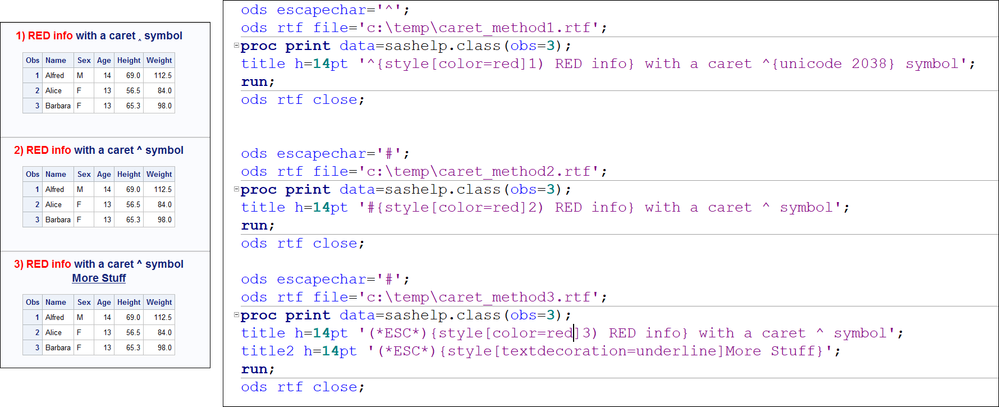
Hi, Easiest would be to change your ODS ESCAPECHAR or, here are some other examples. The bottom line is that if your ESCAPECHAR is the ^, you won't be able to type that character directly. You can use the UNICODE function to get the caret, as shown in #1, but I find the symbol very, very tiny, as opposed to #2 or #3.
Cynthia

escapechar_caret.png

Output  shown is HTML, but RTF looks approx the same except title is in header of Word doc.

View solution in original post

1 REPLY 1
Cynthia_sas
Diamond | Level 26

Hi, Easiest would be to change your ODS ESCAPECHAR or, here are some other examples. The bottom line is that if your ESCAPECHAR is the ^, you won't be able to type that character directly. You can use the UNICODE function to get the caret, as shown in #1, but I find the symbol very, very tiny, as opposed to #2 or #3.
Cynthia

escapechar_caret.png

Output  shown is HTML, but RTF looks approx the same except title is in header of Word doc.

sas-innovate-2026-white.png


April 27 – 30 | Gaylord Texan | Grapevine, Texas

Registration is open

Walk in ready to learn. Walk out ready to deliver. This is the data and AI conference you can't afford to miss.
Register now and save with the early bird rate—just $795!

Register now

How to Concatenate Values

Learn how use the CAT functions in SAS to join values from multiple variables into a single value.

Find more tutorials on the SAS Users YouTube channel.

SAS Training: Just a Click Away

 Ready to level-up your skills? Choose your own adventure.

Browse our catalog!

Discussion stats
  • 1 reply
  • 1655 views
  • 0 likes
  • 2 in conversation