BookmarkSubscribeRSS Feed
🔒 This topic is solved and locked. Need further help from the community? Please sign in and ask a new question.
Doug____
Pyrite | Level 9

How do I get a carat "^" to appear in RTF outputs when that is my ods escape character?

1 ACCEPTED SOLUTION

Accepted Solutions
Cynthia_sas
Diamond | Level 26

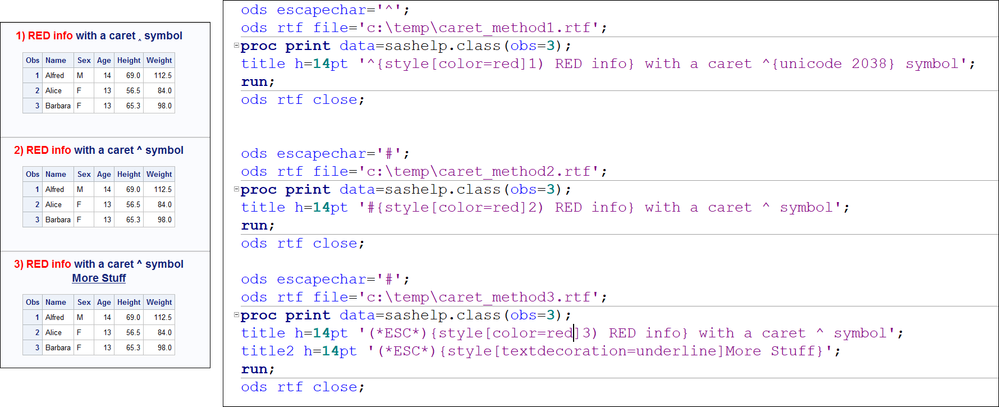
Hi, Easiest would be to change your ODS ESCAPECHAR or, here are some other examples. The bottom line is that if your ESCAPECHAR is the ^, you won't be able to type that character directly. You can use the UNICODE function to get the caret, as shown in #1, but I find the symbol very, very tiny, as opposed to #2 or #3.
Cynthia

escapechar_caret.png

Output  shown is HTML, but RTF looks approx the same except title is in header of Word doc.

View solution in original post

1 REPLY 1
Cynthia_sas
Diamond | Level 26

Hi, Easiest would be to change your ODS ESCAPECHAR or, here are some other examples. The bottom line is that if your ESCAPECHAR is the ^, you won't be able to type that character directly. You can use the UNICODE function to get the caret, as shown in #1, but I find the symbol very, very tiny, as opposed to #2 or #3.
Cynthia

escapechar_caret.png

Output  shown is HTML, but RTF looks approx the same except title is in header of Word doc.

CFC_SAS_Communities_400x225.jpg

Call for content now open!

It's your turn to help shape SAS Innovate 2027. Share your expertise and inspire the SAS community.

Submit your proposal →

How to Concatenate Values

Learn how use the CAT functions in SAS to join values from multiple variables into a single value.

Find more tutorials on the SAS Users YouTube channel.

SAS Training: Just a Click Away

 Ready to level-up your skills? Choose your own adventure.

Browse our catalog!

Discussion stats
  • 1 reply
  • 2324 views
  • 0 likes
  • 2 in conversation