- Home
- /
- Programming
- /
- ODS Reports
- /
- How can I limit the BCOLOR length for a FOOTNOTE so that it doesn't go...
- RSS Feed
- Mark Topic as New
- Mark Topic as Read
- Float this Topic for Current User
- Bookmark
- Subscribe
- Mute
- Printer Friendly Page


- Mark as New
- Bookmark
- Subscribe
- Mute
- RSS Feed
- Permalink
- Report Inappropriate Content


- Mark as New
- Bookmark
- Subscribe
- Mute
- RSS Feed
- Permalink
- Report Inappropriate Content
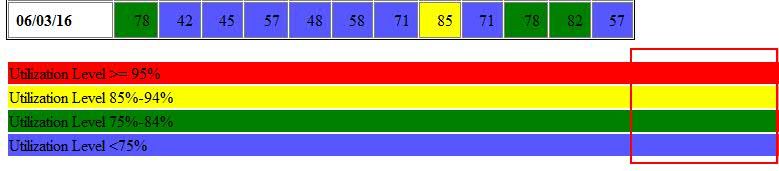
ods escapechar='~';
footnote1 h=4.0 c=black "~S={background=red}Utilization Level >= 95% ";
footnote2 h=4.0 bcolor=yellow c=black "Utilization Level 85%-94%";

proc print data=sashelp.class;run;
- Mark as New
- Bookmark
- Subscribe
- Mute
- RSS Feed
- Permalink
- Report Inappropriate Content
Thank you! That worked.
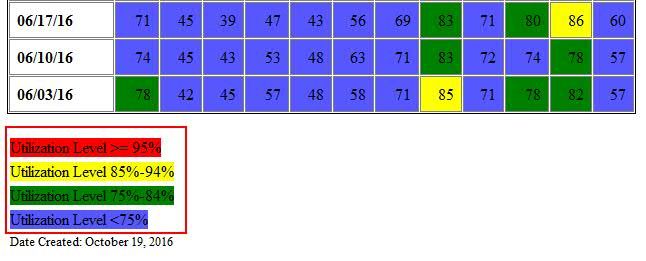
Code looks like this now:
footnote1 h=4.0 c=black "~S={background=red}Utilization Level >= 95% ";
footnote2 h=4.0 c=black "~S={background=yellow}Utilization Level 85%-94%";
footnote3 h=4.0 c=black "~S={background=green}Utilization Level 75%-84%";
footnote4 h=4.0 c=black "~S={background=light blue}Utilization Level <75%";
footnote5 h=3.0 c=black j=l "Date Created: %sysfunc(date(),worddate.)";
And results are posted as JPG attachement.

Catch up on SAS Innovate 2026
Nearly 200 sessions are now available on demand in the Innovate Hub.
Watch Now →Learn how use the CAT functions in SAS to join values from multiple variables into a single value.

Find more tutorials on the SAS Users YouTube channel.
SAS Training: Just a Click Away
Ready to level-up your skills? Choose your own adventure.
-
2 replies
-
10-18-2016 06:29 PM
-
1812 views
-
0 likes
-
2 in conversation
-

