- Home
- /
- Programming
- /
- ODS Reports
- /
- Color of background in PROC TABULATE output
- RSS Feed
- Mark Topic as New
- Mark Topic as Read
- Float this Topic for Current User
- Bookmark
- Subscribe
- Mute
- Printer Friendly Page


- Mark as New
- Bookmark
- Subscribe
- Mute
- RSS Feed
- Permalink
- Report Inappropriate Content
Hi Everyone,
I have the output of my PROC TABULATE going to a PDF. I am able to apply any of the pre-defined SAS color names with any difficulty, however I would like to apply a custom color using the RGB color codes, for example CX31849B (link to SAS documentation: https://v8doc.sas.com/sashtml/gref/zgscheme.htm).
I use PROC FORMAT to define colors to cells, such as "red". This works fine, but when I use something like CX31849B, I get nothing but greyscale.


- Mark as New
- Bookmark
- Subscribe
- Mute
- RSS Feed
- Permalink
- Report Inappropriate Content
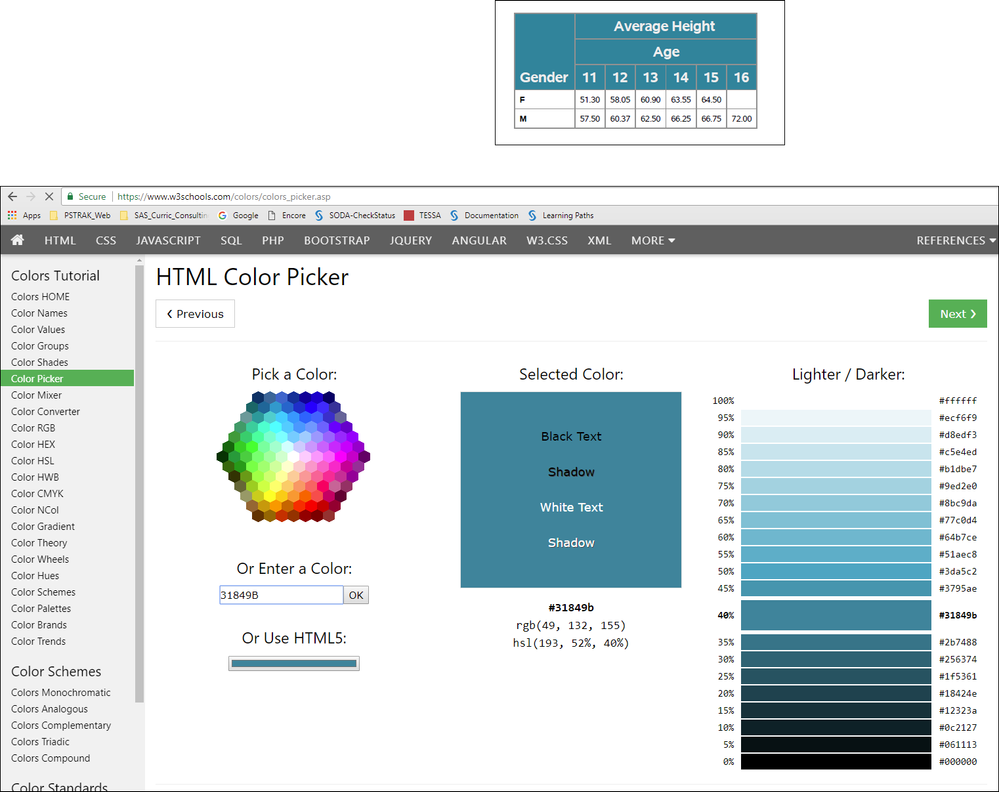
Without code or data, it is hard to make more than a guess, but using PROC TABULATE without a user-defined format, I was able to get this which does appear to be the right color.
cynthia
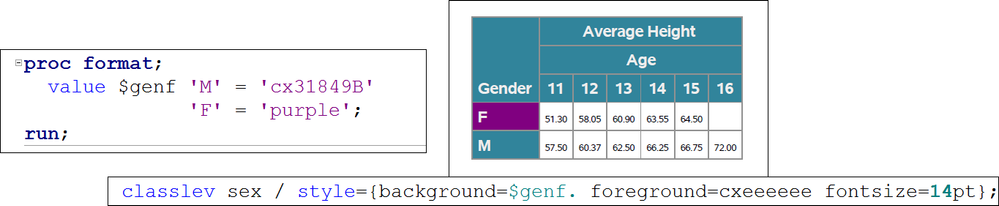
but, even with a user-defined format it still works for me -- see the row header area for the classlev values for the SEX variable:


- Mark as New
- Bookmark
- Subscribe
- Mute
- RSS Feed
- Permalink
- Report Inappropriate Content
Show the code of the Format and the proc tabulate code you are using.
Also Version 8 documentation is a tad old and unless you are using SAS 8 (which is like 12 years out of date) to use version 9 documentation.

Catch up on SAS Innovate 2026
Nearly 200 sessions are now available on demand in the Innovate Hub.
Watch Now →Learn how use the CAT functions in SAS to join values from multiple variables into a single value.

Find more tutorials on the SAS Users YouTube channel.
SAS Training: Just a Click Away
Ready to level-up your skills? Choose your own adventure.
-
2 replies
-
01-12-2018 08:30 AM
-
2337 views
-
0 likes
-
3 in conversation
-


