- RSS Feed
- Mark Topic as New
- Mark Topic as Read
- Float this Topic for Current User
- Bookmark
- Subscribe
- Mute
- Printer Friendly Page


- Mark as New
- Bookmark
- Subscribe
- Mute
- RSS Feed
- Permalink
- Report Inappropriate Content
Hi all,
I'm trying to create a new variable for height in inches. I want to convert an existing character variable in the format feet:inches (04:11 for example) to a numeric variable in inches (such as 59). I am using SAS Studio.
I keep getting this error in my log:
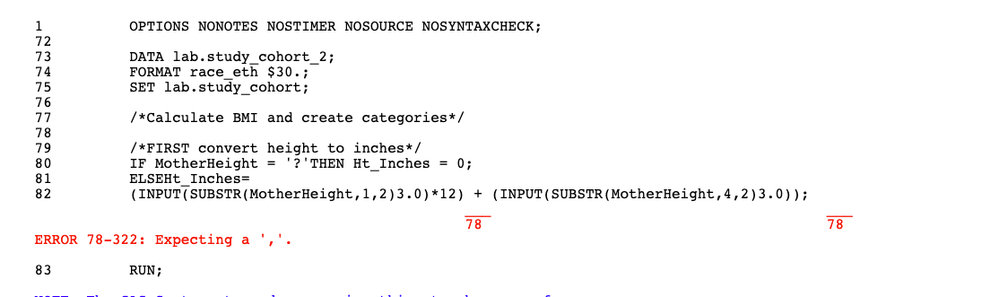
DATA lab.study_cohort_2;
	FORMAT race_eth $30.;
	SET lab.study_cohort;

/*Calculate BMI and create categories*/

/*FIRST convert height to inches*/
		IF 			MotherHeight = '?'							THEN 	Ht_Inches 	= 	0;
		ELSE															Ht_Inches	=
			(INPUT(SUBSTR(MotherHeight,1,2)3.0)*12) + (INPUT(SUBSTR(MotherHeight,4,2)3.0));
RUN;
Accepted Solutions


- Mark as New
- Bookmark
- Subscribe
- Mute
- RSS Feed
- Permalink
- Report Inappropriate Content
data want;
     char_height='04:11';
     num_height = scan(char_height,1,':')*12 + scan(char_height,2,':')*1;
run;Paige Miller
- Mark as New
- Bookmark
- Subscribe
- Mute
- RSS Feed
- Permalink
- Report Inappropriate Content
data want;
     char_height='04:11';
     num_height = scan(char_height,1,':')*12 + scan(char_height,2,':')*1;
run;Paige Miller


- Mark as New
- Bookmark
- Subscribe
- Mute
- RSS Feed
- Permalink
- Report Inappropriate Content
You left out the comma before the second argument in the INPUT() function call. Also not sure why you used a width of 3 instead of 2, but that doesn't matter, as long as the width is not shorter then the length of the string being read by the INPUT() function.
INPUT(SUBSTR(MotherHeight,1,2),3.) *12 + INPUT(SUBSTR(MotherHeight,4,2),3.)Note that this code assumes that the string always has exactly 5 characters with the colon as the third character. So if the value was '6:1' then it would not work as the first two characters would be '6:' and that will not work with the 3. informat. If the strings are always the same then you might want to use SCAN() instead of SUBSTR() to pull out the pieces.

- Mark as New
- Bookmark
- Subscribe
- Mute
- RSS Feed
- Permalink
- Report Inappropriate Content
By any chance to you have values with some sort of code for "not collected"? Maybe 99:99 or similar?
If so you should include such information.
Or check for it.
I had a data set from CDC that used a similar character to number coding scheme that managed to 1)not properly check their input program entry and 2) resulted in an adult of 10 inches height that weighed 150 pounds. They had a value like 5010 instead of 0510.
Moral: chech you resulting conversion for reasonable values. If you have adults under 36 inches or anyone over 90 there may be a problem.

Catch up on SAS Innovate 2026
Nearly 200 sessions are now available on demand in the Innovate Hub.
Watch Now →- Ask the Expert: R and SAS Working Seamlessly Together: Unlocking PROC R in Viya for Life Sciences | 11-Jun-2026
- Ask the Expert: Can Agents Reduce Planning Friction in CPG Supply Chains? | 16-Jun-2026
- Ask the Expert: Get Meaningful Results With New Features in SAS Customer Intelligence 360 | 25-Jun-2026
SAS' Charu Shankar shares her PROC SQL expertise by showing you how to master the WHERE clause using real winter weather data.

Find more tutorials on the SAS Users YouTube channel.
-
3 replies
-
10-10-2020 05:01 PM
-
4083 views
-
1 like
-
4 in conversation
-


