- Home
- /
- Programming
- /
- Graphics
- /
- Re: sgpanel head issue
- RSS Feed
- Mark Topic as New
- Mark Topic as Read
- Float this Topic for Current User
- Bookmark
- Subscribe
- Mute
- Printer Friendly Page


- Mark as New
- Bookmark
- Subscribe
- Mute
- RSS Feed
- Permalink
- Report Inappropriate Content
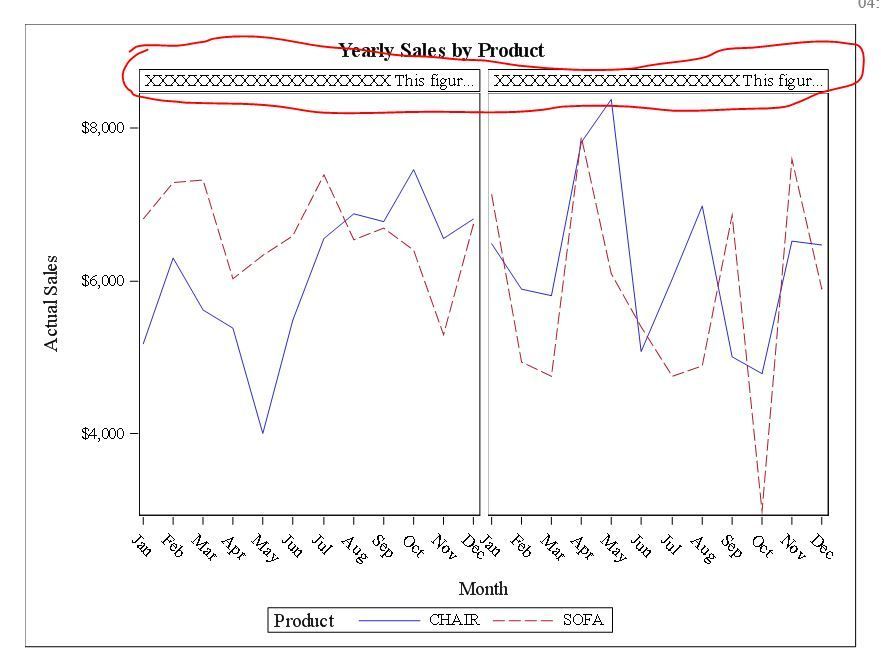
Please see below code and output.
The header was too long and was cut (red marked part). How can I change the header into two rows instead of one row?
Thanks
data x;set sashelp.prdsale;
format _year $200.;
where product in ("CHAIR" "SOFA");
_year="XXXXXXXXXXXXXXXXXXXXX This figure is for "||strip(year);
run;
ods rtf file="xxxx\try.rtf";
proc sgpanel data=x;
where product in ("CHAIR" "SOFA");
title "Yearly Sales by Product";
panelby _year / spacing=5 novarname;
vline month / response=actual group=product;
run;
title;
ods rtf close;

- Mark as New
- Bookmark
- Subscribe
- Mute
- RSS Feed
- Permalink
- Report Inappropriate Content
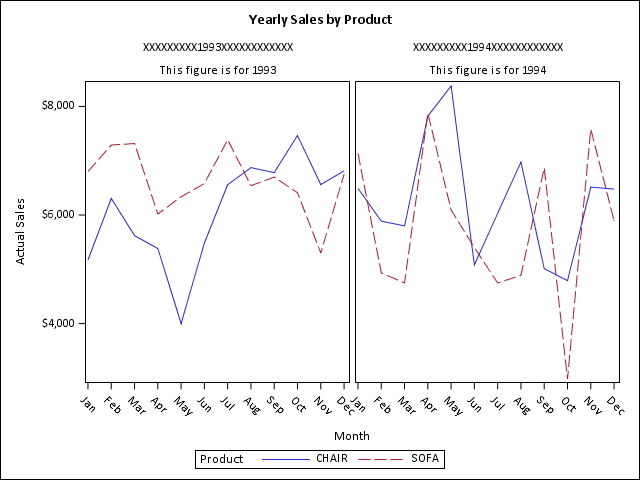
I don't know how to do exactly that, but you might get away with:
data x;
set sashelp.prdsale;
format _year $200.;
  where product in ("CHAIR" "SOFA");
  _year1="XXXXXXXXX"||strip(year)||"XXXXXXXXXXXX";
  _year2="This figure is for "||strip(year);
run;

proc sgpanel data=x;
  where product in ("CHAIR" "SOFA");
  title "Yearly Sales by Product";
  panelby _year1 _year2 / spacing=5 novarname noheaderborder;
  vline month / response=actual group=product;
run;
- Mark as New
- Bookmark
- Subscribe
- Mute
- RSS Feed
- Permalink
- Report Inappropriate Content
PG,
Thanks. That is what I though also. Hopefully. someone has a better solution.
George

Call for content now open!
It's your turn to help shape SAS Innovate 2027. Share your expertise and inspire the SAS community.
Learn how use the CAT functions in SAS to join values from multiple variables into a single value.

Find more tutorials on the SAS Users YouTube channel.
SAS Training: Just a Click Away
Ready to level-up your skills? Choose your own adventure.
-
2 replies
-
05-07-2018 04:51 PM
-
1812 views
-
1 like
-
2 in conversation
-

