- Home
- /
- Programming
- /
- Graphics
- /
- how to add significance sign in boxplot
- RSS Feed
- Mark Topic as New
- Mark Topic as Read
- Float this Topic for Current User
- Bookmark
- Subscribe
- Mute
- Printer Friendly Page


- Mark as New
- Bookmark
- Subscribe
- Mute
- RSS Feed
- Permalink
- Report Inappropriate Content
Hi All,
I am using proc sgplot to plot a boxplot. but how can I add a star sign above the significance variables?
this is my boxplot figure, I want to add a sign in the last two box (red and green) to mark them as significant, since there P-value less than 0.05.
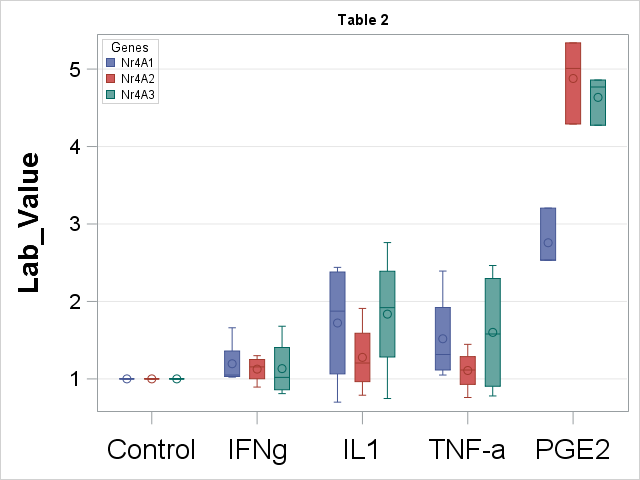
Here is my code:
proc sgplot data=boxplot_1;
vbox lab_value / category = treatment group = group
lineattrs=(pattern=solid) whiskerattrs=(pattern=solid);
refline 0 / axis = y lineattrs = (color = black thickness = 2);
xaxis display=(nolabel) type = discrete labelattrs = (size = 15pt Weight = Bold) valueattrs = (size = 20pt);
yaxis grid labelattrs = (size = 20pt Weight = Bold) valueattrs = (size = 15pt);
keylegend / location = inside position = topleft across = 1;
run;
Any way to help me.
Thanks,
C


- Mark as New
- Bookmark
- Subscribe
- Mute
- RSS Feed
- Permalink
- Report Inappropriate Content
Would using the annotate feature suffice? see: https://support.sas.com/resources/papers/proceedings11/277-2011.pdf
Art, CEO, AnalystFinder.com


- Mark as New
- Bookmark
- Subscribe
- Mute
- RSS Feed
- Permalink
- Report Inappropriate Content
Hello C,
Here is an example that you can use and edit. Basically you need to create the observations in your dataset at the correct y value and use the markerchar option:
data cars;
  set sashelp.cars;
run;

data cars2;
  invoicey = 100000; make = "Acura"; char = "*"; output;
  invoicey = 100000; make = "Audi"; char = "*"; output;
  invoicey = 100000; make = "BMW"; char = "*"; output;
run;

data cars3;
  set cars cars2;
run;

proc sgplot data = cars3;
  where make in ("Acura" "Audi" "BMW");
  scatter x = make y = invoicey / markerchar = char markercharattrs=(size = 15 color = red);
  vbox invoice / category = make;
run;
Many thanks,
Kriss

Catch up on SAS Innovate 2026
Nearly 200 sessions are now available on demand with the SAS Innovate Digital Pass.
Explore Now →Learn how use the CAT functions in SAS to join values from multiple variables into a single value.

Find more tutorials on the SAS Users YouTube channel.
SAS Training: Just a Click Away
Ready to level-up your skills? Choose your own adventure.
-
2 replies
-
05-02-2017 12:20 PM
-
3775 views
-
0 likes
-
3 in conversation
-

