- Home
- /
- Programming
- /
- Graphics
- /
- Re: create a bar gragh with sgplot
- RSS Feed
- Mark Topic as New
- Mark Topic as Read
- Float this Topic for Current User
- Bookmark
- Subscribe
- Mute
- Printer Friendly Page


- Mark as New
- Bookmark
- Subscribe
- Mute
- RSS Feed
- Permalink
- Report Inappropriate Content
I want to create a bar chart using sas code with data as below with sgplot.
PROC SGPLOT DATA = applications;
VBAR sys / RESPONSE = app;
VBAR sys / RESPONSE = env;
RUN;
Sys app env
a 67 45
b 20 54
c 35 60
d 40 78
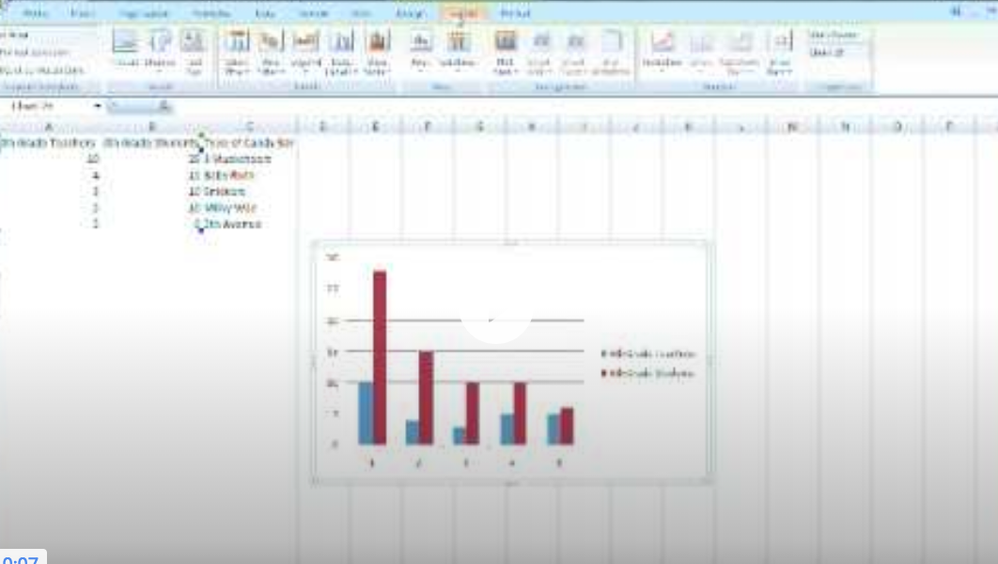
Accepted Solutions

- Mark as New
- Bookmark
- Subscribe
- Mute
- RSS Feed
- Permalink
- Report Inappropriate Content
1. Transform your data to a long format so that you have three variables: SYS, MEASUREMENT_TYPE (APP/ENV), Value (measurement).
SYS, Measurement_Type, Value
2. Sort
3. Use VBAR, GROUP = Measurement_Type and GroupDisplay=Cluster.
If this doesn't work for you, post your code.
I did test it and this does generate the graph indicated.
@radha009 wrote:
I want to create a bar chart using sas code with data as below with sgplot.
PROC SGPLOT DATA = applications;
VBAR sys / RESPONSE = app;
VBAR sys / RESPONSE = env;
RUN;
Sys app env
a 67 45
b 20 54
c 35 60
d 40 78
- Mark as New
- Bookmark
- Subscribe
- Mute
- RSS Feed
- Permalink
- Report Inappropriate Content
1. Transform your data to a long format so that you have three variables: SYS, MEASUREMENT_TYPE (APP/ENV), Value (measurement).
SYS, Measurement_Type, Value
2. Sort
3. Use VBAR, GROUP = Measurement_Type and GroupDisplay=Cluster.
If this doesn't work for you, post your code.
I did test it and this does generate the graph indicated.
@radha009 wrote:
I want to create a bar chart using sas code with data as below with sgplot.
PROC SGPLOT DATA = applications;
VBAR sys / RESPONSE = app;
VBAR sys / RESPONSE = env;
RUN;
Sys app env
a 67 45
b 20 54
c 35 60
d 40 78
- Mark as New
- Bookmark
- Subscribe
- Mute
- RSS Feed
- Permalink
- Report Inappropriate Content
Got it. but how do i transform the data. should i create new table and insert the data.
- Mark as New
- Bookmark
- Subscribe
- Mute
- RSS Feed
- Permalink
- Report Inappropriate Content
@radha009 wrote:
Got it. but how do i transform the data. should i create new table and insert the data.
PROC TRANSPOSE or data step using an array. Tutorials below:
How to reshape data wide to long using proc transpose | SAS ...
Reshaping data wide to long using a data step | SAS ... - Stats at UCLA

Call for content now open!
It's your turn to help shape SAS Innovate 2027. Share your expertise and inspire the SAS community.
Learn how use the CAT functions in SAS to join values from multiple variables into a single value.

Find more tutorials on the SAS Users YouTube channel.
SAS Training: Just a Click Away
Ready to level-up your skills? Choose your own adventure.
-
3 replies
-
04-22-2018 03:07 PM
-
2860 views
-
0 likes
-
2 in conversation
-

