- Home
- /
- Programming
- /
- Graphics
- /
- bihistogram3dparm with heatmap style coloring.
- RSS Feed
- Mark Topic as New
- Mark Topic as Read
- Float this Topic for Current User
- Bookmark
- Subscribe
- Mute
- Printer Friendly Page


- Mark as New
- Bookmark
- Subscribe
- Mute
- RSS Feed
- Permalink
- Report Inappropriate Content
I would like to create figures like the picture below. I have gotten pretty close with bihistogram3dparm and headmapparm
         layout overlay3d / cube=false zaxisopts=(griddisplay=on);
            bihistogram3dparm x=risk0 y=ldl0 z=_freq_ / display=all;
            endlayout;
Is it possible to color the bars in the 3d histogram as below. Sort of a 3d histogram heatmap.
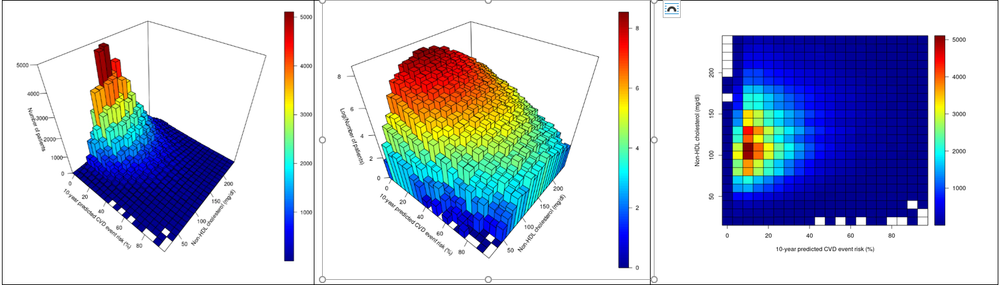
Accepted Solutions


- Mark as New
- Bookmark
- Subscribe
- Mute
- RSS Feed
- Permalink
- Report Inappropriate Content
Th BIHISTOGRAM3DPARM does not current;y support the COLORRESPONSE option. Could you use the SURFACEPLOTPARM with COLORRESPONSE option to get a similar display?
- Mark as New
- Bookmark
- Subscribe
- Mute
- RSS Feed
- Permalink
- Report Inappropriate Content
Th BIHISTOGRAM3DPARM does not current;y support the COLORRESPONSE option. Could you use the SURFACEPLOTPARM with COLORRESPONSE option to get a similar display?
- Mark as New
- Bookmark
- Subscribe
- Mute
- RSS Feed
- Permalink
- Report Inappropriate Content
@DanH_sas wrote:
Th BIHISTOGRAM3DPARM does not current;y support the COLORRESPONSE option. Could you use the SURFACEPLOTPARM with COLORRESPONSE option to get a similar display?
Hi Dan,
Thanks for this info I will try SURFACEPLOTPARM. Is there any way (attrmap?) to color the bars in the BIHISTOGRAM?


- Mark as New
- Bookmark
- Subscribe
- Mute
- RSS Feed
- Permalink
- Report Inappropriate Content
If a plot statement does not have either an ATTRID or RATTRID option to identify the attribute map to use I don't believe it will use an attribute map.

Call for content now open!
It's your turn to help shape SAS Innovate 2027. Share your expertise and inspire the SAS community.
Learn how use the CAT functions in SAS to join values from multiple variables into a single value.

Find more tutorials on the SAS Users YouTube channel.
SAS Training: Just a Click Away
Ready to level-up your skills? Choose your own adventure.
-
3 replies
-
11-17-2020 12:46 PM
-
3462 views
-
0 likes
-
3 in conversation
-
