I have a company standard of using Times New Roman for all reporting but my question revolves around graphs. I've created a custom style template and modified all the GraphFonts:
            class GraphFonts /
              'NodeDetailFont' = ("Times New Roman",7pt)
              'NodeInputLabelFont' = ("Times New Roman",9pt)
              'NodeLabelFont' = ("Times New Roman",9pt)
              'NodeTitleFont' = ("Times New Roman",9pt)
              'GraphDataFont' = ("Times New Roman",8pt)
              'GraphUnicodeFont' = ("Times New Roman",9pt)
              'GraphValueFont' = ("Times New Roman",10pt)
              'GraphLabel2Font' = ("Times New Roman",11pt)
              'GraphLabelFont' = ("Times New Roman",11pt)
              'GraphFootnoteFont' = ("Times New Roman",11pt)
              'GraphTitleFont' = ("Times New Roman",12pt,bold)
              'GraphTitle1Font' = ("Times New Roman",15pt,bold)
              'GraphAnnoFont' = ("Times New Roman",10pt);
However, the Unicode character no longer gets resolved in the Y-Axis Label, if using Times New Roman.
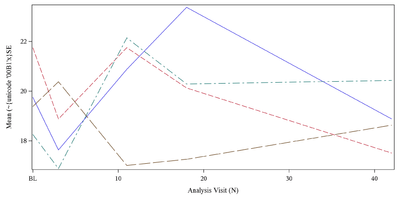 Unicode not resolved in label.
In the past, I've used GraphUnicodeText reference in LABELATTRS
labelattrs=GraphUnicodeText(size9pt weight=bold)
I'd like to maintain using Times New Roman. Any solution?





