Turn on suggestions
Auto-suggest helps you quickly narrow down your search results by suggesting possible matches as you type.
Showing results for
- Home
- /
- Programming
- /
- Graphics
- /
- Re: Trying to put percentage in the right vertical axis.
Options
- RSS Feed
- Mark Topic as New
- Mark Topic as Read
- Float this Topic for Current User
- Bookmark
- Subscribe
- Mute
- Printer Friendly Page


Calcite | Level 5
- Mark as New
- Bookmark
- Subscribe
- Mute
- RSS Feed
- Permalink
- Report Inappropriate Content
Posted 08-17-2017 03:40 PM
(2127 views)
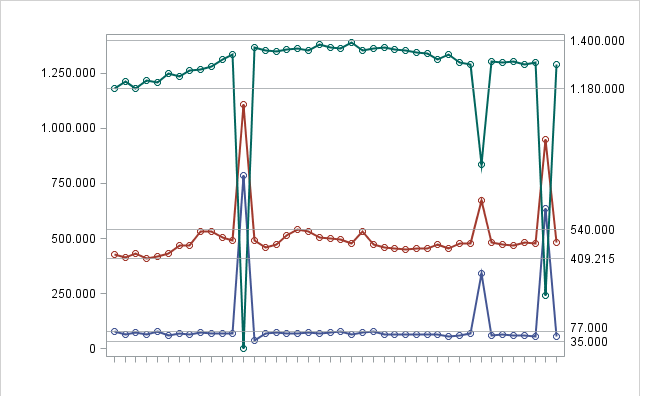
Good day! So I'm learning to use SAS and I've been all day trying to put percentages in the y axis, but the right one. My current graph already uses reflines but I want to replace the reflines for a percentage scale from 0 to 100% in 10 by 10. Is there a way to do it?
I'm on SAS 9.3
2 REPLIES 2


Super User
- Mark as New
- Bookmark
- Subscribe
- Mute
- RSS Feed
- Permalink
- Report Inappropriate Content
Probably. Post your code. Including sample data to allow us to replicate your graph would help, use the SASHELP datasets if necessary.


Tourmaline | Level 20
- Mark as New
- Bookmark
- Subscribe
- Mute
- RSS Feed
- Permalink
- Report Inappropriate Content
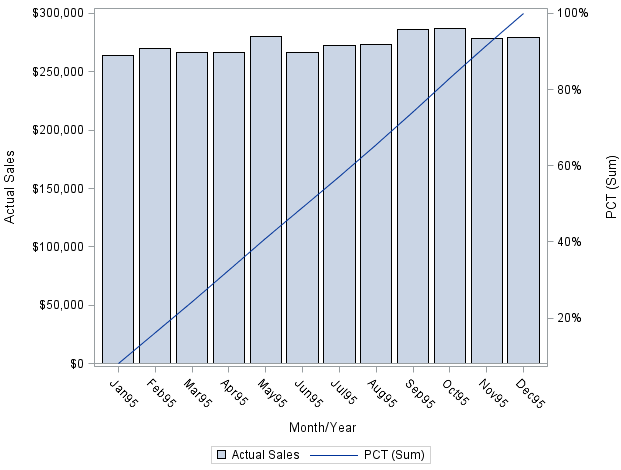
Like this?
proc summary data=SASHELP.PRDSAL2 ;
  where YEAR eq 1995;
  class MONYR;
  var ACTUAL PREDICT;
  output out=SUMMARY  sum=;
run;

data PLOT;
  if _N_=1 then set SUMMARY(where=(MONYR eq .) rename=(ACTUAL=TOTAL) );
  set SUMMARY(where=(MONYR ne .) );
  retain TOTAL;
  PCT+ACTUAL/TOTAL;
  format PCT percent10.1;
run;

proc sgplot data=PLOT;
  vbar monyr / response=ACTUAL ;
  vline monyr / response=PCT y2axis;
run;
(modified from https://communities.sas.com/t5/SAS-GRAPH-and-ODS-Graphics/using-second-y2axis-with-proc-sgplot-vbar/...)

Catch up on SAS Innovate 2026
Nearly 200 sessions are now available on demand with the SAS Innovate Digital Pass.
Explore Now →How to Concatenate Values
Learn how use the CAT functions in SAS to join values from multiple variables into a single value.

Find more tutorials on the SAS Users YouTube channel.
SAS Training: Just a Click Away
Ready to level-up your skills? Choose your own adventure.
Discussion stats
-
2 replies
-
08-17-2017 03:40 PM
-
2128 views
-
2 likes
-
3 in conversation
-


