- Home
- /
- Programming
- /
- Graphics
- /
- Sgpanel Column Descriptions Vertically Rather than Diagonally?
- RSS Feed
- Mark Topic as New
- Mark Topic as Read
- Float this Topic for Current User
- Bookmark
- Subscribe
- Mute
- Printer Friendly Page


- Mark as New
- Bookmark
- Subscribe
- Mute
- RSS Feed
- Permalink
- Report Inappropriate Content
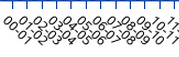
Is there a way to display sgpanel column descriptions vertically rather than diagonally, the diagonal takes a lot of space? I’m guessing this is part of the colaxis display. I am using SAS 9.2.


- Mark as New
- Bookmark
- Subscribe
- Mute
- RSS Feed
- Permalink
- Report Inappropriate Content
9.2 doesn't have as many axis control options for SGpanel as later versions.
You might try setting specific values with the values= option on a Colaxis statement.
Or Fitpolicy=Stagger or StaggerThin to reduce the number of entries displayed and spaced differently.
I'm not sure, but it almost appears that your axis displays a range of values 0 to 1, 1 to 2, 2 to 3. If so, possibly a custom format that would display the midpoint value which might take less space.
Or use the ods graphics options to set more horizontal or vertical space.
I don't think there's any likely way to get vertical text with 9.2.
- Mark as New
- Bookmark
- Subscribe
- Mute
- RSS Feed
- Permalink
- Report Inappropriate Content
I displayed my graphs using less axis points. This is a non-ideal workaround.

Call for content now open!
It's your turn to help shape SAS Innovate 2027. Share your expertise and inspire the SAS community.
Learn how use the CAT functions in SAS to join values from multiple variables into a single value.

Find more tutorials on the SAS Users YouTube channel.
SAS Training: Just a Click Away
Ready to level-up your skills? Choose your own adventure.
-
2 replies
-
08-25-2015 01:08 PM
-
1990 views
-
0 likes
-
2 in conversation
-
