BookmarkSubscribeRSS Feed
🔒 This topic is solved and locked. Need further help from the community? Please sign in and ask a new question.
arpitsharma27
Calcite | Level 5

Hello,


I have a two variables in a dataset.

One is YYYYMM. Ranging from 200601 to 200712.

Second is frequency of the variable.


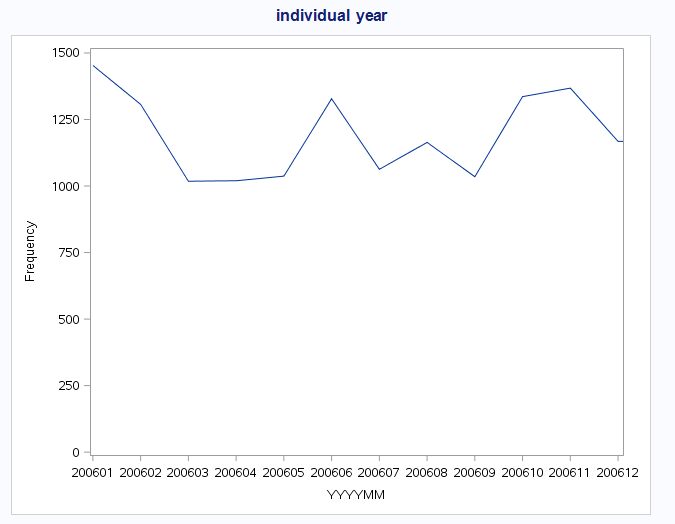
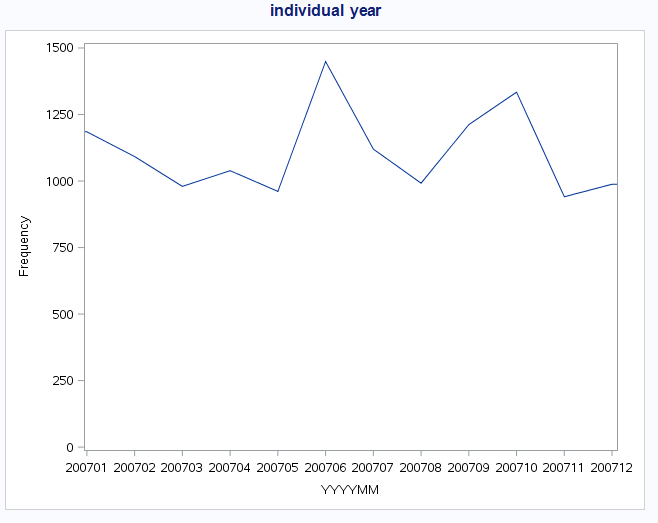
When I run the code for individual year eg 200601 to 200612(or 200701 to 200712) I get the chart with title "Individual Year"


proc sgplot data=tst.numericfrequency;
series 	x=yyyymm 
	y=frequency ;
	xaxis values=(
		200601 200602 200603 200604 200605 200606 200607 200608 200609 200610 200611 200612 
/*		200701 200702 200703 200704 200705 200706 200707 200708 200709 200710 200711 200712 */
					) ;
where variable="numeric_variable" and variable_value=1;
title "Individual Year";
run;


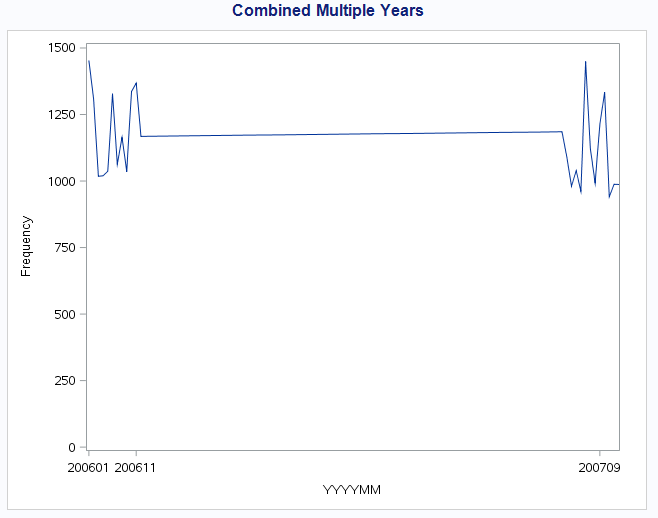
But when I run the code for 2 years all together, I get the chart shown below with title "Combined Multiple Years."

Combined_Multiple_Years.PNGIndividual_Year_2006.PNGIndividual_Year_2007.PNG


There are no error/warnings in log.


Please let me know how can i fix it. I want the transition from 200612 to 200701 to be smooth and not that straight line.


Thanks

1 ACCEPTED SOLUTION

Accepted Solutions
ballardw
Super User

Convert those values to actual SAS dates. In a data step

sasdate = input(put(date,6.),yymmn6.);


Format the resulting date value as you would like it to appear either with a FORMAT statement or VALUESFORMAT on Xaxis.

Use the VALUES option of the XAXIS statement to indicate that you want monthly tick marks such as Values=( '01JAN2016'd to '01Dec2017'd by month) ;


Note the dates in the values statement have to be in 'ddMMMyyyy'd format as date literals (or the 2 digit year but I consider that sloppy), not the "formatted" value.

View solution in original post

1 REPLY 1
ballardw
Super User

Convert those values to actual SAS dates. In a data step

sasdate = input(put(date,6.),yymmn6.);


Format the resulting date value as you would like it to appear either with a FORMAT statement or VALUESFORMAT on Xaxis.

Use the VALUES option of the XAXIS statement to indicate that you want monthly tick marks such as Values=( '01JAN2016'd to '01Dec2017'd by month) ;


Note the dates in the values statement have to be in 'ddMMMyyyy'd format as date literals (or the 2 digit year but I consider that sloppy), not the "formatted" value.

sas-innovate-2026-white.png


April 27 – 30 | Gaylord Texan | Grapevine, Texas

Registration is open

Walk in ready to learn. Walk out ready to deliver. This is the data and AI conference you can't afford to miss.
Register now and lock in 2025 pricing—just $495!

Register now

How to Concatenate Values

Learn how use the CAT functions in SAS to join values from multiple variables into a single value.

Find more tutorials on the SAS Users YouTube channel.

SAS Training: Just a Click Away

 Ready to level-up your skills? Choose your own adventure.

Browse our catalog!

Discussion stats
  • 1 reply
  • 3471 views
  • 1 like
  • 2 in conversation