- Home
- /
- Programming
- /
- Graphics
- /
- Re: Preserve graph labelattrs for labels using unicode?
- RSS Feed
- Mark Topic as New
- Mark Topic as Read
- Float this Topic for Current User
- Bookmark
- Subscribe
- Mute
- Printer Friendly Page


- Mark as New
- Bookmark
- Subscribe
- Mute
- RSS Feed
- Permalink
- Report Inappropriate Content
When using unicode in a graph label, I am losing the effect of weight=bold and the font is not what I expect. This may just apply to ODS RTF (which I'm not sure). See this sample code:
ods rtf file = "H:\Figure.rtf";
ods graphics on / imagename="Figure";

title ;
footnote ;
proc sgplot data=sashelp.baseball;
scatter x=logsalary y=crhome/group=league;
xaxis label="Log(*ESC*){unicode '2081'x}(*ESC*){unicode '2080'x} Salary"
type=log logstyle=logexpand labelattrs=(weight=bold family='arial');
yaxis label="Home Runs" labelattrs=(weight=bold family='arial');
keylegend;
;
run;
ods graphics off;
ods rtf close;
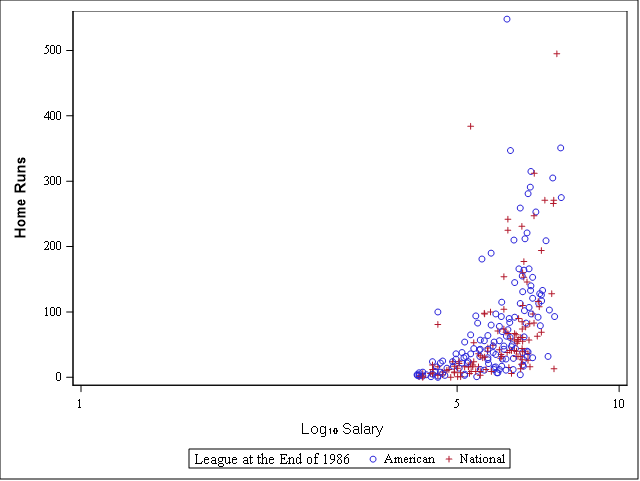
The y-axis label is the correct font, is bold, and is vector quality. The x-axis, using unicode, is not preserving any of those attributes (though it is hard to tell if the font is correct- it looks the same using family='arial unicode ms') .
On a related note, my figure legend is not vector quality, with or without unicode.
Are there any known solutions?
- Tags:
- labelattrs
- unicode
Accepted Solutions


- Mark as New
- Bookmark
- Subscribe
- Mute
- RSS Feed
- Permalink
- Report Inappropriate Content
How does it look if you set the OUTPUTFMT=PNG?
ods graphics on / imagename="Figure" outputfmt=png;- Mark as New
- Bookmark
- Subscribe
- Mute
- RSS Feed
- Permalink
- Report Inappropriate Content
How does it look if you set the OUTPUTFMT=PNG?
ods graphics on / imagename="Figure" outputfmt=png;- Mark as New
- Bookmark
- Subscribe
- Mute
- RSS Feed
- Permalink
- Report Inappropriate Content
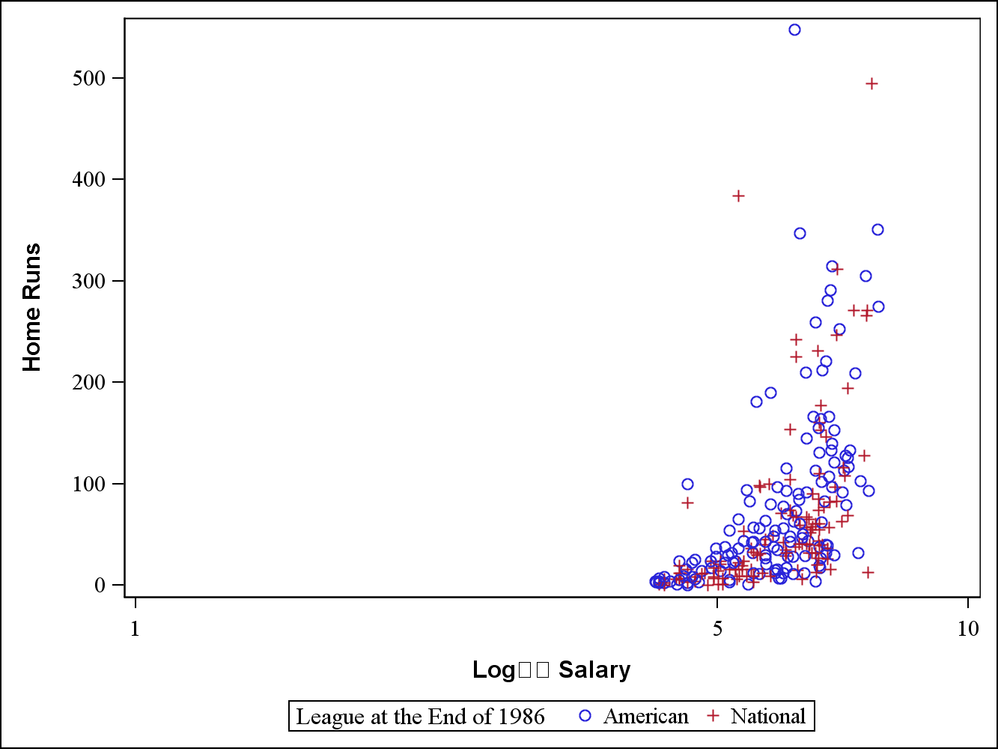
It cleaned up the vector quality issue, bold and font, but I lost the subscripts from the unicode.
- Mark as New
- Bookmark
- Subscribe
- Mute
- RSS Feed
- Permalink
- Report Inappropriate Content
This solution worked perfectly. Thanks Dan!

Call for content now open!
It's your turn to help shape SAS Innovate 2027. Share your expertise and inspire the SAS community.
Learn how use the CAT functions in SAS to join values from multiple variables into a single value.

Find more tutorials on the SAS Users YouTube channel.
SAS Training: Just a Click Away
Ready to level-up your skills? Choose your own adventure.
-
3 replies
-
03-08-2019 12:10 PM
-
3030 views
-
0 likes
-
2 in conversation
-

