Turn on suggestions
Auto-suggest helps you quickly narrow down your search results by suggesting possible matches as you type.
Showing results for
- Home
- /
- Programming
- /
- Graphics
- /
- O(DS) Christmas Tree
Options
- RSS Feed
- Mark Topic as New
- Mark Topic as Read
- Float this Topic for Current User
- Bookmark
- Subscribe
- Mute
- Printer Friendly Page


Lapis Lazuli | Level 10
- Mark as New
- Bookmark
- Subscribe
- Mute
- RSS Feed
- Permalink
- Report Inappropriate Content
Posted 12-20-2015 07:15 PM
(5130 views)
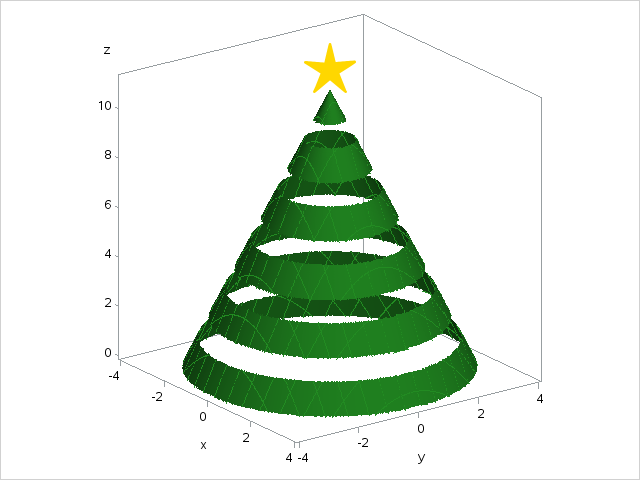
data xmastree;
r=4; h=11.25;
a=arsin(r/(r**2+h**2)**.5);
do y=-r to r by .02;
  do x=-r to r by .02;
    z=h-(x**2+y**2)**.5/sin(a)*cos(a);
    if (x**2+y**2)**.5>4 | 1.25<z<2|3.25<z<4|5.25<z<6|7.25<z<8|9.25<z<10 then z=.;
    output;
  end;
end;

proc template;
define statgraph xmastree;
begingraph;
drawtext textattrs=(size=50pt COLOR=gold FAMILY="Arial Unicode MS") {unicode "2605"x} /
         anchor=topleft widthunit=percent x=46.5 y=99 justify=center ;
layout overlay3d / cube=false;
surfaceplotparm x=x y=y z=z / fillattrs=(color=forestgreen);
endlayout;
endgraph;
end;

proc sgrender data=xmastree template=xmastree;
run;
3 REPLIES 3


Meteorite | Level 14
- Mark as New
- Bookmark
- Subscribe
- Mute
- RSS Feed
- Permalink
- Report Inappropriate Content
Very cool, indeed.


PROC Star
- Mark as New
- Bookmark
- Subscribe
- Mute
- RSS Feed
- Permalink
- Report Inappropriate Content
Nice. I think it is right up there with the cowboy hat!

Meteorite | Level 14
- Mark as New
- Bookmark
- Subscribe
- Mute
- RSS Feed
- Permalink
- Report Inappropriate Content
An awesome trignometric SASmas tree! 
 Nice work.
//Contact me to learn how Metacoda software can help keep your SAS platform secure - https://www.metacoda.com

Call for content now open!
It's your turn to help shape SAS Innovate 2027. Share your expertise and inspire the SAS community.
How to Concatenate Values
Learn how use the CAT functions in SAS to join values from multiple variables into a single value.

Find more tutorials on the SAS Users YouTube channel.
SAS Training: Just a Click Away
Ready to level-up your skills? Choose your own adventure.
Discussion stats
-
3 replies
-
12-20-2015 07:15 PM
-
5131 views
-
9 likes
-
4 in conversation
-


