- Home
- /
- Programming
- /
- Graphics
- /
- Re: Manipulate axis title in graph
- RSS Feed
- Mark Topic as New
- Mark Topic as Read
- Float this Topic for Current User
- Bookmark
- Subscribe
- Mute
- Printer Friendly Page


- Mark as New
- Bookmark
- Subscribe
- Mute
- RSS Feed
- Permalink
- Report Inappropriate Content
Hi all,
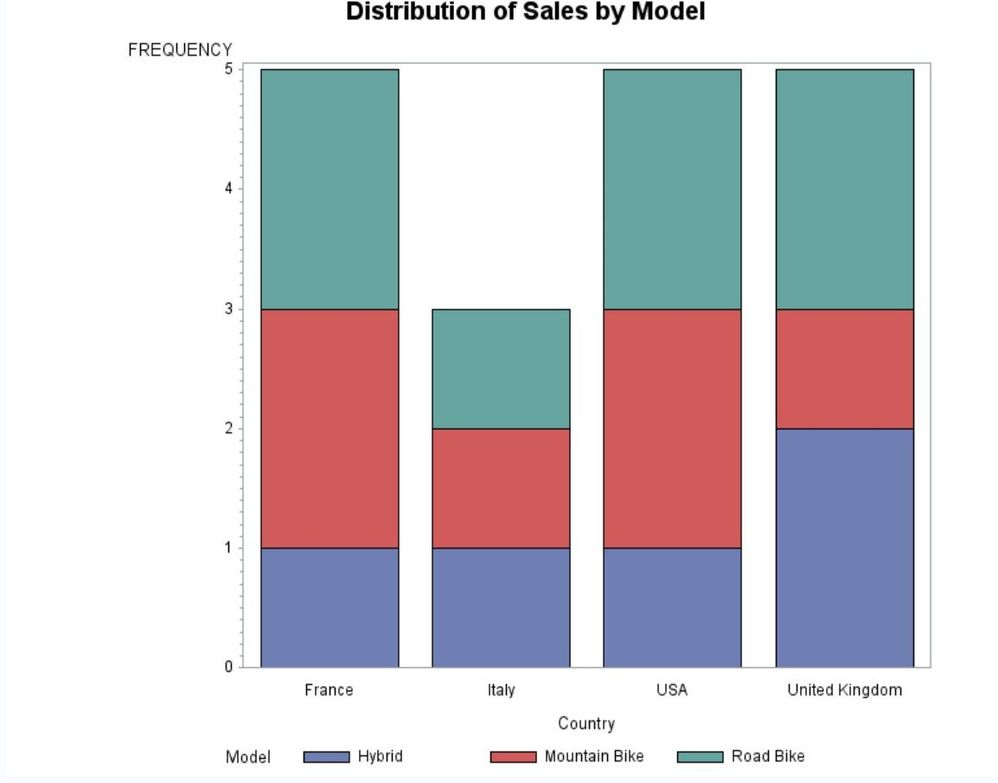
I have this graph created by this code:
PROC SGPLOT DATA = new;
VBAR country / GROUP = model;
RUN;
How can I change the direction of the Y-axis title from vertical to horizontal?


- Mark as New
- Bookmark
- Subscribe
- Mute
- RSS Feed
- Permalink
- Report Inappropriate Content
PROC SGPLOT DATA = new;
VBAR country / GROUP = model;
yaxis LABELPOS=CENTER ;
RUN;
Jag
- Mark as New
- Bookmark
- Subscribe
- Mute
- RSS Feed
- Permalink
- Report Inappropriate Content


- Mark as New
- Bookmark
- Subscribe
- Mute
- RSS Feed
- Permalink
- Report Inappropriate Content
I think JAG meant to say
yaxis LABELPOS=TOP;
- Mark as New
- Bookmark
- Subscribe
- Mute
- RSS Feed
- Permalink
- Report Inappropriate Content
yaxis LABELPOS=TOP ;
I used the above statement, it worked but still I need to make a space between the word "frequency" and the axis, not to be exactly above the axis. Need to make space betwee the two.
- Mark as New
- Bookmark
- Subscribe
- Mute
- RSS Feed
- Permalink
- Report Inappropriate Content
This is the graph I am looking for with a space betwee the word "frequency" and the Y-axis.
- Mark as New
- Bookmark
- Subscribe
- Mute
- RSS Feed
- Permalink
- Report Inappropriate Content

Call for content now open!
It's your turn to help shape SAS Innovate 2027. Share your expertise and inspire the SAS community.
Learn how use the CAT functions in SAS to join values from multiple variables into a single value.

Find more tutorials on the SAS Users YouTube channel.
SAS Training: Just a Click Away
Ready to level-up your skills? Choose your own adventure.
-
6 replies
-
08-02-2017 11:04 PM
-
5975 views
-
1 like
-
3 in conversation
-


