- Home
- /
- Programming
- /
- Graphics
- /
- Re: How to explode slice on pie chart using using GTL?
- RSS Feed
- Mark Topic as New
- Mark Topic as Read
- Float this Topic for Current User
- Bookmark
- Subscribe
- Mute
- Printer Friendly Page


- Mark as New
- Bookmark
- Subscribe
- Mute
- RSS Feed
- Permalink
- Report Inappropriate Content
Hello All,
I have following code,
DATA usedata;
INPUT slicenm $ 1-8 val;
DATALINES;
Slice A 4.5
Slice B 5.8
Slice C 7.2;
RUN;
PROC TEMPLATE;
DEFINE statgraph piechart;
DYNAMIC _name _value;
BEGINGRAPH;
LAYOUT LATTICE;
LAYOUT REGION;
piechart category=_name response=_value / dataskin=sheen datalabellocation=inside;
ENDLAYOUT;
ENDLAYOUT;
ENDGRAPH;
END;
RUN;
PROC SGRENDER DATA=usedata TEMPLATE=piechart;
DYNAMIC _name="slicenm" _value="val";
RUN;
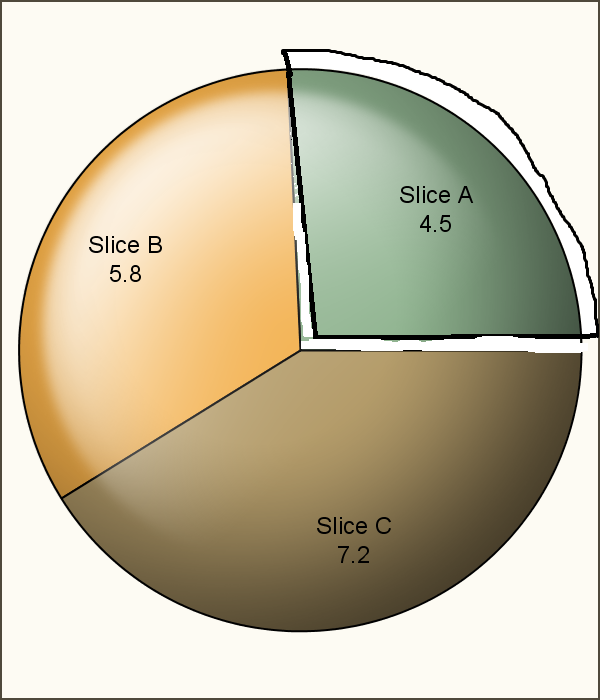
How can I explode specific slice on piechart using GTL? Can you please help me?
My expected output is like following:
Accepted Solutions


- Mark as New
- Bookmark
- Subscribe
- Mute
- RSS Feed
- Permalink
- Report Inappropriate Content
There is no built-in easy way to explode a slice in GTL. I suggest using PROC GCHART, with the PIE statement and EXPLODE option.
- Mark as New
- Bookmark
- Subscribe
- Mute
- RSS Feed
- Permalink
- Report Inappropriate Content
There is no built-in easy way to explode a slice in GTL. I suggest using PROC GCHART, with the PIE statement and EXPLODE option.
- Mark as New
- Bookmark
- Subscribe
- Mute
- RSS Feed
- Permalink
- Report Inappropriate Content
Thanks Sanjay, your answer makes me clear about this option in GTL as I thought earlier there might have way in GTL to do it which I could not able to find out. I did this as following way based on your suggestion,
DATA usedata;
INPUT slicenm $ 1-8 val;
DATALINES;
Slice A 4.5
Slice B 5.8
Slice C 7.2
;
RUN;
GOPTIONS DEVICE=png;
PROC GCHART DATA=usedata;
PIE slicenm / TYPE=SUM SUMVAR=val
EXPLODE="Slice A" ANGLE=0 ASCENDING NOHEADING
VALUE=inside SLICE=outside;
RUN;
QUIT;
Thanks for your suggestion also.

Call for content now open!
It's your turn to help shape SAS Innovate 2027. Share your expertise and inspire the SAS community.
Learn how use the CAT functions in SAS to join values from multiple variables into a single value.

Find more tutorials on the SAS Users YouTube channel.
SAS Training: Just a Click Away
Ready to level-up your skills? Choose your own adventure.
-
2 replies
-
05-13-2015 04:43 AM
-
3927 views
-
1 like
-
2 in conversation
-
