- Home
- /
- Programming
- /
- Graphics
- /
- How to combine bar chart and dot plot?
- RSS Feed
- Mark Topic as New
- Mark Topic as Read
- Float this Topic for Current User
- Bookmark
- Subscribe
- Mute
- Printer Friendly Page


- Mark as New
- Bookmark
- Subscribe
- Mute
- RSS Feed
- Permalink
- Report Inappropriate Content
Dear all,
How can I combine dot plot and bar chart? I've tried the following code:
data have;
input id $1. bar dot1 dot2;
datalines;
a 10 8 7
b 15 18 3
c 5 20 1
d -5 8 2
;
run;
proc sgplot data=have;
vbar id/response=bar;
dot id/response=dot1;
dot id/response=dot2 ;
run;
but got an:
ERROR: All overlays must have the same orientation.
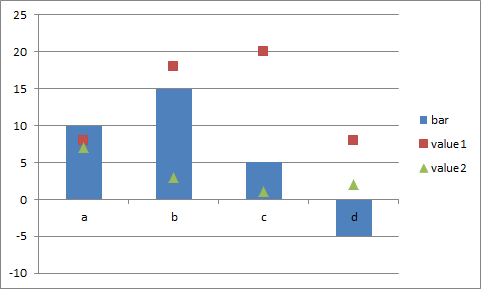
I would like to obtain something similar to the attached graph.
Thanks for help
Accepted Solutions


- Mark as New
- Bookmark
- Subscribe
- Mute
- RSS Feed
- Permalink
- Report Inappropriate Content
Hello,
In SGPLOT, you can only use dotplot with horizontal categorization plot statements. In your code you are trying to overlay a vertical plot with a horizontal plot and that is why you get that error.
You can use GTL to achieve what you want. Please try this code below:
proc template;
define statgraph barwithdot;
begingraph;
layout overlay;
barchart x=id y=bar / orient = vertical;
scatterplot x=id y=dot1 / markerattrs=(color=red symbol=squarefilled);
scatterplot x=id y=dot2 / markerattrs=(color=green symbol=trianglefilled);
endlayout;
endgraph;
end;
run;
proc sgrender data = have template = barwithdot;
run;
Thank you.
- Mark as New
- Bookmark
- Subscribe
- Mute
- RSS Feed
- Permalink
- Report Inappropriate Content
Hello,
In SGPLOT, you can only use dotplot with horizontal categorization plot statements. In your code you are trying to overlay a vertical plot with a horizontal plot and that is why you get that error.
You can use GTL to achieve what you want. Please try this code below:
proc template;
define statgraph barwithdot;
begingraph;
layout overlay;
barchart x=id y=bar / orient = vertical;
scatterplot x=id y=dot1 / markerattrs=(color=red symbol=squarefilled);
scatterplot x=id y=dot2 / markerattrs=(color=green symbol=trianglefilled);
endlayout;
endgraph;
end;
run;
proc sgrender data = have template = barwithdot;
run;
Thank you.
- Mark as New
- Bookmark
- Subscribe
- Mute
- RSS Feed
- Permalink
- Report Inappropriate Content
Thanks a lot djrisks. It works fine.
Best
- Mark as New
- Bookmark
- Subscribe
- Mute
- RSS Feed
- Permalink
- Report Inappropriate Content
You're welcome 🙂


- Mark as New
- Bookmark
- Subscribe
- Mute
- RSS Feed
- Permalink
- Report Inappropriate Content
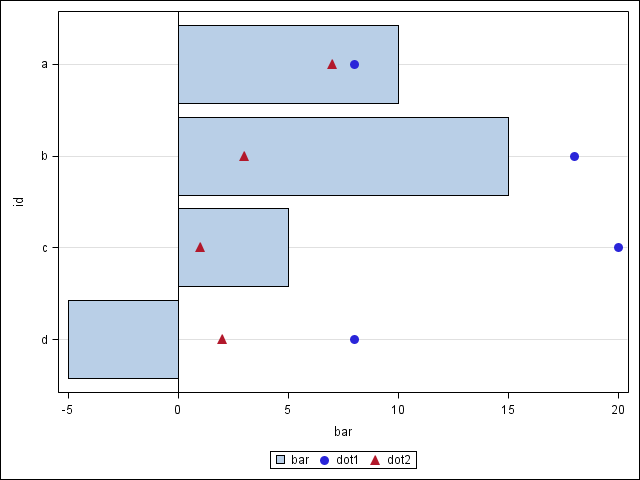
The SGPLOT DOT plot is horizontally oriented. So, you could use an HBAR statement instead.
proc sgplot data=have;
hbar id/response=bar nostatlabel;
dot id/response=dot1 nostatlabel markerattrs=graphdata1(symbol=circlefilled size=10);
dot id/response=dot2 nostatlabel markerattrs=graphdata2(symbol=trianglefilled size=10);
run;

Call for content now open!
It's your turn to help shape SAS Innovate 2027. Share your expertise and inspire the SAS community.
Learn how use the CAT functions in SAS to join values from multiple variables into a single value.

Find more tutorials on the SAS Users YouTube channel.
SAS Training: Just a Click Away
Ready to level-up your skills? Choose your own adventure.
-
4 replies
-
06-15-2015 07:30 AM
-
9514 views
-
4 likes
-
3 in conversation
-

