BookmarkSubscribeRSS Feed
French
Calcite | Level 5

I want to import the excel data into SAS Studio University Edition (Online).


I was trying to upload the excel file but i could not find the "Tab" that says " Server files and folders" ... so i cannot create the folder and upload the file. Later, i searched over youtube and find that this is missing. (Enclosed is picture, on the left is my SAS Studio & on the right is the missing tab, that i could not bring back)


If anyone could please guide me how to bring back that tab. 


I am sorry to ask some basic question, but i am unable to figure out the soluction. I shall be thankful to you for your kind reply
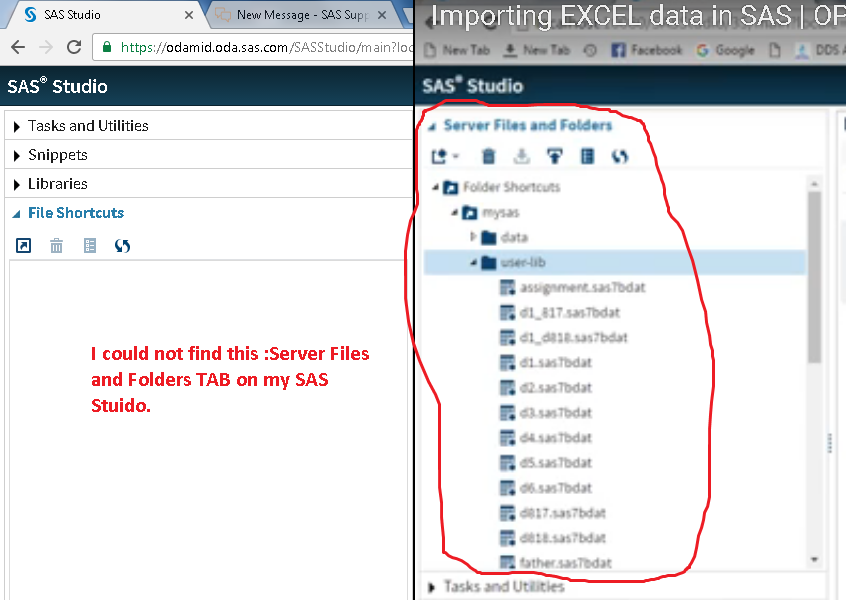

Missing Folder Tab.png
1 REPLY 1
Reeza
Super User

Have you tried restarting your VM? 


Is this a new or older installation? 


Can you show rhe full browser window, including the bottom?  make sure zoom is set to 0, so that you see the full menu. 

sas-innovate-2026-white.png


April 27 – 30 | Gaylord Texan | Grapevine, Texas

Registration is open

Walk in ready to learn. Walk out ready to deliver. This is the data and AI conference you can't afford to miss.
Register now and lock in 2025 pricing—just $495!

Register now

Discussion stats
  • 1 reply
  • 1584 views
  • 0 likes
  • 2 in conversation