- Home
- /
- Administration
- /
- Admin & Deploy
- /
- Re: SAS installation SASUSER error
- RSS Feed
- Mark Topic as New
- Mark Topic as Read
- Float this Topic for Current User
- Bookmark
- Subscribe
- Mute
- Printer Friendly Page


- Mark as New
- Bookmark
- Subscribe
- Mute
- RSS Feed
- Permalink
- Report Inappropriate Content
Hello community,
I'm having problems to install SAS on my computer,
I passed all the installations steps, however i'm always getting this ERROR when I try to launch SAS :
ERROR: Nom physique incorrect pour la biblio. SASUSER.
NOTE: Unable to initialize the options subsystem.
ERROR: (SASXKINI): PHASE 3 KERNEL INITIALIZATION FAILED.
ERROR: Unable to initialize the SAS kernel.
I went on SAS website and tried the different solutions :
1- find the SASv9.cfg and the path the SASUSER biblo, but i can't find this library because i can't find the "MY SAS Files" that should be on my computer,
2- I read the installation notice where they say to create a "My SAS files" and change the path in the SASv9.cfg, however i'm still getting the same error message and can't launch SAS
3- I deleted avast antivirus as I red that it might block SAS from running, and re-installed SAS but still nothing
I have a windows 10 Lenovo computer, it has 64bit processor and 4gb RAM
can someone help me ?
thank you in advance


- Mark as New
- Bookmark
- Subscribe
- Mute
- RSS Feed
- Permalink
- Report Inappropriate Content
Hello @Tahahessane,
please check this SAS Note, it should be able to help you: http://support.sas.com/kb/12/457.html
For your information, @ChrisHemedinger also describes this problem here: https://communities.sas.com/t5/SAS-Programming/Unable-to-launch-SAS/td-p/406774
- Mark as New
- Bookmark
- Subscribe
- Mute
- RSS Feed
- Permalink
- Report Inappropriate Content
Hello,
thank you for your answer,
but I already did that, and I couldn't find the "My SAS files"... even though everything is installed
- Mark as New
- Bookmark
- Subscribe
- Mute
- RSS Feed
- Permalink
- Report Inappropriate Content
Hello @Tahahessane,
not sure of your doubt, but let me summarize the instruction, to ensure we are on the same page.
in your Program Files/SASHome/SASFoundation/9.4/nls/ you should find a few folders and each with a sasv9.cfg file.
In those files, there should be the following lines in:
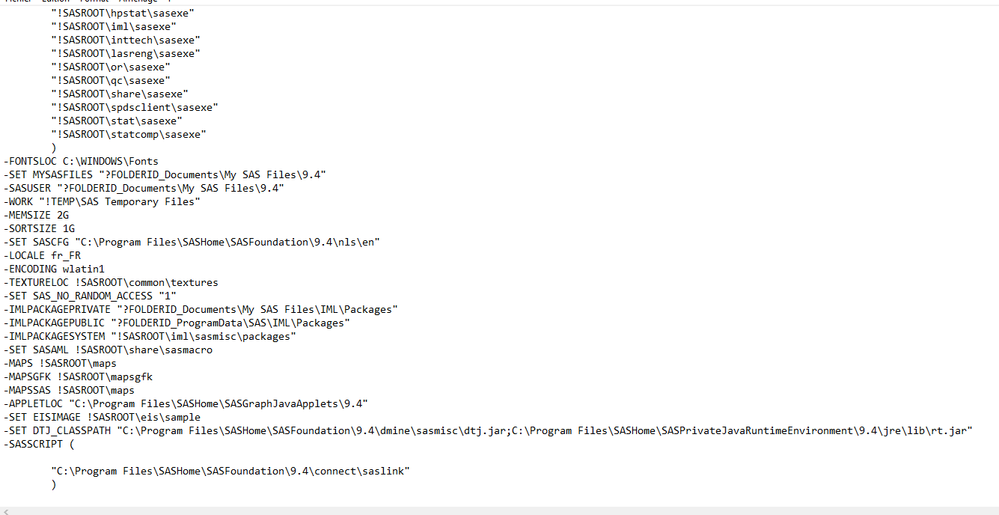
-SET MYSASFILES "?FOLDERID_Documents\My SAS Files\9.4"
-SASUSER "?FOLDERID_Documents\My SAS Files\9.4"
-WORK "!TEMP\SAS Temporary Files"
Please check that the string value of SASUSER (and/or MYSASFILES) option does exist and that location has permissions for your user.
The error is about SASUSER not MYSASFILES, but still worth a check.
- Mark as New
- Bookmark
- Subscribe
- Mute
- RSS Feed
- Permalink
- Report Inappropriate Content
thank you for your answer,
I don't understand what you mean with "Please check that the string value of SASUSER (and/or MYSASFILES) option does exist and that location has permissions for your user."
how can check that ?
I launched SAS as administrator i don't know if that helps
- Mark as New
- Bookmark
- Subscribe
- Mute
- RSS Feed
- Permalink
- Report Inappropriate Content
Hello @Tahahessane,
- please open your SAS session and run the following code "%put _ALL_;" and send us the log/output.
- please get your SASFoundation/9.4/nls/[xxx]/sasv9.conf files and share with us the content (specially the last lines, where you will find the SASUSER and MYSASFILES values).
Thank you in advance,
Kind regards,
Juan


- Mark as New
- Bookmark
- Subscribe
- Mute
- RSS Feed
- Permalink
- Report Inappropriate Content
@Tahahessane wrote:
I launched SAS as administrator i don't know if that helps
DON'T DO THAT.
sasadm@saspw is an internal account (exists only in SAS metadata) and does not have a corresponding account in the operating system. Therefore it cannot be used for workspace server sssions, which need the infrastructure of a defined OS user to set up the necessary infrastructure (SASUSER, WORK). Use a non-admin account (your personal account) to start a workspace server.
- Mark as New
- Bookmark
- Subscribe
- Mute
- RSS Feed
- Permalink
- Report Inappropriate Content
Hi @Kurt_Bremser,
please let me chime in. Please let me know if this correction/comment does not apply or I miss-read anything from your post.
I think your comment might be interesting for readers, because what you say is 100% true, but I think it does not apply for @Tahahessane, the poster of the initial question.
If you read him well, he just installed SAS in his PC, meaning, SAS Base.
- sasadm@saspw does not apply at all, there is no metadata.
- when he said that he ran SAS as Administrator, he meant exactly that: with his own user, he clicked on SAS Base and selected "Run as Administrator", which will grant him some local administrator permissions on his computer.
That being said:
@Tahahessane, did you had the chance to get what I asked for?
Kind regards,
Juan
- Mark as New
- Bookmark
- Subscribe
- Mute
- RSS Feed
- Permalink
- Report Inappropriate Content
If it actually means running Base SAS with Display Manager from the Windows Menu, then yes, my sasadm@saspw remark does not apply.
But still, SAS should be run with a "normal" account and not as Windows Administrator. Same as you don't run SAS as root on UNIX. It may (or will) work, but it shouldn't be done.
- Mark as New
- Bookmark
- Subscribe
- Mute
- RSS Feed
- Permalink
- Report Inappropriate Content
Hi @Kurt_Bremser,
I agree with you, and then, the answer to his question would be : "no, I would not help" or "no, I think it won't help".
In any case, not that I don't understand his question, he thinks it might be a matter of permissions.
And it actually might be a problem of permissions, but that is the second step, first we need to see how the environment variables are asigned, or if there is a typo in the config files.
- Mark as New
- Bookmark
- Subscribe
- Mute
- RSS Feed
- Permalink
- Report Inappropriate Content
Hello
Sorry for the delay,
I'm still getting the same error again and again,
i created a "my sas file" and changed the path but still its not working ....
i cannot launch SAS 9.4

- Ask the Expert: SAS Functions That Put the "FUN" in Programming | 06-Oct-2026
- PhilaSUG & NJSUG Joint In-Person Meeting 2026 | 09-Oct-2026
- North Texas SAS User Group (NoTSUG) Fall Meeting | 09-Oct-2026
- Ask the Expert: How Can I Integrate SAS® Viya® With Microsoft 365? | 13-Oct-2026
- Ask the Expert: Map to Success: Using ODS Graphics for Data Visualization | 15-Oct-2026
- Southeast & Atlantic SAS Users Group Conference | 22-Oct-2026
- Ask the Expert: Getting Started With SAS Visual Analytics: Build Your First Dashboard | 22-Oct-2026
Learn how to explore data assets, create new data discovery agents, schedule data discovery agents, and much more.

Find more tutorials on the SAS Users YouTube channel.
-
10 replies
-
09-20-2018 05:26 AM
-
8107 views
-
1 like
-
3 in conversation
-


