- Home
- /
- Administration
- /
- Admin & Deploy
- /
- Re: SAS 9.4 installation issue | 'One or more hotfixes...couldn't be a...
- RSS Feed
- Mark Topic as New
- Mark Topic as Read
- Float this Topic for Current User
- Bookmark
- Subscribe
- Mute
- Printer Friendly Page


- Mark as New
- Bookmark
- Subscribe
- Mute
- RSS Feed
- Permalink
- Report Inappropriate Content
Windows 10 Pro machine -- new install of SAS 9.4. Installation proceeds normally (I simply accepted the defaults to confirm that wasn't going to be a problem), until I get to
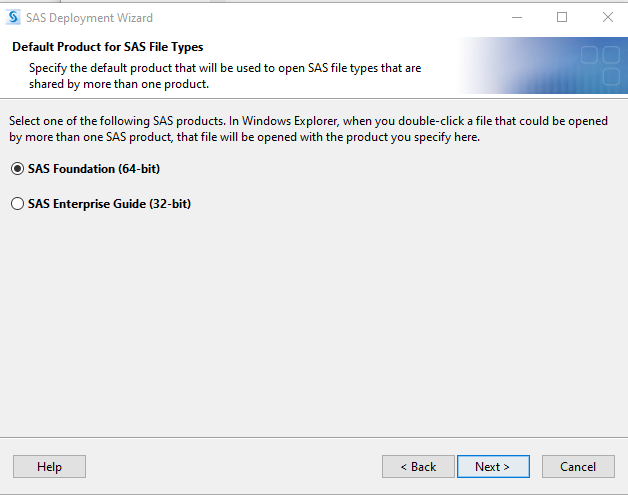
Click next, and....installer throws the following error, and upon 'clicking OK' exits.

The log it refers to is filled with lines like the following:
INFO: ExeProc::ReadFromPipe=Standard outputjava.nio.file.NoSuchFileException: C:\Users\egc\Desktop\sas.installer\hot_fix\M2K007pt.zipat java.base/sun.nio.fs.WindowsException.translateToIOException(Unknown Source)at java.base/sun.nio.fs.WindowsException.rethrowAsIOException(Unknown Source)
java version "1.8.0_451"
Java(TM) SE Runtime Environment (build 1.8.0_451-b10)
Java HotSpot(TM) 64-Bit Server VM (build 25.451-b10, mixed mode)
- Mark as New
- Bookmark
- Subscribe
- Mute
- RSS Feed
- Permalink
- Report Inappropriate Content
Additional 'data point'. Aftrer scrolling back *up* the log file, I get to this, which seems to suggest it isn't finding the 'local, private SAS JRE' (or something to that effect.
INFO: Launcher::Run::start::launchercmd=..\..\products\privatejre__99574__wx6__xx__sp0__1\bin\java
Thu May 22 11:53:37 2025
INFO: Launcher::Run::start::launcherargs=-Xmx2048M -jar deploywiz/setup.jar
Thu May 22 11:53:37 2025
INFO: Launcher::Run::start::Run with stdout="..\..\products\privatejre__99574__wx6__xx__sp0__1\bin\java" -Xmx2048M -jar deploywiz/setup.jar -startuplocation "C:\Users\egc\Desktop\sas.installer"
Thu May 22 11:53:37 2025
ERROR: ExeProc::ExeandDisplay::GetStdHandle::NULL=183


- Mark as New
- Bookmark
- Subscribe
- Mute
- RSS Feed
- Permalink
- Report Inappropriate Content
Has the SAS Software Depot you are installing off been used to successfully install on other computers? Is this an upgrade to an existing SAS installation or a completely new installation from scratch?
It would be worthwhile opening a track with Tech Support for this problem.
- Mark as New
- Bookmark
- Subscribe
- Mute
- RSS Feed
- Permalink
- Report Inappropriate Content
- Mark as New
- Bookmark
- Subscribe
- Mute
- RSS Feed
- Permalink
- Report Inappropriate Content
In that case you might want to reach out to your IT folks for guidance and provide them with the install log.

- Spring 2026 ESUG Meeting | 03-Jun-2026
- Ask the Expert: Fast, Clear, Beautiful: Your First Steps With PROC SGPLOT | 04-Jun-2026
- Ask the Expert: R and SAS Working Seamlessly Together: Unlocking PROC R in Viya for Life Sciences | 11-Jun-2026
- Ask the Expert: Can Agents Reduce Planning Friction in CPG Supply Chains? | 16-Jun-2026
- Ask the Expert: Get Meaningful Results With New Features in SAS Customer Intelligence 360 | 25-Jun-2026
Learn how to explore data assets, create new data discovery agents, schedule data discovery agents, and much more.

Find more tutorials on the SAS Users YouTube channel.
-
4 replies
-
05-22-2025 12:24 PM
-
2220 views
-
0 likes
-
2 in conversation
-


