BookmarkSubscribeRSS Feed
VSalekin
Calcite | Level 5

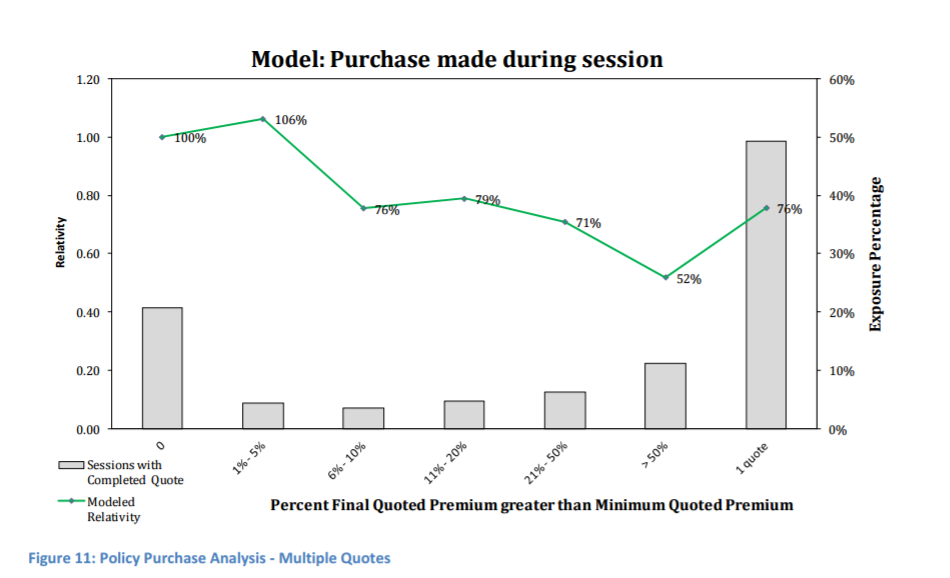
I'm building a binomial logit model and, for each variable, would like to produce a graph showing the relativities (as a decimal or percent) of each level compared to the base level. Is there a built-in option to do this in Enterprise Guide? This is not a simple graph comparing each level's correlation with the binary target or log odds with that of the base level; I want to be sure that the relativities shown are true relativities, i.e. they satisfy the "all other things equal" assumption so that the effects of all other variables are controlled for (or essentially set to the base levels). I've attached an example of what I'm looking for.  Any help will be greatly appreciated.


--V.S.


relativities.png
1 REPLY 1
Rick_SAS
SAS Super FREQ

I've never heard of a "relativity graph." Could you provide a reference or formula? It might be known by a different name.


Without knowing what a "relativity plot" is, I suggest you investigate the EFFECTPLOT statement, which enables you to visualize the effect of many continuous and classification effects. A few examples are shown in the article that I linked to, and the article links to the documentation which provides full details.

sas-innovate-2026-white.png


April 27 – 30 | Gaylord Texan | Grapevine, Texas

Registration is open

Walk in ready to learn. Walk out ready to deliver. This is the data and AI conference you can't afford to miss.
Register now and lock in 2025 pricing—just $495!

Register now

What is ANOVA?

ANOVA, or Analysis Of Variance, is used to compare the averages or means of two or more populations to better understand how they differ. Watch this tutorial for more.

Find more tutorials on the SAS Users YouTube channel.

Discussion stats
  • 1 reply
  • 2394 views
  • 1 like
  • 2 in conversation