- Home
- /
- Programming
- /
- Web Report Studio
- /
- Re: SAS WEb Report Studio-Filtering
- RSS Feed
- Mark Topic as New
- Mark Topic as Read
- Float this Topic for Current User
- Bookmark
- Subscribe
- Mute
- Printer Friendly Page


- Mark as New
- Bookmark
- Subscribe
- Mute
- RSS Feed
- Permalink
- Report Inappropriate Content
Hello,
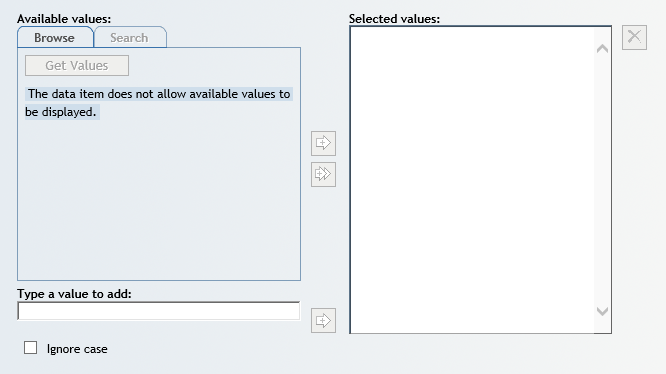
I am currently trying to filter several different data items in a report and I am receving the following message:
"The data item does not allow avaiable values to be displayed."
The "Browse", "Search", and "Get Values" buttons are grayed out.
Please see attachement for the screenshot.
Any help would be greatly appreciated.
Thanks.
- Tags:
- filter
Accepted Solutions


- Mark as New
- Bookmark
- Subscribe
- Mute
- RSS Feed
- Permalink
- Report Inappropriate Content
To allow SAS Web Report Studio to retrieve values, you will need to edit the data items in the information map. In the information map, open the properties for each data item that you want to filter.
- Select Value-Generation Method
- Select User selects values from a dynamic list.
- Save the changes.
Now you should be able to retrieve values in Web Report Studio. You might need to log out and back in to see the changes in the map.
-------------------------------------------------------------------------
Four tips to remember when you contact SAS Technical Support
Tricks for SAS Visual Analytics Report Builders
SAS Visual Analytics Learning Center
- Mark as New
- Bookmark
- Subscribe
- Mute
- RSS Feed
- Permalink
- Report Inappropriate Content
To allow SAS Web Report Studio to retrieve values, you will need to edit the data items in the information map. In the information map, open the properties for each data item that you want to filter.
- Select Value-Generation Method
- Select User selects values from a dynamic list.
- Save the changes.
Now you should be able to retrieve values in Web Report Studio. You might need to log out and back in to see the changes in the map.
-------------------------------------------------------------------------
Four tips to remember when you contact SAS Technical Support
Tricks for SAS Visual Analytics Report Builders
SAS Visual Analytics Learning Center
- Mark as New
- Bookmark
- Subscribe
- Mute
- RSS Feed
- Permalink
- Report Inappropriate Content
That did it!
Thank you !

Call for content now open!
It's your turn to help shape SAS Innovate 2027. Share your expertise and inspire the SAS community.
Learn how use the CAT functions in SAS to join values from multiple variables into a single value.

Find more tutorials on the SAS Users YouTube channel.
SAS Training: Just a Click Away
Ready to level-up your skills? Choose your own adventure.
-
2 replies
-
04-21-2017 12:56 PM
-
2782 views
-
2 likes
-
2 in conversation
-


