- RSS Feed
- Mark Topic as New
- Mark Topic as Read
- Float this Topic for Current User
- Bookmark
- Subscribe
- Mute
- Printer Friendly Page


- Mark as New
- Bookmark
- Subscribe
- Mute
- RSS Feed
- Permalink
- Report Inappropriate Content
I downloaded a dataset (csv files)
How to import the csv files to a new folder named data in
SAS Studio and create from the csv of other SAS
Accepted Solutions


- Mark as New
- Bookmark
- Subscribe
- Mute
- RSS Feed
- Permalink
- Report Inappropriate Content
You can either write code to import your data or you can use a task/GUI.
The Task will also show you the generated code, so if you're not sure what the code is, use a TASK first, and see what the generated code looks like.


- Mark as New
- Bookmark
- Subscribe
- Mute
- RSS Feed
- Permalink
- Report Inappropriate Content
1.Create a new folder in the SAS studio by selecting Folder. You may have to enter the folder name
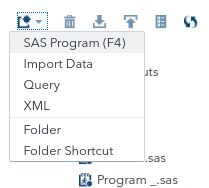
2.Upload the file to the new folder from your desktop. Highlight the folder and select the upward arrow 
3. Import the csv, See this video
- Mark as New
- Bookmark
- Subscribe
- Mute
- RSS Feed
- Permalink
- Report Inappropriate Content
Thank you for your reply
it means the import is done manually without writing any code?
- Mark as New
- Bookmark
- Subscribe
- Mute
- RSS Feed
- Permalink
- Report Inappropriate Content
You can either write code to import your data or you can use a task/GUI.
The Task will also show you the generated code, so if you're not sure what the code is, use a TASK first, and see what the generated code looks like.
- Mark as New
- Bookmark
- Subscribe
- Mute
- RSS Feed
- Permalink
- Report Inappropriate Content
Thank you for your help

Catch up on SAS Innovate 2026
Nearly 200 sessions are now available on demand in the Innovate Hub.
Watch Now →- Ask the Expert: R and SAS Working Seamlessly Together: Unlocking PROC R in Viya for Life Sciences | 11-Jun-2026
- Ask the Expert: Can Agents Reduce Planning Friction in CPG Supply Chains? | 16-Jun-2026
- Ask the Expert: Get Meaningful Results With New Features in SAS Customer Intelligence 360 | 25-Jun-2026
-
4 replies
-
05-07-2021 07:59 AM
-
3308 views
-
2 likes
-
3 in conversation
-


