Main Benefit
Use SAS Viya Copilot as your modeling assistant to explore options and decide which nodes to include in your pipeline. Copilot simplifies pipeline creation by explaining node functionality, recommending best practices, and automatically adding the nodes you choose.
How to Use This Feature
- Open Model Studio in SAS Viya.
- Click the Copilot icon in the toolbar.

3. In the chat window, start by asking questions like:
“What nodes are best for feature selection?” or “Explain the difference between Gradient Boosting and Decision Tree nodes.”

4: Use the exploratory process to test various pipeline architectures.
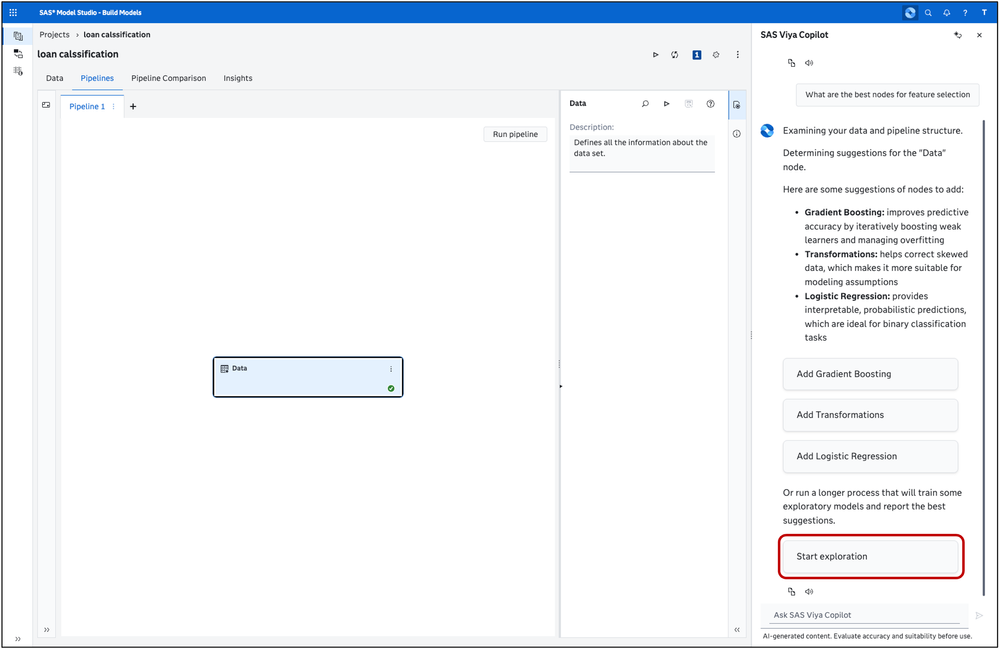
5: Once you’ve decided, select from the list of provided nodes or type a prompt such as:
“Add a Gradient Boosting node to my pipeline.”

6: Review the generated pipeline and make any adjustments before running it.

Beginning with the release of SAS Viya 2025.12, SAS Viya Copilot adds new AI-enabled productivity and automation features across your SAS Viya applications.