- RSS Feed
- Mark Topic as New
- Mark Topic as Read
- Float this Topic for Current User
- Bookmark
- Subscribe
- Mute
- Printer Friendly Page


- Mark as New
- Bookmark
- Subscribe
- Mute
- RSS Feed
- Permalink
- Report Inappropriate Content
We have a SAS Viya server. It is already configured and I can see our companies data (sql tables) in SAS Environment Manager under Data -> Data Sources. I can also preview it in Environment manager.
The next step is I want to access this data with SAS code, from SAS Studio. The issue is that inside SAS Studio -> SAS Libreries I only see default libraries. How do I access tables I see in Environment manager?
This is what I see in SAS Studio

And in SAS environment I see cas-shared-default which inclueds multiple tables I want to access through SAS Studio

Accepted Solutions


- Mark as New
- Bookmark
- Subscribe
- Mute
- RSS Feed
- Permalink
- Report Inappropriate Content
By default, cas libraries will not be shown. First you will need to set up a cas session.
cas;(this line creates a cas session named casauto.) Also note that the standard selected cas-library is casuser. You can change this with options and or parameters
The CAS libraries are not yet displayed.
Use the following code to assign all available cas - libraries
caslib _all_ assign;
this line assignes all available cas - libraries
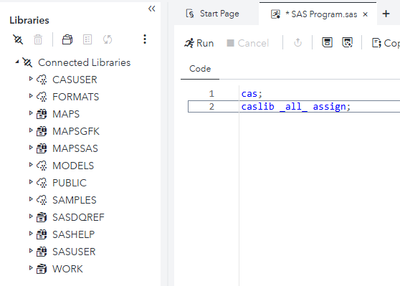
After that, you can load data into cas with proc casutil.
- Mark as New
- Bookmark
- Subscribe
- Mute
- RSS Feed
- Permalink
- Report Inappropriate Content
By default, cas libraries will not be shown. First you will need to set up a cas session.
cas;(this line creates a cas session named casauto.) Also note that the standard selected cas-library is casuser. You can change this with options and or parameters
The CAS libraries are not yet displayed.
Use the following code to assign all available cas - libraries
caslib _all_ assign;
this line assignes all available cas - libraries
After that, you can load data into cas with proc casutil.
- Mark as New
- Bookmark
- Subscribe
- Mute
- RSS Feed
- Permalink
- Report Inappropriate Content

Catch up on SAS Innovate 2026
Nearly 200 sessions are now available on demand with the SAS Innovate Digital Pass.
Explore Now →- Spring 2026 ESUG Meeting - Social Celebration | 02-Jun-2026
- Spring 2026 ESUG Meeting | 03-Jun-2026
-
2 replies
-
04-08-2025 07:07 AM
-
2016 views
-
1 like
-
2 in conversation
-


