- Home
- /
- SAS Viya
- /
- Visual Analytics
- /
- Re: Unable to export detailed data from graph in Visual Analytics with...
- RSS Feed
- Mark Topic as New
- Mark Topic as Read
- Float this Topic for Current User
- Bookmark
- Subscribe
- Mute
- Printer Friendly Page


- Mark as New
- Bookmark
- Subscribe
- Mute
- RSS Feed
- Permalink
- Report Inappropriate Content
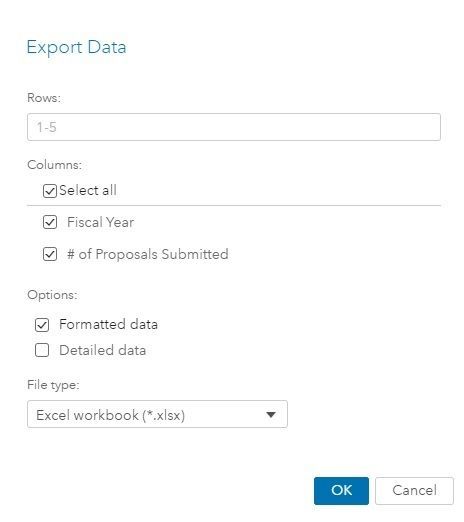
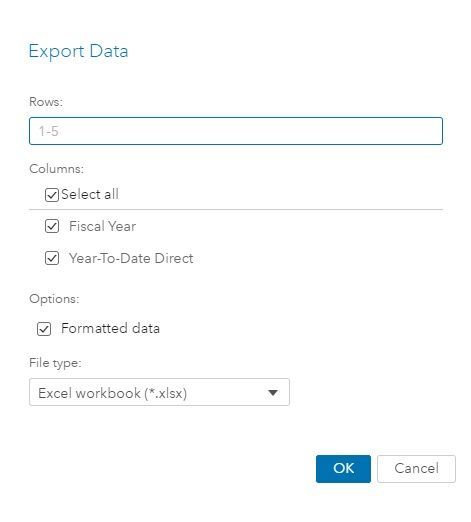
I have noticed that when there is a section prompt in a Visual Analytics report (for example, a drop-down list), then the ability to export detailed data from a graph in that report disappears. I can still click on the 'Export data' icon and see the Export Data pop-up, but the 'Detailed data' check-box under 'Options:' is missing. This is a need for my end users, to be able to export all of the columns from a table via exporting in a graph, and having section prompts in my reports is also a necessity. Has anyone else experienced this? Any workarounds or fixes?
- Tags:
- visual analytics


- Mark as New
- Bookmark
- Subscribe
- Mute
- RSS Feed
- Permalink
- Report Inappropriate Content
One thing that can prevent detailed data export is applying a post-aggregate filter to an object. Is your section filter filtering on a post-aggregated value? For example, Frequency Percent is a post-aggregate value.
-------------------------------------------------------------------------
Four tips to remember when you contact SAS Technical Support
Tricks for SAS Visual Analytics Report Builders
SAS Visual Analytics Learning Center
- Mark as New
- Bookmark
- Subscribe
- Mute
- RSS Feed
- Permalink
- Report Inappropriate Content
No, I'm not filtering on a post-aggregated value, but I was filtering on a custom category, and that turned out to be the issue! I can change the report to filter based on a non-custom category and the detailed data option re-appears. Thank you!

Call for content now open!
It's your turn to help shape SAS Innovate 2027. Share your expertise and inspire the SAS community.
See how to use one filter for multiple data sources by mapping your data from SAS’ Alexandria McCall.

Find more tutorials on the SAS Users YouTube channel.
-
2 replies
-
09-16-2019 11:09 AM
-
3071 views
-
0 likes
-
2 in conversation
-


