BookmarkSubscribeRSS Feed
mj-dhs-sas
Calcite | Level 5

Hello,


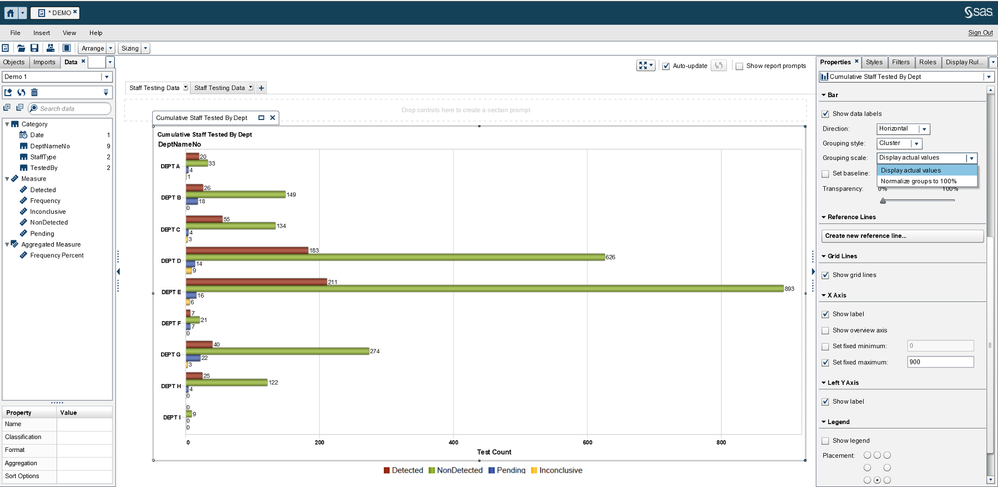
I'm using SAS VA 7.4 and I'm using the Report Writer to try and create a horizontal bar chart that shows both the actual values and percent of total as data labels.


It appears my only options are a choice between "Display actual values" and "Normalize groups to 100%."


example 4.png


Is there a way to make SAS VA display a combination of the two options so that my horizontal bar chart looks something like this?


example 3.PNG

1 REPLY 1
FredrikE
Rhodochrosite | Level 12
I don't think you can do this with the default graphs. You should be able to achieve the desired result using the graph designer and add two bar charts on top of each other, one showing actual value and the other hte percentage. I think you can hide the percentage bar so only the percentage figure is visable.

sas-innovate-2026-white.png


April 27 – 30 | Gaylord Texan | Grapevine, Texas

Registration is open

Walk in ready to learn. Walk out ready to deliver. This is the data and AI conference you can't afford to miss.
Register now and lock in 2025 pricing—just $495!

Register now

Tips for filtering data sources in SAS Visual Analytics

See how to use one filter for multiple data sources by mapping your data from SAS’ Alexandria McCall.

Find more tutorials on the SAS Users YouTube channel.

Discussion stats
  • 1 reply
  • 2196 views
  • 0 likes
  • 2 in conversation