- Home
- /
- SAS Viya
- /
- Visual Analytics
- /
- Re: Connectivity Issues in our SAS Environment
- RSS Feed
- Mark Topic as New
- Mark Topic as Read
- Float this Topic for Current User
- Bookmark
- Subscribe
- Mute
- Printer Friendly Page


- Mark as New
- Bookmark
- Subscribe
- Mute
- RSS Feed
- Permalink
- Report Inappropriate Content
Hello everyone,
I hope you are doing well.
We are reaching out to you as we are currently experiencing connectivity issues in our SAS environment. Despite our efforts to configure an internal user with all access and administrator rights, we continue to encounter problems.
When attempting to import Excel files into SAS, we encounter an error stating "Insufficient information provided for a connection to the metadata server."
Additionally, when trying to connect to the SAS Console Management, we receive the following error: "No host credentials exist to start server SASApp - Workspace Server Either the client needs to send in host credentials, or credentials need to be specified for the server."
We are actively seeking assistance to resolve these issues and would appreciate any guidance or support you can provide.
Thank you for your attention to this matter.
Best regards,


- Mark as New
- Bookmark
- Subscribe
- Mute
- RSS Feed
- Permalink
- Report Inappropriate Content
In order to import data to LASR, users must have an account on the operating system. This is described here:
https://go.documentation.sas.com/doc/en/bicdc/9.4/vaag/n1qzydpsie8xr0n0zddgk8m309l1.htm#p1mhx8msdy8w...
Unfortunately you will not be able to use an internal metadata user for this.
- Mark as New
- Bookmark
- Subscribe
- Mute
- RSS Feed
- Permalink
- Report Inappropriate Content
Hello,
I hope this email finds you well.
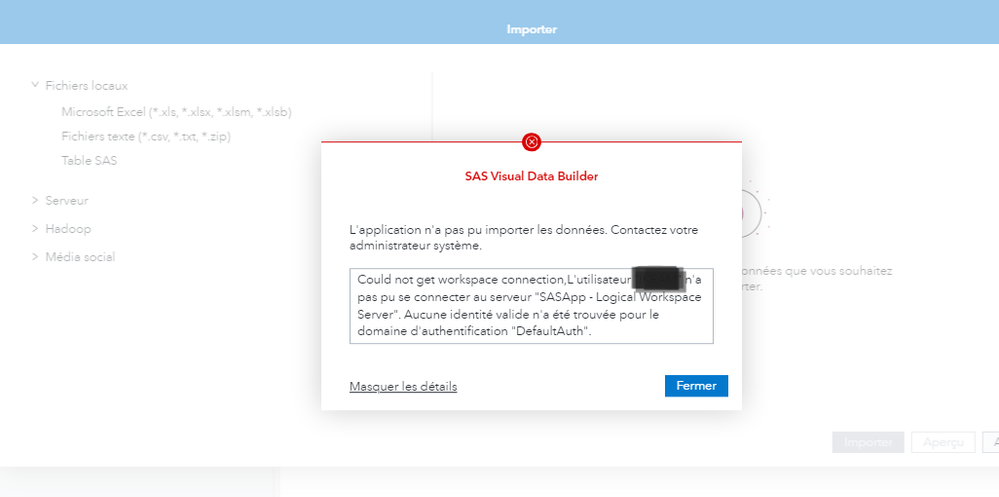
I have consistently encountered an issue with importing files from Data Builder, even after utilizing an external account in SAS with the "Log on as batch job" privilege on the SAS server. However, I still receive the same error message as indicated here.


- Mark as New
- Bookmark
- Subscribe
- Mute
- RSS Feed
- Permalink
- Report Inappropriate Content
There is still something not right with the account you are using to launch the workspace server. For more troubleshooting tips, see this SAS note: https://support.sas.com/kb/52/121.html
-------------------------------------------------------------------------
Four tips to remember when you contact SAS Technical Support
Tricks for SAS Visual Analytics Report Builders
SAS Visual Analytics Learning Center

Call for content now open!
It's your turn to help shape SAS Innovate 2027. Share your expertise and inspire the SAS community.
See how to use one filter for multiple data sources by mapping your data from SAS’ Alexandria McCall.

Find more tutorials on the SAS Users YouTube channel.
-
3 replies
-
02-06-2024 08:13 AM
-
2787 views
-
0 likes
-
3 in conversation
-


