Hi there,
I would like to make a permanent file of the work files that I have, in SAS UNIVERSITY STUDIO.
Previously in SAS 9.4 and enterprise, we can use libname statement, in SAS university, the folder disappears and no permanent folder is saved in the machine. (my own computer /myfolders).
Also in SAS 9.4 and enterprise we can access the databases using ctrl.b and we can COPY AND PASTE the files we want. This is not available in SAS studio??
Thanks
This is the same as BASE SAS and/or EG.
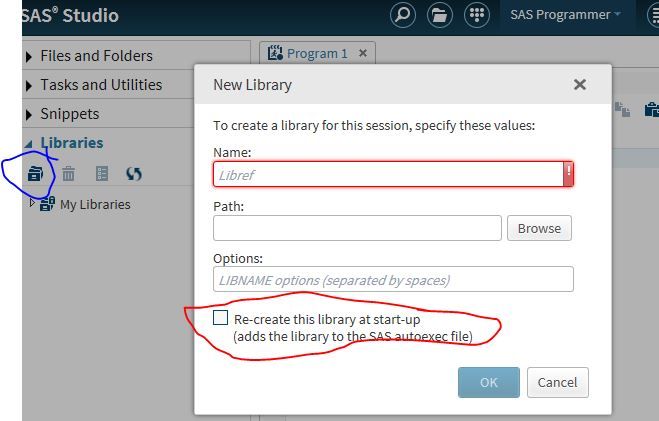
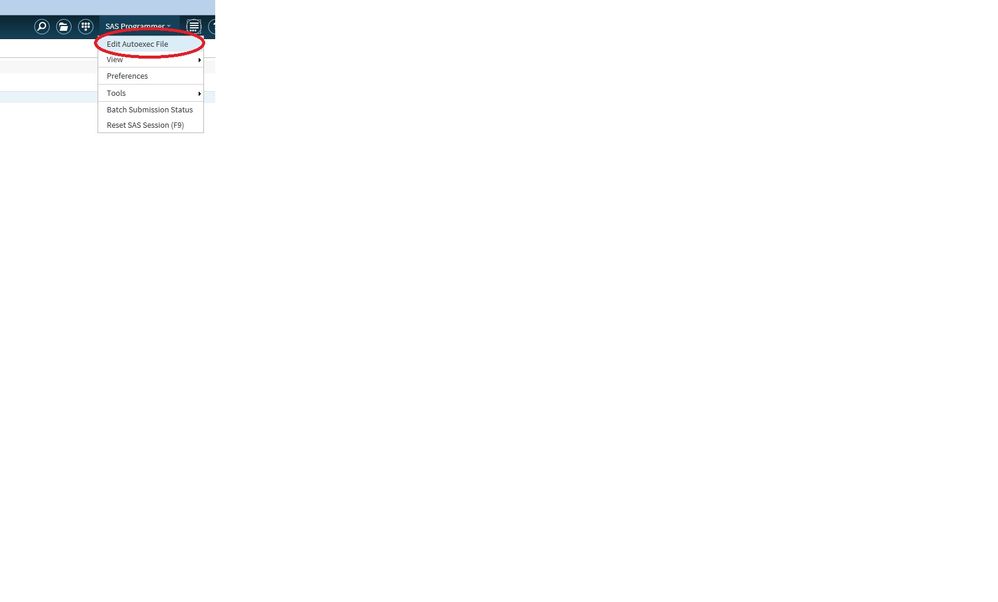
If you create a library and don't add it to the autoexec or make it permanent then each time you restart SAS the library 'disappears'. To make a library permanent create the library via the GUI interface and check make this permanent or add it to the autoexec.
The files in the library never disappear, unless you delete the folder.
This is the same as BASE SAS and/or EG.
If you create a library and don't add it to the autoexec or make it permanent then each time you restart SAS the library 'disappears'. To make a library permanent create the library via the GUI interface and check make this permanent or add it to the autoexec.
The files in the library never disappear, unless you delete the folder.
April 27 – 30 | Gaylord Texan | Grapevine, Texas
Walk in ready to learn. Walk out ready to deliver. This is the data and AI conference you can't afford to miss.
Register now and lock in 2025 pricing—just $495!
Get started using SAS Studio to write, run and debug your SAS programs.

Find more tutorials on the SAS Users YouTube channel.
Ready to level-up your skills? Choose your own adventure.