- Home
- /
- Programming
- /
- SAS Studio
- /
- Re: Tips for Programming Efficiently in SAS Studio
- RSS Feed
- Mark Topic as New
- Mark Topic as Read
- Float this Topic for Current User
- Bookmark
- Subscribe
- Mute
- Printer Friendly Page


- Mark as New
- Bookmark
- Subscribe
- Mute
- RSS Feed
- Permalink
- Report Inappropriate Content
Hello,
I am only using SAS studio: SAS on-demand for academics. It is the web based version. I have recently pyrchased a book on SAS. It has come accompanied with data files and program codes (.sas files). I have figured out how to import the data into SAS studio. But can anybody please tell me how to 'import' the program codes? Normally, I can cut and paste codes (from the training video). But the programs (accompanying the book) can not be opened with a text editor. Hence can not be cut and pasted.
Your help will be invaluable.
Accepted Solutions


- Mark as New
- Bookmark
- Subscribe
- Mute
- RSS Feed
- Permalink
- Report Inappropriate Content
What happens when you right-click the .sas file and open with notepad or another text editor?
- Mark as New
- Bookmark
- Subscribe
- Mute
- RSS Feed
- Permalink
- Report Inappropriate Content
What happens when you right-click the .sas file and open with notepad or another text editor?


- Mark as New
- Bookmark
- Subscribe
- Mute
- RSS Feed
- Permalink
- Report Inappropriate Content
Hi @amitavaroycal0,
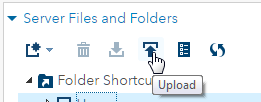
Have you tried to "upload" the files? In the FIles and Folders pane there is an Upload icon on the toolbar. Select a folder that you want to upload files to and then click Upload. Locate the files on your local drive and then upload then to the selected folder.
HTH. Let me know if you still have issues.
- Mark as New
- Bookmark
- Subscribe
- Mute
- RSS Feed
- Permalink
- Report Inappropriate Content
Hello,
I got the solution now as some of you also suggested. Thanks for that. I am able to display and edit .sas program files in Notepad. Hence, I can cut/paste into SAS studio.
So, this is resolved now!
Thanks again.

Catch up on SAS Innovate 2026
Nearly 200 sessions are now available on demand in the Innovate Hub.
Watch Now →Get started using SAS Studio to write, run and debug your SAS programs.

Find more tutorials on the SAS Users YouTube channel.
SAS Training: Just a Click Away
Ready to level-up your skills? Choose your own adventure.
-
3 replies
-
02-16-2017 07:23 AM
-
2522 views
-
0 likes
-
3 in conversation
-


