- Home
- /
- Programming
- /
- SAS Studio
- /
- SAS University Edition - Virtual Box, Shared Folder, Invalid settings ...
- RSS Feed
- Mark Topic as New
- Mark Topic as Read
- Float this Topic for Current User
- Bookmark
- Subscribe
- Mute
- Printer Friendly Page


- Mark as New
- Bookmark
- Subscribe
- Mute
- RSS Feed
- Permalink
- Report Inappropriate Content
To whom it may concern,
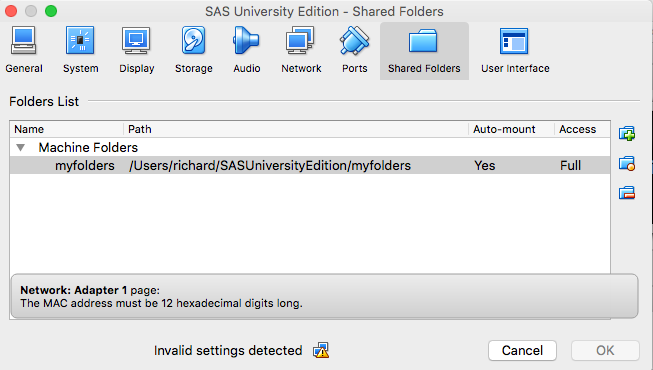
I am trying to get SAS University Edition up and running on a Mac in an OS X environment. The error experienced occurs when setting up my Shared Folder in the Virtual Box after adding the vApp to Virtual Box. When setting up the shared folder, "Invalid settings detected" is displayed. Clicking on the caution sign brings up the error "Network: Adapter 1 page: The MAC address must be 12 hexadecimal digits long (see screenshot).
Not sure how to address this - pun intended 🙂
Thanking you in advance,
rg
Accepted Solutions


- Mark as New
- Bookmark
- Subscribe
- Mute
- RSS Feed
- Permalink
- Report Inappropriate Content
- Mark as New
- Bookmark
- Subscribe
- Mute
- RSS Feed
- Permalink
- Report Inappropriate Content
Search MAC address in Analytics U section for the solution.
- Mark as New
- Bookmark
- Subscribe
- Mute
- RSS Feed
- Permalink
- Report Inappropriate Content

Catch up on SAS Innovate 2026
Nearly 200 sessions are now available on demand with the SAS Innovate Digital Pass.
Explore Now →Get started using SAS Studio to write, run and debug your SAS programs.

Find more tutorials on the SAS Users YouTube channel.
SAS Training: Just a Click Away
Ready to level-up your skills? Choose your own adventure.
-
2 replies
-
09-09-2016 10:18 PM
-
2944 views
-
0 likes
-
2 in conversation
-


