Turn on suggestions
Auto-suggest helps you quickly narrow down your search results by suggesting possible matches as you type.
Showing results for
- Home
- /
- Programming
- /
- SAS Studio
- /
- Re: SAS Studio Tutorial Video #2 - Working in SAS Studio
Options
- RSS Feed
- Mark Topic as New
- Mark Topic as Read
- Float this Topic for Current User
- Bookmark
- Subscribe
- Mute
- Printer Friendly Page


Obsidian | Level 7
- Mark as New
- Bookmark
- Subscribe
- Mute
- RSS Feed
- Permalink
- Report Inappropriate Content
Posted 08-11-2016 07:21 AM
(2076 views)
Dears,
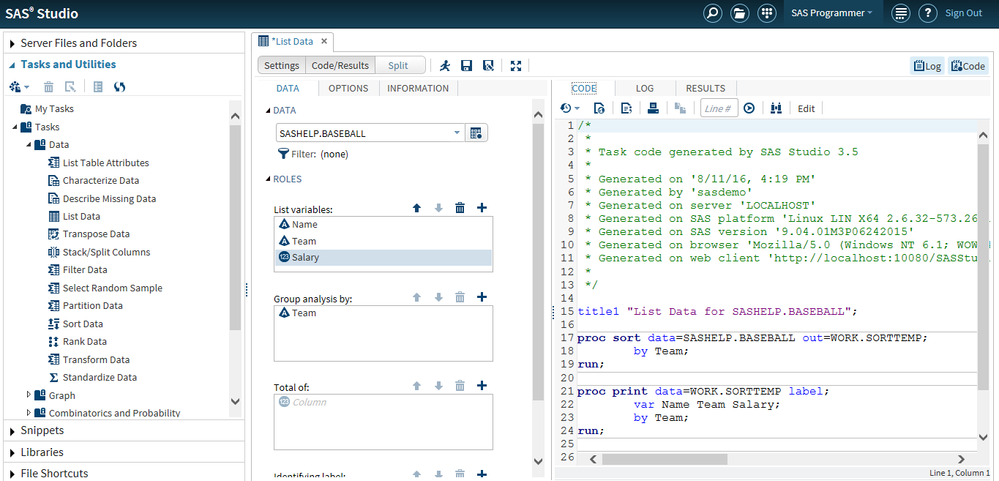
With reference to the Youtube video - https://youtu.be/usnucvpnGLM?list=PLVBcK_IpFVi9cajJtRel2uBLbtcLz-WIN , at about 3.53 minute, the instruction says to create a new SAS program. I am not getting this option on code tab. What am I missing? Refer to the screen shot enclosed.
2 REPLIES 2


Diamond | Level 26
- Mark as New
- Bookmark
- Subscribe
- Mute
- RSS Feed
- Permalink
- Report Inappropriate Content
Hi:
From your screen shot, it does appear that your view of SAS Studio differs from the view of SAS Studio in the video. When I want to start a new program, I always use the F4 key. That seems to open a new program window without using the little icon on the tool bar. Have you tried hitting F4 to start a new program?
Perhaps someone else will have a suggestion about how to find the new program icon when you have the screen arranged as you do.
cynthia
From your screen shot, it does appear that your view of SAS Studio differs from the view of SAS Studio in the video. When I want to start a new program, I always use the F4 key. That seems to open a new program window without using the little icon on the tool bar. Have you tried hitting F4 to start a new program?
Perhaps someone else will have a suggestion about how to find the new program icon when you have the screen arranged as you do.
cynthia
Obsidian | Level 7
- Mark as New
- Bookmark
- Subscribe
- Mute
- RSS Feed
- Permalink
- Report Inappropriate Content
Hello Cynthia,
Thanks for your help. I am using your advice on other occassions also. Sincerely appreciate it.
Kind regards,
Niranjana

Catch up on SAS Innovate 2026
Nearly 200 sessions are now available on demand in the Innovate Hub.
Watch Now →Develop Code with SAS Studio
Get started using SAS Studio to write, run and debug your SAS programs.

Find more tutorials on the SAS Users YouTube channel.
SAS Training: Just a Click Away
Ready to level-up your skills? Choose your own adventure.
Discussion stats
-
2 replies
-
08-11-2016 07:21 AM
-
2077 views
-
0 likes
-
2 in conversation
-


