- Home
- /
- Programming
- /
- SAS Studio
- /
- Re: How to caculate age range between youngest and oldest
- RSS Feed
- Mark Topic as New
- Mark Topic as Read
- Float this Topic for Current User
- Bookmark
- Subscribe
- Mute
- Printer Friendly Page


- Mark as New
- Bookmark
- Subscribe
- Mute
- RSS Feed
- Permalink
- Report Inappropriate Content
I need to caculate age range between youngest and oldest of each type, could someone help mw with this as not every row has data.
proc sort data=hw5.customer_club out=work.customer_club;
   by Customer_Type Customer_BirthDate;
   format Customer_BirthDate mmddyy10.;
run;

data work.Oldest;
   set work.customer_club;
   by Customer_Type Customer_BirthDate;
   if First.Customer_Type then oldest=Customer_ID;
      oldest_bday=Customer_BirthDate;
   if First.Customer_Type;
   keep oldest oldest_bday Customer_Type;
   format oldest_bday mmddyy10.;
run;

data work.Youngest;
   set work.customer_club;
   by Customer_Type Customer_BirthDate;
   if Last.Customer_Type then youngest=Customer_ID;
      youngest_bday=Customer_BirthDate;
   if Last.Customer_Type;
   keep youngest youngest_bday Customer_Type;
   format youngest_bday mmddyy10.;
run;

proc sort data=work.Youngest out=new_Youngest;
   by Customer_Type;
run;

proc sort data=work.Oldest out=new_Oldest;
   by Customer_Type;
run;

data work.merge1;
   set work.new_Youngest work.new_Oldest;
   by Customer_Type;
run;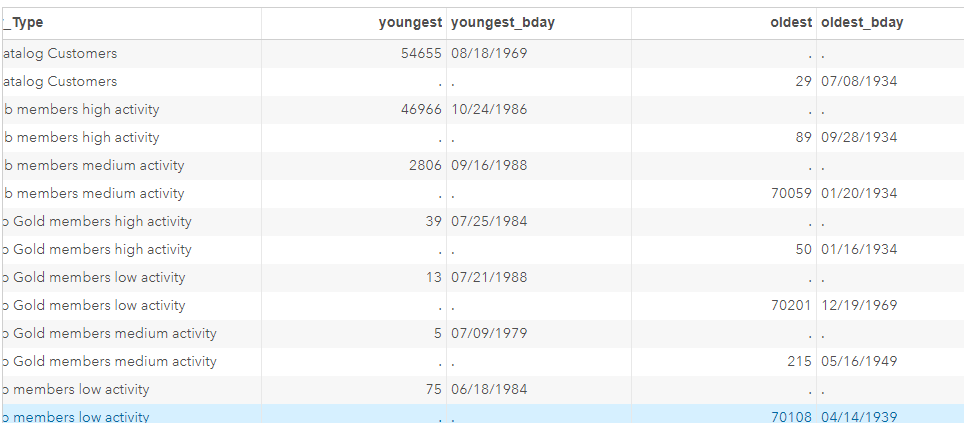
The output of merge1 is above. I need to caculate their age range: agerange = the number of years (rounded to the nearest tenth) between the age of the oldest and youngest members of that type
Accepted Solutions


- Mark as New
- Bookmark
- Subscribe
- Mute
- RSS Feed
- Permalink
- Report Inappropriate Content
At a minimum, the final step needs to switch from SET to MERGE. That would combine information onto a single observation for each customer type.
The calculations are easy:
age_range_in_years = (oldest_bday - youngest_bday) / 365.25;
There is no need to round this to the nearest tenth. You would lose a little accuracy, so the proper way to control this would be when printing. Apply a format to print to the nearest tenth:
format age_range_in_years 5.1;
Also note, this result can be gotten much more easily if all you need is this one number per customer type:
proc summary data=hw5.customer_club nway;
class customer_type;
var customer_birthdate;
output out=ages (keep=customer_type youngest_age oldest_age) min=youngest_age max=oldest_age;
run;
If you need the customer id as well, that too can be done with a short program.
- Mark as New
- Bookmark
- Subscribe
- Mute
- RSS Feed
- Permalink
- Report Inappropriate Content
At a minimum, the final step needs to switch from SET to MERGE. That would combine information onto a single observation for each customer type.
The calculations are easy:
age_range_in_years = (oldest_bday - youngest_bday) / 365.25;
There is no need to round this to the nearest tenth. You would lose a little accuracy, so the proper way to control this would be when printing. Apply a format to print to the nearest tenth:
format age_range_in_years 5.1;
Also note, this result can be gotten much more easily if all you need is this one number per customer type:
proc summary data=hw5.customer_club nway;
class customer_type;
var customer_birthdate;
output out=ages (keep=customer_type youngest_age oldest_age) min=youngest_age max=oldest_age;
run;
If you need the customer id as well, that too can be done with a short program.


- Mark as New
- Bookmark
- Subscribe
- Mute
- RSS Feed
- Permalink
- Report Inappropriate Content
I think it would be easiest with proc sql. e.g.:
libname hw5 '/folders/myfolders';
data hw5.customer_club;
  informat Customer_BirthDate date9.;
  input Customer_Type $ Customer_BirthDate;
  cards;
AAA 20JUN1954
AAA 17APR1992
AAA 14JUL1960
BBB 18JUN1961
BBB 13FEB1995
BBB 6MAY1965
;
proc sql noprint;
  create table merge1 as
    select min(Customer_BirthDate) as youngest format=date9.,
           max(Customer_BirthDate) as oldeest format=date9.,
           yrdif(min(Customer_BirthDate), max(Customer_BirthDate)) as Range format=4.1
      from hw5.customer_club
        group by Customer_Type
  ;
quit;
Art, CEO, AnalystFinder.com

Catch up on SAS Innovate 2026
Nearly 200 sessions are now available on demand with the SAS Innovate Digital Pass.
Explore Now →Get started using SAS Studio to write, run and debug your SAS programs.

Find more tutorials on the SAS Users YouTube channel.
SAS Training: Just a Click Away
Ready to level-up your skills? Choose your own adventure.
-
2 replies
-
07-16-2017 11:58 AM
-
3083 views
-
0 likes
-
3 in conversation
-


