BookmarkSubscribeRSS Feed
Macy
Calcite | Level 5

Dear All,


I am new to sas studio, so not quite familiar with this softwre. currently the problem i am facing is i tried to do the data transforming, but each time i can only put three numeric vriable into transform, right, if i have the fourth one, i have to drag one more task of data transforming to do it, right ? then it will transform the first three variable first, then transform the fourth one ? 


another one s i tried to mae the boxplot after the transform, but how can i link to the data i just transform, it is mandatory to link to the original data, so i do not know how to link them in the process flow ? 


third one is each time i can only put one variable into box plot, right, so if i have several variables to check outlier, i have to drag several task of boxplot into process flow to check outlier ? they should be all linked to the data i have transformed already ? 
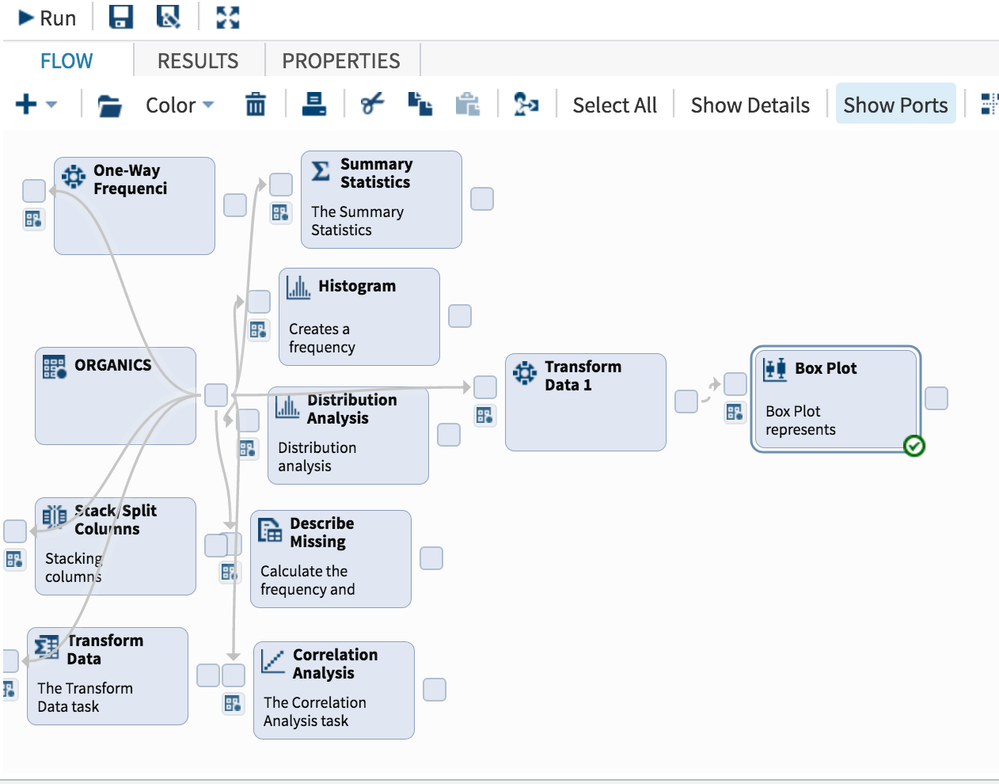

屏幕快照 2016-11-26 下午1.41.13.png
1 REPLY 1
Macy
Calcite | Level 5

Dear All,


I am new to sas studio, so not quite familiar with this softwre. currently the problem i am facing is i tried to do the data transforming, but each time i can only put three numeric vriable into transform, right, if i have the fourth one, i have to drag one more task of data transforming to do it, right ? then it will transform the first three variable first, then transform the fourth one ? 


another one s i tried to mae the boxplot after the transform, but how can i link to the data i just transform, it is mandatory to link to the original data, so i do not know how to link them in the process flow ? 


third one is each time i can only put one variable into box plot, right, so if i have several variables to check outlier, i have to drag several task of boxplot into process flow to check outlier ? they should be all linked to the data i have transformed already ? 

sas-innovate-2026-white.png


April 27 – 30 | Gaylord Texan | Grapevine, Texas

Registration is open

Walk in ready to learn. Walk out ready to deliver. This is the data and AI conference you can't afford to miss.
Register now and lock in 2025 pricing—just $495!

Register now

Develop Code with SAS Studio

Get started using SAS Studio to write, run and debug your SAS programs.

Find more tutorials on the SAS Users YouTube channel.

SAS Training: Just a Click Away

 Ready to level-up your skills? Choose your own adventure.

Browse our catalog!

Discussion stats
  • 1 reply
  • 1079 views
  • 0 likes
  • 1 in conversation
