- Home
- /
- Programming
- /
- SAS Studio
- /
- Re: DO UNTIL STATEMENT
- RSS Feed
- Mark Topic as New
- Mark Topic as Read
- Float this Topic for Current User
- Bookmark
- Subscribe
- Mute
- Printer Friendly Page


- Mark as New
- Bookmark
- Subscribe
- Mute
- RSS Feed
- Permalink
- Report Inappropriate Content
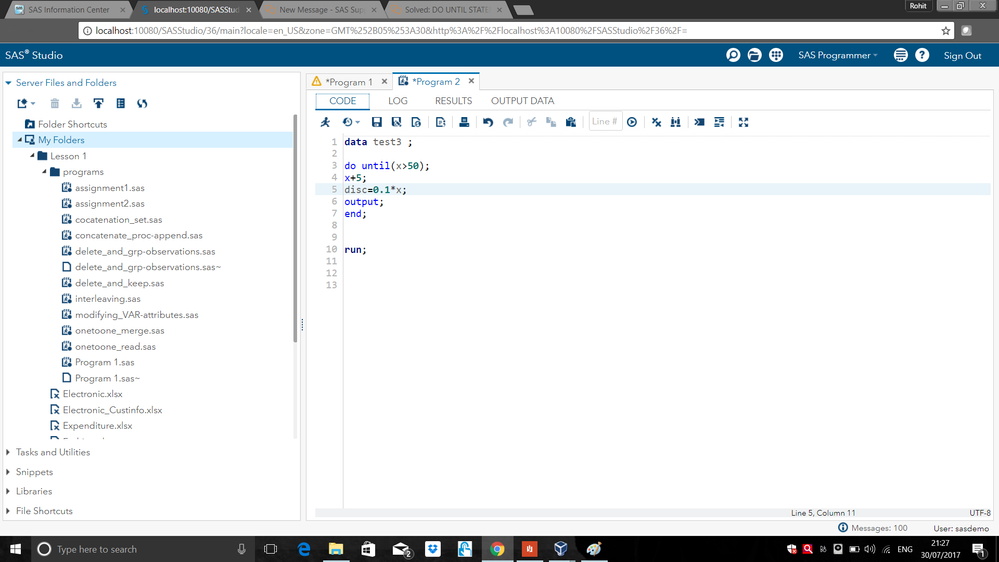
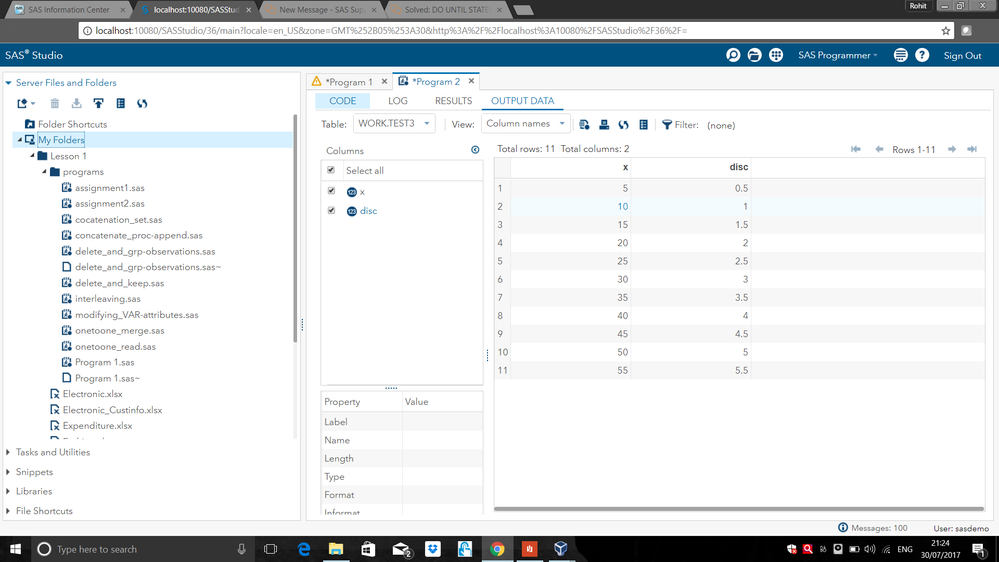
Please explain how the do until loop as shown in the picture iterates to give the output as show in the other picture.
Accepted Solutions


- Mark as New
- Bookmark
- Subscribe
- Mute
- RSS Feed
- Permalink
- Report Inappropriate Content
DO UNTIL means that the loop iterates until the condtion IS true.
On the first iteration X=5 so that is less than 50 so the loop continues. On the second iteration X=10 which is also less than 50, etc.


- Mark as New
- Bookmark
- Subscribe
- Mute
- RSS Feed
- Permalink
- Report Inappropriate Content
The code X+5; (whithout the equal = sign) means: start with 0 and add 5 at each iteration.
do until (x>50); means to stop loop at the given condition.
- Mark as New
- Bookmark
- Subscribe
- Mute
- RSS Feed
- Permalink
- Report Inappropriate Content
- Mark as New
- Bookmark
- Subscribe
- Mute
- RSS Feed
- Permalink
- Report Inappropriate Content
DO UNTIL means that the loop iterates until the condtion IS true.
On the first iteration X=5 so that is less than 50 so the loop continues. On the second iteration X=10 which is also less than 50, etc.
- Mark as New
- Bookmark
- Subscribe
- Mute
- RSS Feed
- Permalink
- Report Inappropriate Content
SAS code is just simple text. Paste in the text so that it is readable and can be copied. Use the Insert SAS code icon to get a pop-up window where you can paste the code so that it retains its formatting.
Posting photogrpahs of text takes longer than pasting the actual text. So it is a waste of your time and of the readers time.

- Mark as New
- Bookmark
- Subscribe
- Mute
- RSS Feed
- Permalink
- Report Inappropriate Content
As someone else mentioned, please post input and output as text, not images.
@rohit_95 wrote:
Please explain how the do until loop as shown in the picture iterates to give the output as show in the other picture.

Catch up on SAS Innovate 2026
Nearly 200 sessions are now available on demand in the Innovate Hub.
Watch Now →Get started using SAS Studio to write, run and debug your SAS programs.

Find more tutorials on the SAS Users YouTube channel.
SAS Training: Just a Click Away
Ready to level-up your skills? Choose your own adventure.
-
5 replies
-
07-30-2017 12:05 PM
-
3498 views
-
2 likes
-
4 in conversation
-


