BookmarkSubscribeRSS Feed
thomas29
Fluorite | Level 6

Hello,


At one of our customers I have an issue with file systems getting full because Enterpise Miner data is often stored in the default folder. I have not found an answer in any guide so maybe someone here can help.


How can I change the path which is displayed in the second step when creating a new project? (SAS Server directory, as shown in the screenshot) Is the path set during installation? Or is there a way to alter it afterwards?

We found out that people just use the default path, so changing it to a specific directory would help a lot.


We use version 12.1 of EM.


Thank in advance,
Thomas
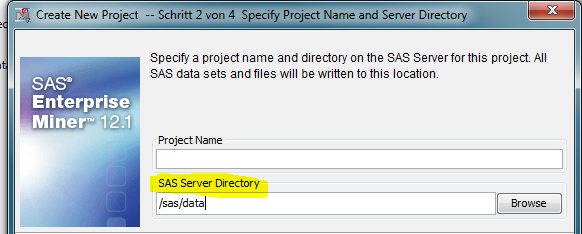

Unbenannt.png
1 REPLY 1
frajuc
SAS Employee

You can change the default location for new projects using SAS Management Console.

See section Logical Workspace Server Customizations for more details. 

http://support.sas.com/documentation/cdl/en/emag/65360/HTML/default/viewer.htm#p1ark7dlwhpzlcn1ud2ck...

sas-innovate-2026-white.png


April 27 – 30 | Gaylord Texan | Grapevine, Texas

Registration is open

Walk in ready to learn. Walk out ready to deliver. This is the data and AI conference you can't afford to miss.
Register now and lock in 2025 pricing—just $495!

Register now

Discussion stats
  • 1 reply
  • 2042 views
  • 0 likes
  • 2 in conversation