- Home
- /
- Programming
- /
- Programming
- /
- Re: where is the problem for this macro variable reference?
- RSS Feed
- Mark Topic as New
- Mark Topic as Read
- Float this Topic for Current User
- Bookmark
- Subscribe
- Mute
- Printer Friendly Page


- Mark as New
- Bookmark
- Subscribe
- Mute
- RSS Feed
- Permalink
- Report Inappropriate Content
%macro test1;
    data a;
    a=1;
    put "a long text";
    run;
%mend;
%test1;       * this works;


%let long=%nrbquote(%test1);
%put &long;

options mprint mlogic symbolgen;
%macro test2;
%if &long ne %str( ) %then %do;
    data b;
    b=1;
%end;
 &long  /* problem here, why? */
proc print width=min;
run;
%mend;

%test2;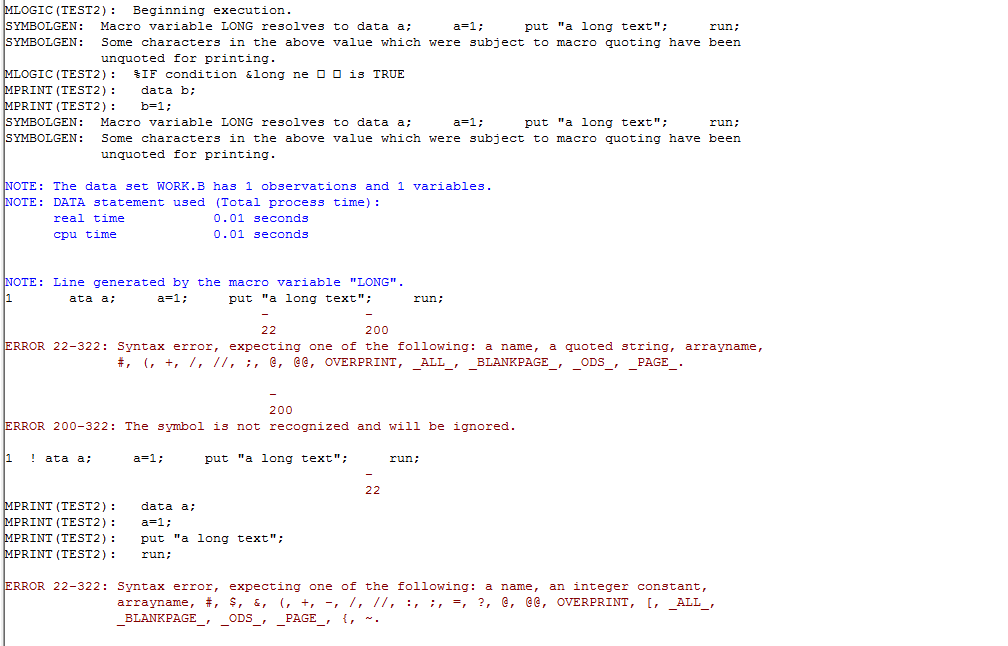
I was about to check some macros, but happened to find this error while testing, where is the problem?
Thank you very much
Accepted Solutions


- Mark as New
- Bookmark
- Subscribe
- Mute
- RSS Feed
- Permalink
- Report Inappropriate Content
The contents of &long have been quoted by %NRBQUOTE. That includes the double quotes surrounding "a long text". Evidently, SAS isn't figuring out to unquote those in time to parse the statement correctly. Try replacing this:
&long
Instead, use:
%unquote(&long)


- Mark as New
- Bookmark
- Subscribe
- Mute
- RSS Feed
- Permalink
- Report Inappropriate Content
What happens if you add a semicolon after &long?
- Mark as New
- Bookmark
- Subscribe
- Mute
- RSS Feed
- Permalink
- Report Inappropriate Content
Thank you, Reeza. I still got the same error if i add a semicolon...
but if i remove the the put "a long text" , it works, do not know why

- Mark as New
- Bookmark
- Subscribe
- Mute
- RSS Feed
- Permalink
- Report Inappropriate Content
%macro test1;
%do;
data a;
a=1;
%put a long text; /*There must be a sign "%"*/
run;
%end;
%mend;
%test1;
%let long=%nrbquote(%test1);
%put &long;
options mprint mlogic symbolgen;
%macro test2;
%if &long ne %str( ) %then %do;
data b;
b=1;
run;
%end;
&long /* problem here, why? */
proc print width=min;
run;
%mend;
%test2;
- Mark as New
- Bookmark
- Subscribe
- Mute
- RSS Feed
- Permalink
- Report Inappropriate Content
The contents of &long have been quoted by %NRBQUOTE. That includes the double quotes surrounding "a long text". Evidently, SAS isn't figuring out to unquote those in time to parse the statement correctly. Try replacing this:
&long
Instead, use:
%unquote(&long)
- Mark as New
- Bookmark
- Subscribe
- Mute
- RSS Feed
- Permalink
- Report Inappropriate Content

- Mark as New
- Bookmark
- Subscribe
- Mute
- RSS Feed
- Permalink
- Report Inappropriate Content
Try %UNQUOTE()
%macro test1;
    data a;
    a=1;
    put "a long text";
    run;
%mend;
%test1


%let long=%nrbquote(%test1);
%put &long;

options mprint mlogic symbolgen;
%macro test2;
%if &long ne  %then %do;
    data b;
    b=1;
    run;
%end;
 %unquote(&long)
proc print width=min;
run;
%mend;

%test2;
- Mark as New
- Bookmark
- Subscribe
- Mute
- RSS Feed
- Permalink
- Report Inappropriate Content
The macro quoting introduced by the %NRBQUOTE() function is causing the generated code to not be valid SAS syntax.
Use the %UNQUOTE() function to remove the macro quoting when you no longer need it.
Here is a simplier example.
%let mvar1=put "no macro quoting";
%let mvar2=%nrbquote(put "macro quoting");
data _null_;
 &mvar1;
run;
data _null_;
 &mvar2;
run;
data _null_;
 %unquote(&mvar2);
run;- Mark as New
- Bookmark
- Subscribe
- Mute
- RSS Feed
- Permalink
- Report Inappropriate Content
Thank you all

Call for content now open!
It's your turn to help shape SAS Innovate 2027. Share your expertise and inspire the SAS community.
Learn how use the CAT functions in SAS to join values from multiple variables into a single value.

Find more tutorials on the SAS Users YouTube channel.
SAS Training: Just a Click Away
Ready to level-up your skills? Choose your own adventure.
-
8 replies
-
05-25-2017 11:33 PM
-
5807 views
-
4 likes
-
6 in conversation
-


