Turn on suggestions
Auto-suggest helps you quickly narrow down your search results by suggesting possible matches as you type.
Showing results for
- Home
- /
- Programming
- /
- Programming
- /
- Re: proc sgplot show lines splitting graph into 4 sections?
Options
- RSS Feed
- Mark Topic as New
- Mark Topic as Read
- Float this Topic for Current User
- Bookmark
- Subscribe
- Mute
- Printer Friendly Page
🔒 This topic is solved and locked.
Need further help from the community? Please
sign in and ask a new question.


Obsidian | Level 7
- Mark as New
- Bookmark
- Subscribe
- Mute
- RSS Feed
- Permalink
- Report Inappropriate Content
Posted 10-31-2019 02:27 PM
(2778 views)
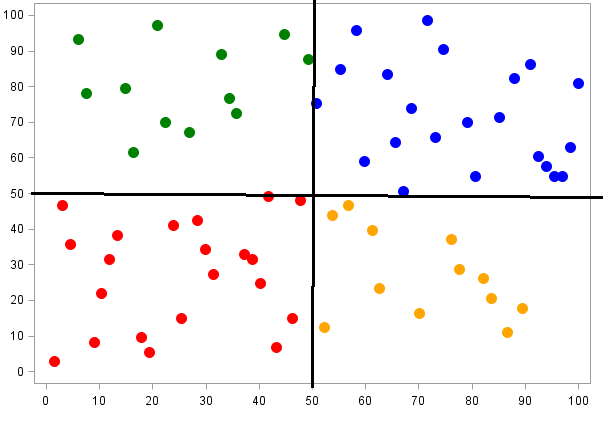
Hi there, Is there a way to separate my graph into 4 quadrants like in the picture? I'd want the lines to go through the 50 mark on both axis.
Thank you
1 ACCEPTED SOLUTION
Accepted Solutions


Tourmaline | Level 20
- Mark as New
- Bookmark
- Subscribe
- Mute
- RSS Feed
- Permalink
- Report Inappropriate Content
See if this gets you started. Feel free to ask
data have;
   do x=1 to 100;
      y=rand('integer', 0, 100);
      output;
   end;
run;

data plot;
   set have;
        if x <= 50 & y <= 50 then group=1;
   else if x >  50 & y <= 50 then group=2;
   else if x <= 50 & y >  50 then group=3;
   else if x >  50 & y >  50 then group=4;
run;

proc sgplot data=plot noautolegend;
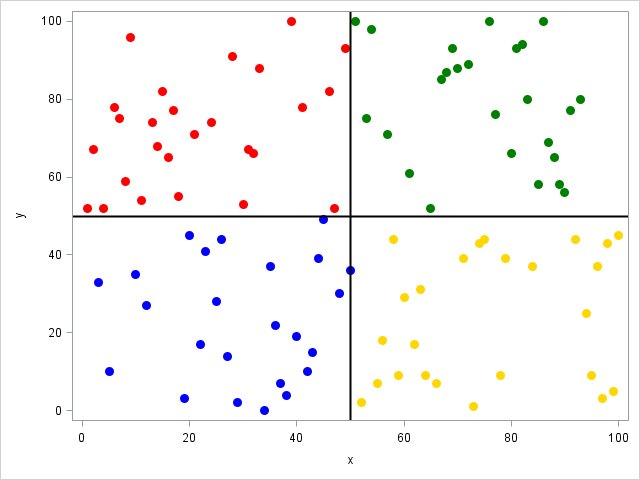
   scatter x=x y=y / group=group markerattrs=(symbol=circlefilled size=10) colorresponse=group colormodel=(blue gold red green);
   refline 50 / axis=x lineattrs=(thickness=2 color=black);
   refline 50 / axis=y lineattrs=(thickness=2 color=black);
run;
Result:
2 REPLIES 2
Tourmaline | Level 20
- Mark as New
- Bookmark
- Subscribe
- Mute
- RSS Feed
- Permalink
- Report Inappropriate Content
See if this gets you started. Feel free to ask
data have;
   do x=1 to 100;
      y=rand('integer', 0, 100);
      output;
   end;
run;

data plot;
   set have;
        if x <= 50 & y <= 50 then group=1;
   else if x >  50 & y <= 50 then group=2;
   else if x <= 50 & y >  50 then group=3;
   else if x >  50 & y >  50 then group=4;
run;

proc sgplot data=plot noautolegend;
   scatter x=x y=y / group=group markerattrs=(symbol=circlefilled size=10) colorresponse=group colormodel=(blue gold red green);
   refline 50 / axis=x lineattrs=(thickness=2 color=black);
   refline 50 / axis=y lineattrs=(thickness=2 color=black);
run;
Result:
Obsidian | Level 7
- Mark as New
- Bookmark
- Subscribe
- Mute
- RSS Feed
- Permalink
- Report Inappropriate Content
thank you this is perfect!

Call for content now open!
It's your turn to help shape SAS Innovate 2027. Share your expertise and inspire the SAS community.
How to Concatenate Values
Learn how use the CAT functions in SAS to join values from multiple variables into a single value.

Find more tutorials on the SAS Users YouTube channel.
SAS Training: Just a Click Away
Ready to level-up your skills? Choose your own adventure.
Discussion stats
-
2 replies
-
10-31-2019 02:27 PM
-
2779 views
-
0 likes
-
2 in conversation
-


