Turn on suggestions
Auto-suggest helps you quickly narrow down your search results by suggesting possible matches as you type.
Showing results for
- Home
- /
- Programming
- /
- Programming
- /
- proc freq getting only first row
Options
- RSS Feed
- Mark Topic as New
- Mark Topic as Read
- Float this Topic for Current User
- Bookmark
- Subscribe
- Mute
- Printer Friendly Page
🔒 This topic is solved and locked.
Need further help from the community? Please
sign in and ask a new question.


Obsidian | Level 7
- Mark as New
- Bookmark
- Subscribe
- Mute
- RSS Feed
- Permalink
- Report Inappropriate Content
Posted 03-21-2017 11:47 AM
(3848 views)
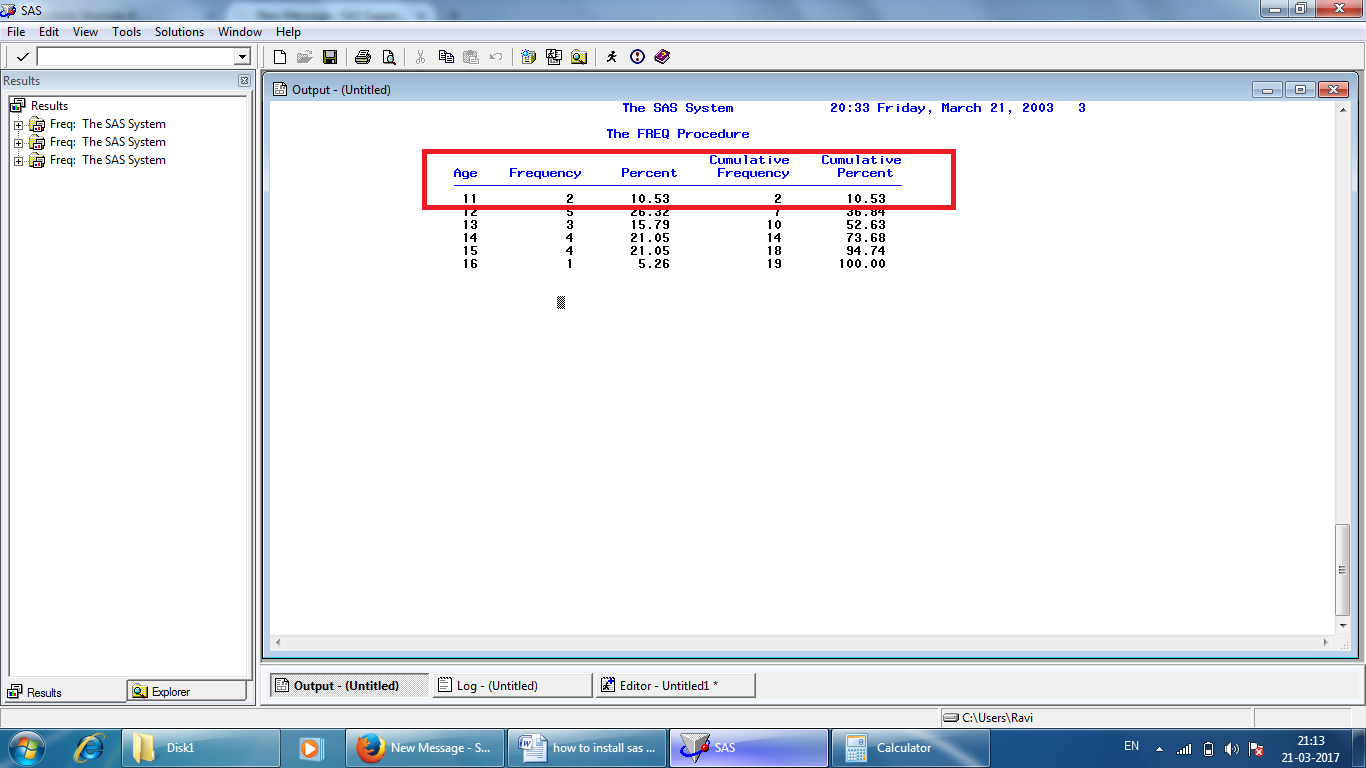
below example how to get only first row in output
proc freq data=sashelp.class;
tables age;run;
need only highlited in output window instead of getting all
1 ACCEPTED SOLUTION
Accepted Solutions


Quartz | Level 8
- Mark as New
- Bookmark
- Subscribe
- Mute
- RSS Feed
- Permalink
- Report Inappropriate Content
3 REPLIES 3


PROC Star
- Mark as New
- Bookmark
- Subscribe
- Mute
- RSS Feed
- Permalink
- Report Inappropriate Content
PROC FREQ prints the whole table (or alternatively, none of the table). But you can work around that if you find a slightly different report format satisfactory:
proc freq data=have;
tables age / noprint out=counts;
run;
proc print data=counts (obs=1);
run;
Quartz | Level 8
- Mark as New
- Bookmark
- Subscribe
- Mute
- RSS Feed
- Permalink
- Report Inappropriate Content
proc freq data=sashelp.class(where=(age=11));
tables age;run;
tables age;run;


Opal | Level 21
- Mark as New
- Bookmark
- Subscribe
- Mute
- RSS Feed
- Permalink
- Report Inappropriate Content
Another way:
proc freq data=sashelp.class noprint;
tables age / out=counts;
run;

proc sql;
create table firstCount as
select * from counts
having age=min(age);
select * from firstCount;
quit;
PG

Call for content now open!
It's your turn to help shape SAS Innovate 2027. Share your expertise and inspire the SAS community.
How to Concatenate Values
Learn how use the CAT functions in SAS to join values from multiple variables into a single value.

Find more tutorials on the SAS Users YouTube channel.
SAS Training: Just a Click Away
Ready to level-up your skills? Choose your own adventure.
Discussion stats
-
3 replies
-
03-21-2017 11:47 AM
-
3849 views
-
1 like
-
4 in conversation
-


