- Home
- /
- Programming
- /
- Programming
- /
- piechart: overlapping values
- RSS Feed
- Mark Topic as New
- Mark Topic as Read
- Float this Topic for Current User
- Bookmark
- Subscribe
- Mute
- Printer Friendly Page


- Mark as New
- Bookmark
- Subscribe
- Mute
- RSS Feed
- Permalink
- Report Inappropriate Content
Dear Community,
i just created a pie chart and have a lot of overlapping values. Do you know how to deal with it?
I also would like to have the whole Name of the categories, but its only the first 7 letters. What can i do about it?
Thank you in advance 🙂
data arzneimittelgruppen;
set arzneimittelgruppen;
if allergy=1 then category="allergy";
if antibiotics=1 then category="antibiotics";
if antidiabetic=1 then category="antidiabetic";
if antihypertensive=1 then category="antihypertensive";
if antipsychotic=1 then category="antipsychotic";
if antivirals=1 then category="antivirals";
if biologicals=1 then category="biologicals";
if contrast=1 then category="contrast";
if copd=1 then category="copd";
if dermatology=1 then category="dermatology";
if registry=1 then category="registry";
if eye=1 then category="eye";
if haematology=1 then category="haematology";
if hormone=1 then category="hormone";
if neurological=1 then category="neurological";
if nondrug=1 then category="nondrug";
if nonpres=1 then category="nonpres";
if oncology=1 then category="oncology";
if orphan=1 then category="orphan";
if others=1 then category="others";
if pain=1 then category="pain";
if urologics=1 then category="urologics";
run;

data arzneimittelgruppen;
set arzneimittelgruppen;
format category $20.;
run;

data arzneimittelgruppen;
  length category $ 20;
  set arzneimittelgruppen;
run;


PROC GCHART
DATA=arzneimittelgruppen;
PIE3d category / other=0 clockwise type= percent;
RUN;
QUIT;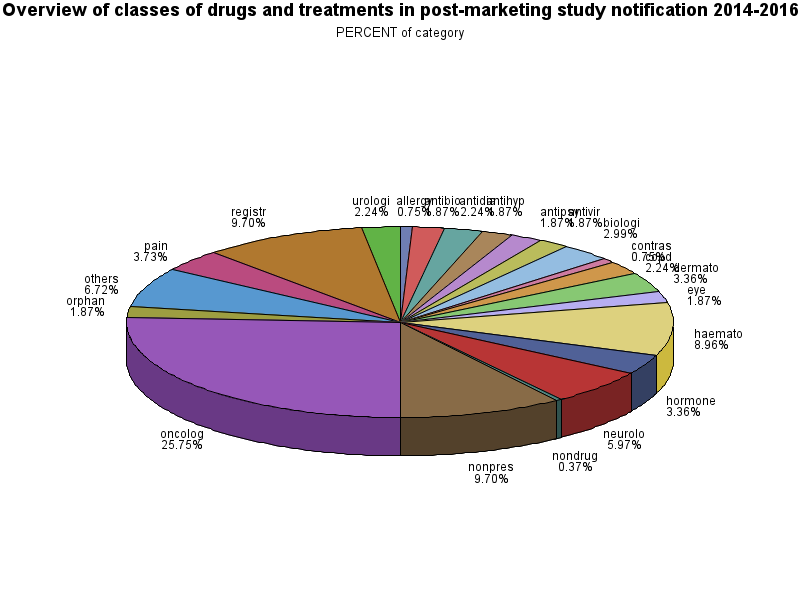


- Mark as New
- Bookmark
- Subscribe
- Mute
- RSS Feed
- Permalink
- Report Inappropriate Content
You can get the full value of your Category variable by adding a LENGTH statement prior to assigning a value.
Length category $ 20;
if allergy=1 then category="allergy";
If a length is not explicitly set then SAS default rules will assign a length. Since the first use you have is to assign "allergy" then the length gets set to 7 to hold that word. Everything longer then gets truncated.
Pie charts in general are hard to interpret the visual portion of contribution to a whole. The tilted 3d version is even worse.
If a Pie chart must be use then use PIE instead of pie3d and the option percent=arrow may help with displaying text of the smaller slices.
- Mark as New
- Bookmark
- Subscribe
- Mute
- RSS Feed
- Permalink
- Report Inappropriate Content

Call for content now open!
It's your turn to help shape SAS Innovate 2027. Share your expertise and inspire the SAS community.
Learn how use the CAT functions in SAS to join values from multiple variables into a single value.

Find more tutorials on the SAS Users YouTube channel.
SAS Training: Just a Click Away
Ready to level-up your skills? Choose your own adventure.
-
2 replies
-
06-26-2018 04:28 AM
-
1918 views
-
0 likes
-
2 in conversation
-

