- Home
- /
- Programming
- /
- Programming
- /
- Re: gps heat map using gps lat/long degrees
- RSS Feed
- Mark Topic as New
- Mark Topic as Read
- Float this Topic for Current User
- Bookmark
- Subscribe
- Mute
- Printer Friendly Page


- Mark as New
- Bookmark
- Subscribe
- Mute
- RSS Feed
- Permalink
- Report Inappropriate Content
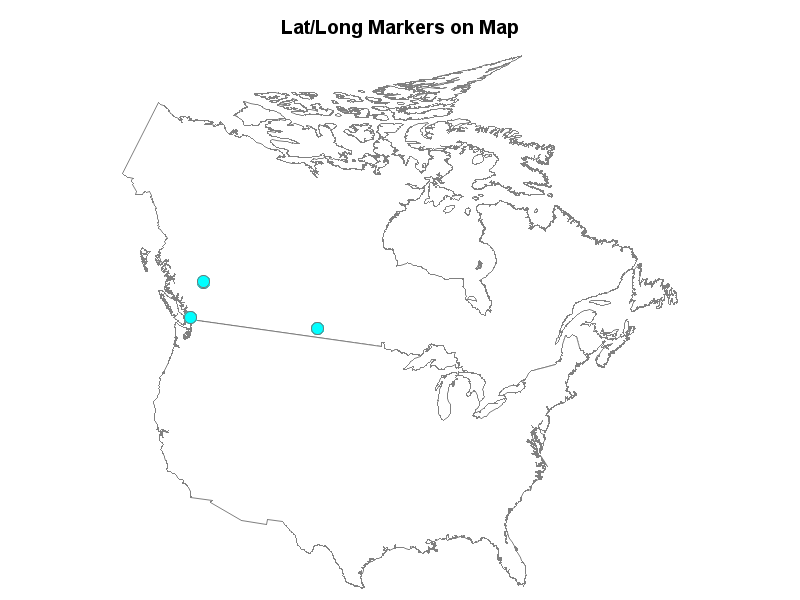
I use the following US map. I would like to add to it gps lat/long coordinate in degrees to populate the US map with incident locations.
pattern v=e;
title 'US MAP Data set';

* use a SAS-supplied map data set (US) as both the map and response data sets;
proc gmap
	map=maps.us
	data=maps.us (obs=1)
	all;
	id state;
	choro state / nolegend;
run;

quit;
Typical gps lat/long degree inputs are:
50.512 -104.535
50.512 -104.535
50.512 -104.535
49.216 -122.848
49.216 -122.848
52.868 -122.431
52.870 -122.434
52.983 -122.485


- Mark as New
- Bookmark
- Subscribe
- Mute
- RSS Feed
- Permalink
- Report Inappropriate Content
You will have to convert lat, long to map coordinate x,y values to map onto the maps.us map data set.
There are several examples here http://support.sas.com/sassamples/graphgallery/PROC_GMAP_Graph_Elements_Annotation.html though these mostly use the maps.states map data set.
If your locations are in in cities you may want to consider attempting a look up from maps.uscity though longitude in that set is positive and increasing to the west.


- Mark as New
- Bookmark
- Subscribe
- Mute
- RSS Feed
- Permalink
- Report Inappropriate Content
data my_data;
input lat long;
datalines;
50.512 -104.535
50.512 -104.535
50.512 -104.535
49.216 -122.848
49.216 -122.848
52.868 -122.431
52.870 -122.434
52.983 -122.485
;
run;
data my_map; set mapsgfk.namerica (where=((id='US' and segment=1) or id='CA'));
run;
proc gproject data=my_map out=my_map latlong eastlong degrees dupok
parmout=work.projparm;
id id;
run;
proc gproject data=my_data out=my_data latlong eastlong degrees dupok
parmin=work.projparm parmentry=my_map;
id;
run;
data my_anno; set my_data;
length function $8 color $12;
xsys='2'; ysys='2'; hsys='3'; when='a';
function='pie'; size=1.0; rotate=360;
style='solid'; color='cyan'; output;
style='empty'; color='gray77'; output;
run;
pattern1 v=s c=white;
title1 ls=1.5 "Lat/Long Markers on Map";
proc gmap data=my_map map=my_map all anno=my_anno;
id id;
choro segment / levels=1 nolegend coutline=gray;
run;

Catch up on SAS Innovate 2026
Nearly 200 sessions are now available on demand with the SAS Innovate Digital Pass.
Explore Now →Learn how use the CAT functions in SAS to join values from multiple variables into a single value.

Find more tutorials on the SAS Users YouTube channel.
SAS Training: Just a Click Away
Ready to level-up your skills? Choose your own adventure.
-
2 replies
-
11-28-2017 10:10 AM
-
2185 views
-
0 likes
-
3 in conversation
-


