Turn on suggestions
Auto-suggest helps you quickly narrow down your search results by suggesting possible matches as you type.
Showing results for
- Home
- /
- Programming
- /
- Programming
- /
- change structure of summary table
Options
- RSS Feed
- Mark Topic as New
- Mark Topic as Read
- Float this Topic for Current User
- Bookmark
- Subscribe
- Mute
- Printer Friendly Page
🔒 This topic is solved and locked.
Need further help from the community? Please
sign in and ask a new question.


Onyx | Level 15
- Mark as New
- Bookmark
- Subscribe
- Mute
- RSS Feed
- Permalink
- Report Inappropriate Content
Posted 03-03-2020 06:01 AM
(1561 views)
Hello
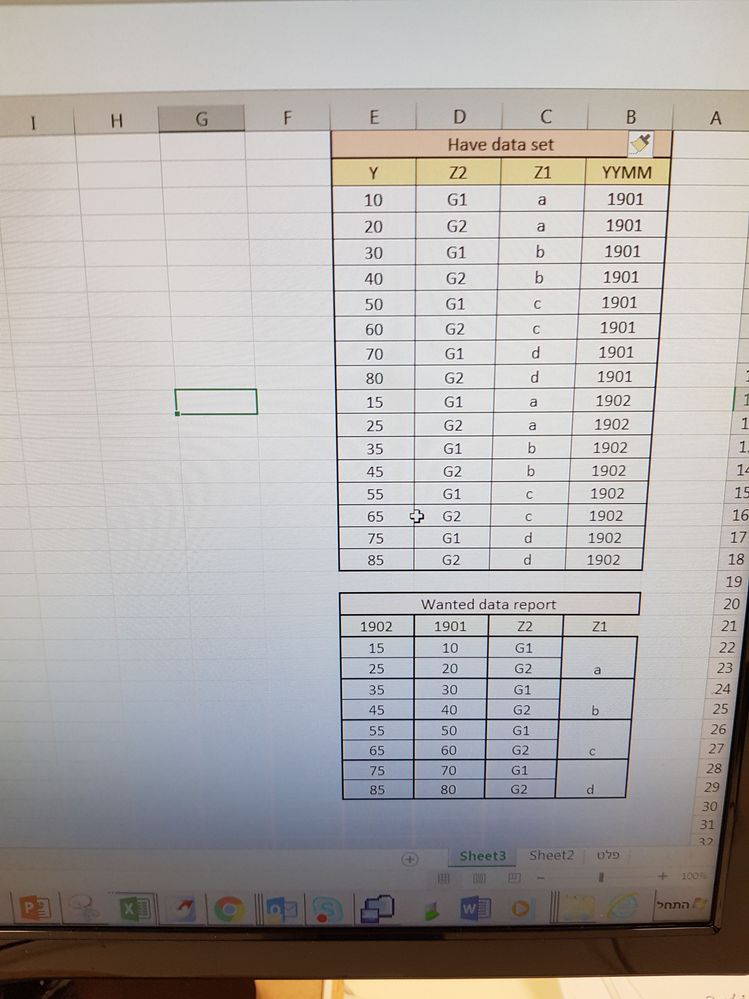
I want to change the structure of the summary table
I want to create a summary table that will have following structure as you can see in the photo
Data SummaryInfo;
input YYMM $ Z1 $ z2 $ Y;
cards;
1901 a G1 10
1901 a G2 20
1901 b G1 30
1901 b G2 40
1901 c G1 50
1901 c G2 60
1901 d G1 70
1901 d G2 80
1902 a G1 15
1902 a G2 25
1902 b G1 35
1902 b G2 45
1902 c G1 55
1902 c G2 65
1902 d G1 75
1902 d G2 85
;
run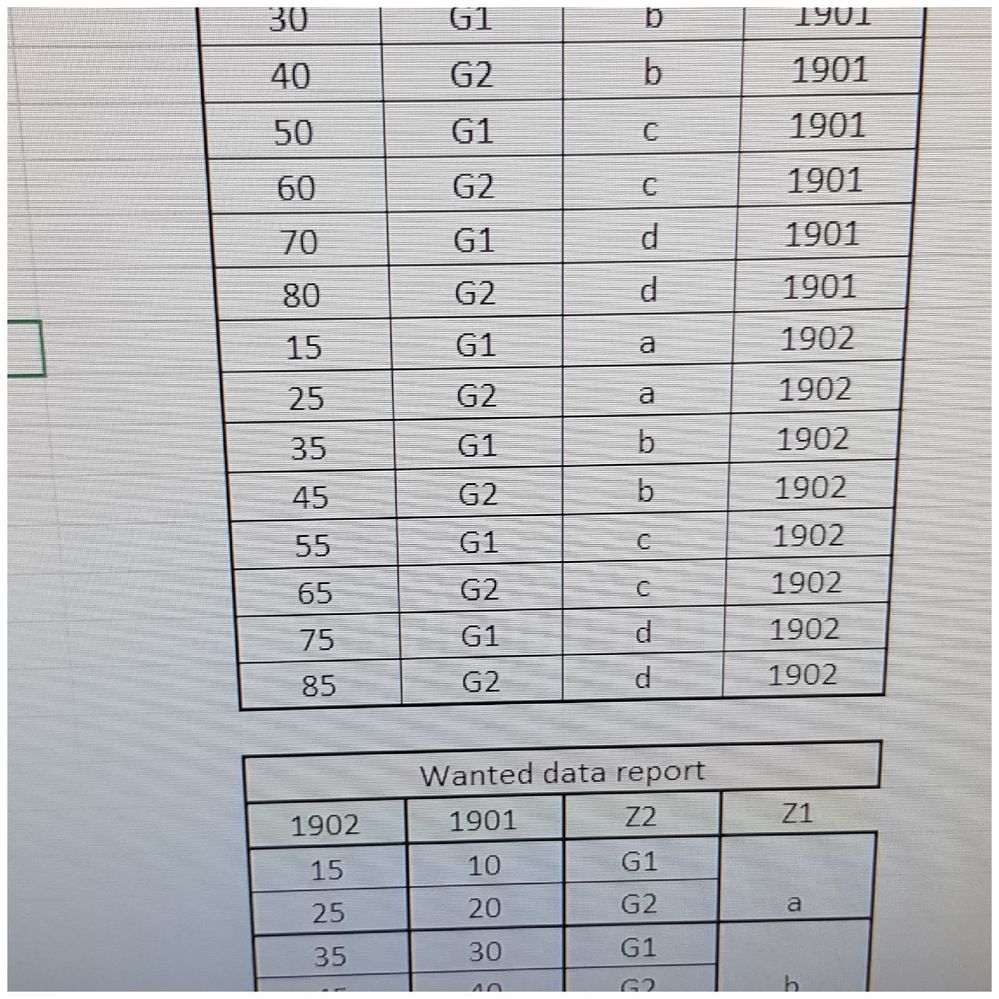
1 ACCEPTED SOLUTION
Accepted Solutions
Onyx | Level 15
- Mark as New
- Bookmark
- Subscribe
- Mute
- RSS Feed
- Permalink
- Report Inappropriate Content
Data SummaryInfo;
input YYMM $ Z1 $ z2 $ Y;
cards;
1901 a G1 10
1901 a G2 20
1901 b G1 30
1901 b G2 40
1901 c G1 50
1901 c G2 60
1901 d G1 70
1901 d G2 80
1902 a G1 15
1902 a G2 25
1902 b G1 35
1902 b G2 45
1902 c G1 55
1902 c G2 65
1902 d G1 75
1902 d G2 85
;
run;
proc sort data=SummaryInfo;by Z1  Z2;run;
proc transpose data=SummaryInfo out=wide1(drop=_name_) prefix=_;
    by Z1  Z2;
    id YYMM;
    var Y;
run;
3 REPLIES 3


Meteorite | Level 14
- Mark as New
- Bookmark
- Subscribe
- Mute
- RSS Feed
- Permalink
- Report Inappropriate Content
Hi @Ronein
The picture seems to be missing. Could you please update your post?
Onyx | Level 15
- Mark as New
- Bookmark
- Subscribe
- Mute
- RSS Feed
- Permalink
- Report Inappropriate Content
Onyx | Level 15
- Mark as New
- Bookmark
- Subscribe
- Mute
- RSS Feed
- Permalink
- Report Inappropriate Content
Data SummaryInfo;
input YYMM $ Z1 $ z2 $ Y;
cards;
1901 a G1 10
1901 a G2 20
1901 b G1 30
1901 b G2 40
1901 c G1 50
1901 c G2 60
1901 d G1 70
1901 d G2 80
1902 a G1 15
1902 a G2 25
1902 b G1 35
1902 b G2 45
1902 c G1 55
1902 c G2 65
1902 d G1 75
1902 d G2 85
;
run;
proc sort data=SummaryInfo;by Z1  Z2;run;
proc transpose data=SummaryInfo out=wide1(drop=_name_) prefix=_;
    by Z1  Z2;
    id YYMM;
    var Y;
run;

Catch up on SAS Innovate 2026
Nearly 200 sessions are now available on demand in the Innovate Hub.
Watch Now →How to Concatenate Values
Learn how use the CAT functions in SAS to join values from multiple variables into a single value.

Find more tutorials on the SAS Users YouTube channel.
SAS Training: Just a Click Away
Ready to level-up your skills? Choose your own adventure.
Discussion stats
-
3 replies
-
03-03-2020 06:01 AM
-
1562 views
-
0 likes
-
2 in conversation
-


