- Home
- /
- Programming
- /
- Programming
- /
- Re: Way of catch dataset is opened or not.
- RSS Feed
- Mark Topic as New
- Mark Topic as Read
- Float this Topic for Current User
- Bookmark
- Subscribe
- Mute
- Printer Friendly Page


- Mark as New
- Bookmark
- Subscribe
- Mute
- RSS Feed
- Permalink
- Report Inappropriate Content
Is there any way that I can determine whether the dataset is open or not?
For example, If I open the dataset "x" in the work library,which means there is a window which title bar is "VIEWTABLE: work.X".
In this situation,I exist below code
data work.x;
yy = 1;
run;
There's a ERROR log saying "member-level control" etc., you know.
To avoid this, I'm looking for a way to grasp how this data set is open before casting the dataset(work.x) to DATA step.
I know "open" function,which is for open dataset.This time I'm looking "opened" or not.
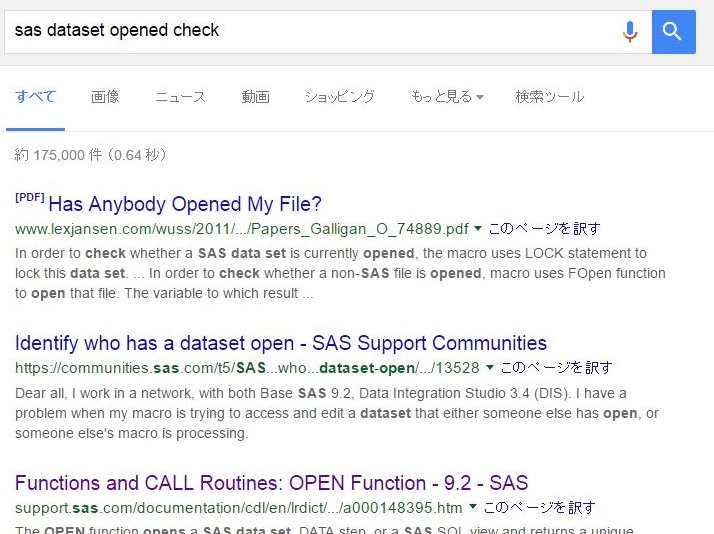
I asked “Google” but it seems no answer.
Sincerely,
- Tags:
- member-level control
Accepted Solutions


- Mark as New
- Bookmark
- Subscribe
- Mute
- RSS Feed
- Permalink
- Report Inappropriate Content
The first paper in your google search is appplicable isn't it?
Try to open/lock the file and you'all get an error code if file is already opened.
The FOPEN function()
- Mark as New
- Bookmark
- Subscribe
- Mute
- RSS Feed
- Permalink
- Report Inappropriate Content
The first paper in your google search is appplicable isn't it?
Try to open/lock the file and you'all get an error code if file is already opened.
The FOPEN function()
- Mark as New
- Bookmark
- Subscribe
- Mute
- RSS Feed
- Permalink
- Report Inappropriate Content
Reeza,Thank you for your kindness every time.
Oops,actually if "open" function returns error,it means the dataset is opened.Thanks.


- Mark as New
- Bookmark
- Subscribe
- Mute
- RSS Feed
- Permalink
- Report Inappropriate Content
In case you've started looking into this because you have some sort of a control/log table where multiple processes insert or update in parallel (so only short lock of the table per process) then have also a look into option FileLockWait as this will make the locking issue "go away" for such use cases.
- Mark as New
- Bookmark
- Subscribe
- Mute
- RSS Feed
- Permalink
- Report Inappropriate Content
Thank you,Patrick.
I haven't seen "FILELOCKWAIT" System Option,so I'll check it.

Catch up on SAS Innovate 2026
Nearly 200 sessions are now available on demand with the SAS Innovate Digital Pass.
Explore Now →Learn how use the CAT functions in SAS to join values from multiple variables into a single value.

Find more tutorials on the SAS Users YouTube channel.
SAS Training: Just a Click Away
Ready to level-up your skills? Choose your own adventure.
-
4 replies
-
10-15-2016 11:43 PM
-
2833 views
-
0 likes
-
3 in conversation
-


