Turn on suggestions
Auto-suggest helps you quickly narrow down your search results by suggesting possible matches as you type.
Showing results for
- Home
- /
- Programming
- /
- Programming
- /
- Re: Relabeling variables in a dataset - 0 observations?
Options
- RSS Feed
- Mark Topic as New
- Mark Topic as Read
- Float this Topic for Current User
- Bookmark
- Subscribe
- Mute
- Printer Friendly Page


Calcite | Level 5
- Mark as New
- Bookmark
- Subscribe
- Mute
- RSS Feed
- Permalink
- Report Inappropriate Content
Posted 03-09-2022 12:22 AM
(1647 views)
I have a dataset called “Now”,
And I wanted to rename some of the variables within “Now”.
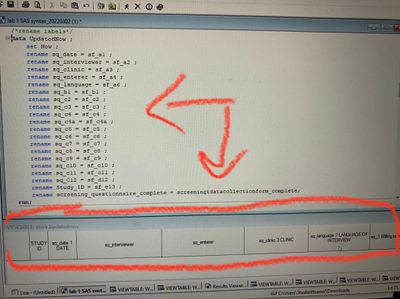
To do this I created a duplicate dataset labeled “UpdatedNow” with the rename function for the different variables and what I want it changed to.
However when I run this:
1)upon clicking on the “UpdatedNow” dataset, the message “NOTE: Data set has 0 observations” keeps coming up. What am I doing wrong?
2) Also, why are the label names not actually converting?
Would greatly appreciate all and any advice. Thank you!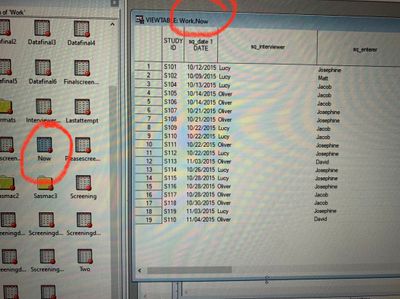
3 REPLIES 3


Rhodochrosite | Level 12
- Mark as New
- Bookmark
- Subscribe
- Mute
- RSS Feed
- Permalink
- Report Inappropriate Content
Are you sure you are not using the label display?
Try switching to variable name display by doing the following.
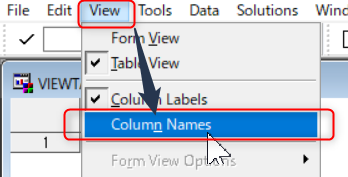
Or try using proc contents to display a list of variable names.


Diamond | Level 26
- Mark as New
- Bookmark
- Subscribe
- Mute
- RSS Feed
- Permalink
- Report Inappropriate Content
I think @japelin has the right answer, and of course a simple fix.
--
Paige Miller
Paige Miller


Super User
- Mark as New
- Bookmark
- Subscribe
- Mute
- RSS Feed
- Permalink
- Report Inappropriate Content
data now;
 set sashelp.class;
 label name='XXXX';
run;

data updatednow;
 set now;
rename name=aaaa age=bbbb weight=cccc height=dddd;
attrib _all_ label='';
run;
Remove all these variable's label .

Catch up on SAS Innovate 2026
Nearly 200 sessions are now available on demand with the SAS Innovate Digital Pass.
Explore Now →How to Concatenate Values
Learn how use the CAT functions in SAS to join values from multiple variables into a single value.

Find more tutorials on the SAS Users YouTube channel.
SAS Training: Just a Click Away
Ready to level-up your skills? Choose your own adventure.
Discussion stats
-
3 replies
-
03-09-2022 12:22 AM
-
1648 views
-
3 likes
-
4 in conversation
-


