- Home
- /
- Programming
- /
- Programming
- /
- ROC Table with Cutpoints
- RSS Feed
- Mark Topic as New
- Mark Topic as Read
- Float this Topic for Current User
- Bookmark
- Subscribe
- Mute
- Printer Friendly Page


- Mark as New
- Bookmark
- Subscribe
- Mute
- RSS Feed
- Permalink
- Report Inappropriate Content
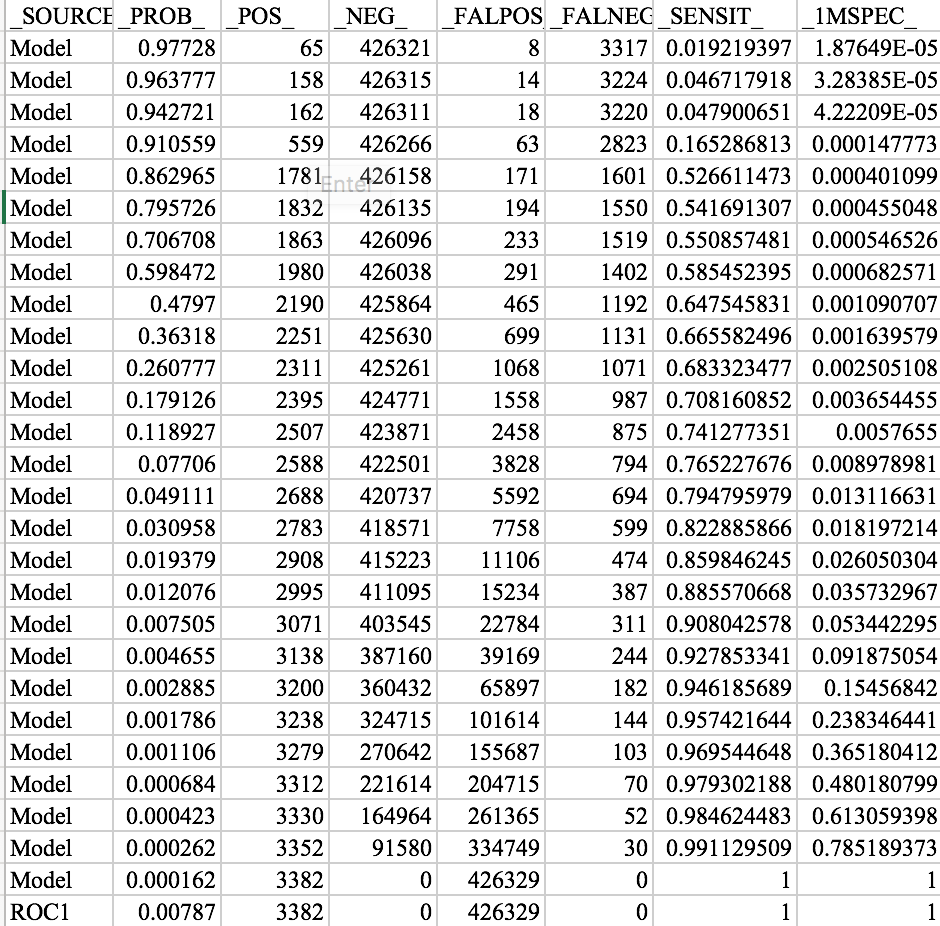
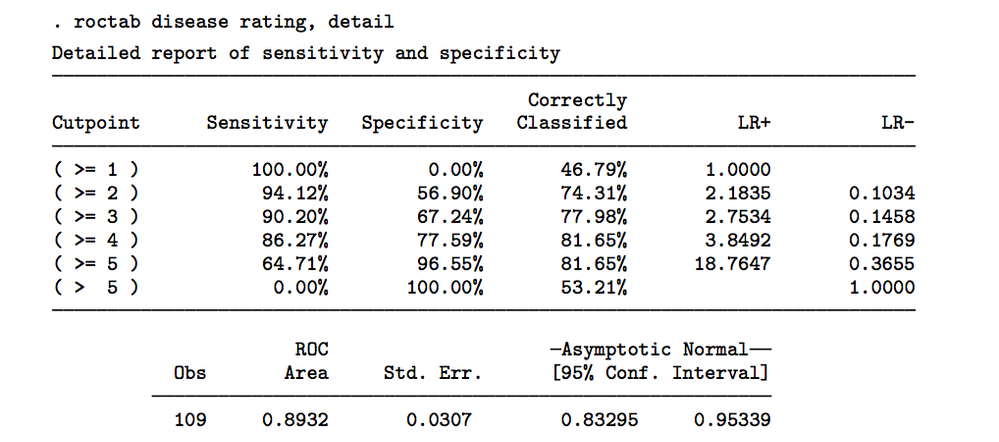
I have successfully created a SAS ROC Plot and have obtained the charted output. See attached picture. However, I am trying to obtain a table identical to how STATA will output its table (See 2nd attached picture). Can anyone help guide me into how I can get SAS to output cut-points?
Thanks!


- Mark as New
- Bookmark
- Subscribe
- Mute
- RSS Feed
- Permalink
- Report Inappropriate Content
Can you show your code so far? 🙂
A good start may be in the ROCOPTIONS part of the PROC LOGISTIC Documentation specifying ID=PROB | CUTPOINT.
- Mark as New
- Bookmark
- Subscribe
- Mute
- RSS Feed
- Permalink
- Report Inappropriate Content
My code for this model is:
proc logistic data=test.n;
model yes (ref = first) = score /outroc = rocscore;
roc;
run;
- Mark as New
- Bookmark
- Subscribe
- Mute
- RSS Feed
- Permalink
- Report Inappropriate Content
I added my code below, do you have any suggestions? Thanks so much for your help!


- Mark as New
- Bookmark
- Subscribe
- Mute
- RSS Feed
- Permalink
- Report Inappropriate Content
Check model option CTABLE, PPROB
- Mark as New
- Bookmark
- Subscribe
- Mute
- RSS Feed
- Permalink
- Report Inappropriate Content
Can you assist with adding these model options into the following code?
proc logistic data=test.n;
model yes (ref = first) = score /outroc = rocscore;
roc;
run;
**I tried adding each after the rocscore but it wouldn't run properly.
- Mark as New
- Bookmark
- Subscribe
- Mute
- RSS Feed
- Permalink
- Report Inappropriate Content
How do I add those options onto the code that I have pasted? Thanks!
- Mark as New
- Bookmark
- Subscribe
- Mute
- RSS Feed
- Permalink
- Report Inappropriate Content
Hi . You can search these options at support.sas.com   and you will find the answer.


proc logistic data=sashelp.class;
model sex=height weight  /outroc = rocscore ctable pprob=(0.8 0.7 0.6 0.5 0.4);
run;

Call for content now open!
It's your turn to help shape SAS Innovate 2027. Share your expertise and inspire the SAS community.
Learn how use the CAT functions in SAS to join values from multiple variables into a single value.

Find more tutorials on the SAS Users YouTube channel.
SAS Training: Just a Click Away
Ready to level-up your skills? Choose your own adventure.
-
7 replies
-
09-12-2017 06:49 PM
-
5350 views
-
4 likes
-
3 in conversation
-


