- Home
- /
- Programming
- /
- Programming
- /
- Last observation: total of column
- RSS Feed
- Mark Topic as New
- Mark Topic as Read
- Float this Topic for Current User
- Bookmark
- Subscribe
- Mute
- Printer Friendly Page


- Mark as New
- Bookmark
- Subscribe
- Mute
- RSS Feed
- Permalink
- Report Inappropriate Content
Hi,
I have a csv table, and at the end of each column, I have the total of the column that appears. I would separate the last line, and that the line is not an observation but the total.
..... , ...... , ...;
| 02/10/2016,126,473 |
| 03/10/2016,213,648 |
| 04/10/2016,242,809 |
| 05/10/2016,235,807 |
| 06/10/2016,285,1013 |
| 07/10/2016,260,905 |
| 08/10/2016,132,400 |
| 09/10/2016,150,446 |
| 10/10/2016,256,655 |
11/10/2016,249,790 |
| ,611246,1864947 |
,611246,1864947 here in the last line, the total of column 2 and 3.
I want : ... ......... .... ....
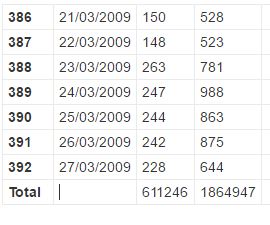
Thank you for your help.
Accepted Solutions


- Mark as New
- Bookmark
- Subscribe
- Mute
- RSS Feed
- Permalink
- Report Inappropriate Content
filename x temp;
data _null_;
file x;
input;
put _infile_;
datalines;
02/10/2016,126,473
03/10/2016,213,648
04/10/2016,242,809
05/10/2016,235,807
06/10/2016,285,1013
07/10/2016,260,905
08/10/2016,132,400
09/10/2016,150,446
10/10/2016,256,655
11/10/2016,249,790
,611246,1864947
;
run;


data have;
length id $ 20;
infile x dsd truncover end=last;
input date : ddmmyy10. x y;
format date ddmmyy10.;
id=put(_n_,best. -l);
if last then id='Total';
run;
proc print noobs;run;


- Mark as New
- Bookmark
- Subscribe
- Mute
- RSS Feed
- Permalink
- Report Inappropriate Content
Pay attention that TOTAL rows are with missing date.
If you use PROC IMPORT then you need add a second step, otherwise you can do it in same data step
reading your csv file to sas:
data want; set have;
if date = . then delete; /* or if missing(date) then delete */
run;
- Mark as New
- Bookmark
- Subscribe
- Mute
- RSS Feed
- Permalink
- Report Inappropriate Content
filename x temp;
data _null_;
file x;
input;
put _infile_;
datalines;
02/10/2016,126,473
03/10/2016,213,648
04/10/2016,242,809
05/10/2016,235,807
06/10/2016,285,1013
07/10/2016,260,905
08/10/2016,132,400
09/10/2016,150,446
10/10/2016,256,655
11/10/2016,249,790
,611246,1864947
;
run;


data have;
length id $ 20;
infile x dsd truncover end=last;
input date : ddmmyy10. x y;
format date ddmmyy10.;
id=put(_n_,best. -l);
if last then id='Total';
run;
proc print noobs;run;

Catch up on SAS Innovate 2026
Nearly 200 sessions are now available on demand with the SAS Innovate Digital Pass.
Explore Now →Learn how use the CAT functions in SAS to join values from multiple variables into a single value.

Find more tutorials on the SAS Users YouTube channel.
SAS Training: Just a Click Away
Ready to level-up your skills? Choose your own adventure.
-
2 replies
-
10-28-2016 04:00 PM
-
1979 views
-
0 likes
-
3 in conversation
-


