- Home
- /
- Programming
- /
- Programming
- /
- Re: Justification issues using PROC ODSTEXT
- RSS Feed
- Mark Topic as New
- Mark Topic as Read
- Float this Topic for Current User
- Bookmark
- Subscribe
- Mute
- Printer Friendly Page


- Mark as New
- Bookmark
- Subscribe
- Mute
- RSS Feed
- Permalink
- Report Inappropriate Content
Greetings All!
I am creating an executive report and need the appearance to follow a specific scheme as it is the first page of a report. The desired output has the appearance below (notice the gray is centered on the page, but the test is justified left):
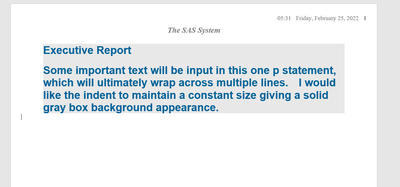
Currently I have this, which has the gray box left justified:
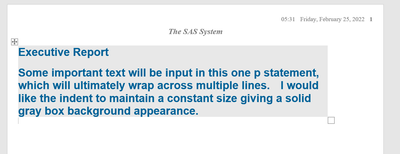
The code at the moment is this, and the third p statement runs on but is displayed in the above output:

I have tried lots of different options including textalign, padding, etc. I am not able to get the desired output.
Any suggestions?


- Mark as New
- Bookmark
- Subscribe
- Mute
- RSS Feed
- Permalink
- Report Inappropriate Content
Please post code as text in a code box. You can copy from the editor and then open either code box with the "running man" or a plain text box with the </> icons that appear above the message window. With text we can make edits a lot easier.
Proc ODSTEXT should be recognizing your SAS System option for Center/Nocenter.
I would try adding a line like this before your Proc:
options center;to reset other output to left align:
options nocenter;The options affect the entire output. Things like textalign, justification or padding only affect items in cells.
- Mark as New
- Bookmark
- Subscribe
- Mute
- RSS Feed
- Permalink
- Report Inappropriate Content
Sorry about the code, here is a text version for you:
ODS RTF file = "temp.rtf";
OPTIONS center;
PROC ODSTEXT PAGEBREAK = NO ;
p 'Executive Report' / style = {font_weight = bold FONT_SIZE=18pt FONT_FACE=Arial background = CXE8E8E8 COLOR = cx006298 width = 7in };
p ' ' /style = {FONT_SIZE=11pt JUST=L FONT_FACE=Arial background = CXE8E8E8 COLOR = cx006298 width = 7in};
p 'Some important text will be input in this one p statement, which will ultimately wrap across multiple lines. I would like the indent to maintain a constant size giving a solid gray box background appearance.' / style = {font_weight = bold FONT_SIZE=18pt FONT_FACE=Arial background = CXE8E8E8 COLOR = cx006298 width = 7in };
RUN;
ODS RTF CLOSE;
The options center is not giving me the desired output. I appreciate the suggestion and let me know if anything is wrong with the code above.
Thanks again!

Call for content now open!
It's your turn to help shape SAS Innovate 2027. Share your expertise and inspire the SAS community.
Learn how use the CAT functions in SAS to join values from multiple variables into a single value.

Find more tutorials on the SAS Users YouTube channel.
SAS Training: Just a Click Away
Ready to level-up your skills? Choose your own adventure.
-
2 replies
-
02-25-2022 05:44 PM
-
1744 views
-
0 likes
-
2 in conversation
-

