- Home
- /
- Programming
- /
- Programming
- /
- Is there Unicode support for SAS studio 3.81? I want to write Unicode ...
- RSS Feed
- Mark Topic as New
- Mark Topic as Read
- Float this Topic for Current User
- Bookmark
- Subscribe
- Mute
- Printer Friendly Page


- Mark as New
- Bookmark
- Subscribe
- Mute
- RSS Feed
- Permalink
- Report Inappropriate Content
Hi, I am a SAS 9.4 and SAS Studio 3.81 Single-User.
I wonder if there is Uncode support of Studio 3.81, allows me to write Chinese, French, or emoji into SAS table encoded as UTF-8. I know regular SAS has Unicode support, but I just want to do it using Studio.
My current SAS Studio session is WLATIN1.
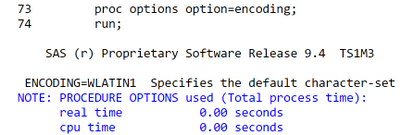
If yes, do I need to install and how can I start a SAS Studio Unicode session?
- Tags:
- sas studio
- unicode


- Mark as New
- Bookmark
- Subscribe
- Mute
- RSS Feed
- Permalink
- Report Inappropriate Content
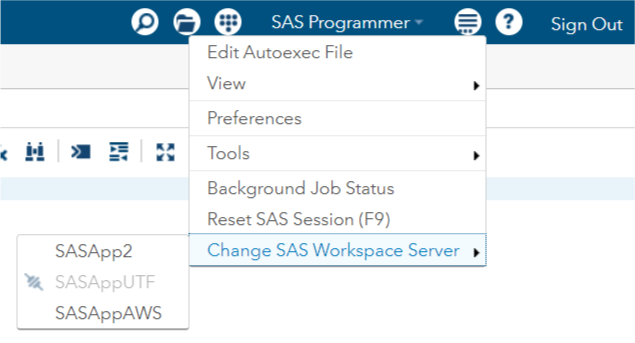
SAS/Studio itself should support unicode. What you need to find out is whether your location has stood up a SAS application server that is using UTF-8 encoding. If so then just use the options menu in SAS/Studio to choose to connect to that server instead of the one that is using WLATIN1 encoding.
- Mark as New
- Bookmark
- Subscribe
- Mute
- RSS Feed
- Permalink
- Report Inappropriate Content
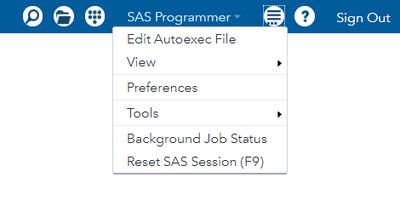
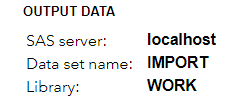
Hi, I don't have this option to choose other servers. Looks like I have only one server running, it's localhost. How can I do to start other type of servers?

- Mark as New
- Bookmark
- Subscribe
- Mute
- RSS Feed
- Permalink
- Report Inappropriate Content
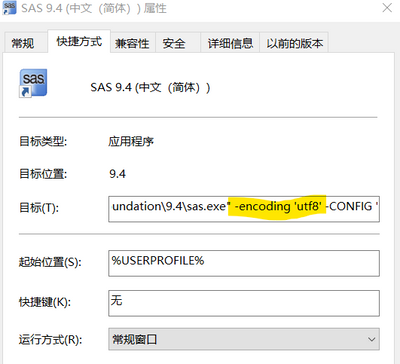
If your is setup on your local PC .
You need add option to change your sas encoding .
- Mark as New
- Bookmark
- Subscribe
- Mute
- RSS Feed
- Permalink
- Report Inappropriate Content
I already have this. The problem now is how to do it on SAS Studio.

Catch up on SAS Innovate 2026
Nearly 200 sessions are now available on demand in the Innovate Hub.
Watch Now →Learn how use the CAT functions in SAS to join values from multiple variables into a single value.

Find more tutorials on the SAS Users YouTube channel.
SAS Training: Just a Click Away
Ready to level-up your skills? Choose your own adventure.
-
4 replies
-
02-08-2021 10:43 AM
-
2912 views
-
0 likes
-
3 in conversation
-


