- Home
- /
- Programming
- /
- Programming
- /
- Re: Infile issue
- RSS Feed
- Mark Topic as New
- Mark Topic as Read
- Float this Topic for Current User
- Bookmark
- Subscribe
- Mute
- Printer Friendly Page


- Mark as New
- Bookmark
- Subscribe
- Mute
- RSS Feed
- Permalink
- Report Inappropriate Content
Hi, i'm trying to import a txt file delimited by ";" into SAS, but when i use the following code:
DATA TEST;
LENGTH
P_TERM $ 6
amount 8
Moeda_1 $ 3 ;
FORMAT
P_TERM $CHAR6.
amount COMMA12.2
Moeda_1 $CHAR3. ;
INFORMAT
P_TERM $CHAR6.
amount COMMA12.2
Moeda_1 $CHAR3. ;
INFILE "/home/FILE.txt"
DLM=";"
FIRSTOBS=2
MISSOVER
DSD ;
INPUT
P_TERM $CHAR6.
amount COMMA12.2
Moeda_1 $CHAR3. ;
RUN;
The result its not right as follows:
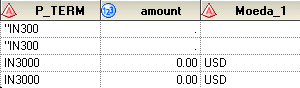
But when i use the import wizard formating it the same way it works and i get this:
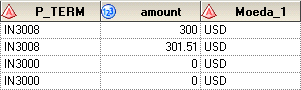
I need to import by code, because i will use File*.txt to get all files in a directory and there are moren than 3 columns, but only these get this trouble.
Tks,
Rodrigo Elias


- Mark as New
- Bookmark
- Subscribe
- Mute
- RSS Feed
- Permalink
- Report Inappropriate Content
Try
INPUT
P_TERM :$6.
amount :COMMA12.
Moeda_1 :$3. ;
PG
- Mark as New
- Bookmark
- Subscribe
- Mute
- RSS Feed
- Permalink
- Report Inappropriate Content
I tested, not works.
Tks


- Mark as New
- Bookmark
- Subscribe
- Mute
- RSS Feed
- Permalink
- Report Inappropriate Content
Try this:
DATA TEST;
LENGTH
P_TERM $ 6
amount 8
Moeda_1 $ 3 ;
FORMAT
P_TERM $CHAR6.
amount COMMA12.2
Moeda_1 $CHAR3. ;
INFORMAT
P_TERM $CHAR6.
amount COMMA12.2
Moeda_1 $CHAR3. ;
INFILE "/home/FILE.txt"
DLM=";"
FIRSTOBS=2
TRUNCOVER
DSD ;
INPUT
P_TERM $
amount
Moeda_1 $;
RUN;
- Mark as New
- Bookmark
- Subscribe
- Mute
- RSS Feed
- Permalink
- Report Inappropriate Content
Not working.
- Mark as New
- Bookmark
- Subscribe
- Mute
- RSS Feed
- Permalink
- Report Inappropriate Content
Attach sample data.
- Mark as New
- Bookmark
- Subscribe
- Mute
- RSS Feed
- Permalink
- Report Inappropriate Content
Try TRUNCOVER instead of MISSOVER

- Mark as New
- Bookmark
- Subscribe
- Mute
- RSS Feed
- Permalink
- Report Inappropriate Content
1) Do NOT use MISSOVER. You almost always want TRUNCOVER instead of MISSOVER.
2) If you have defined an INFORMAT for the variable then you do NOT need to list another informat on the INPUT statement.
3) Do NOT use an INFORMAT with decimal value specified. That tells SAS that if no period is in the data then assume it has an implied decimal point. So if you use an informat of COMMA12.2 and your value is 56 then it will be converted to 0.56 .
4) Do you really want to preserve leading spaces in the character variables?
data test;
length p_term $6 amount 8 moeda_1 $3 ;
format amount comma12.2 ;
informat amount comma12. ;
infile "/home/file.txt" dsd dlm=";" firstobs=2 truncover ;
input p_term -- moeda_1 ;
run;

Call for content now open!
It's your turn to help shape SAS Innovate 2027. Share your expertise and inspire the SAS community.
Learn how use the CAT functions in SAS to join values from multiple variables into a single value.

Find more tutorials on the SAS Users YouTube channel.
SAS Training: Just a Click Away
Ready to level-up your skills? Choose your own adventure.
-
7 replies
-
07-29-2015 01:04 PM
-
4499 views
-
1 like
-
4 in conversation
-


